
Published: March 14, 2026
Author: SEO Free Genius Team
Reading time: 8–10 minutes
Introduction
You hit “send” on an important email campaign. Hours pass. Then crickets. Your open rates are abysmal, conversions are non-existent, and you start to wonder—are my emails even reaching anyone?
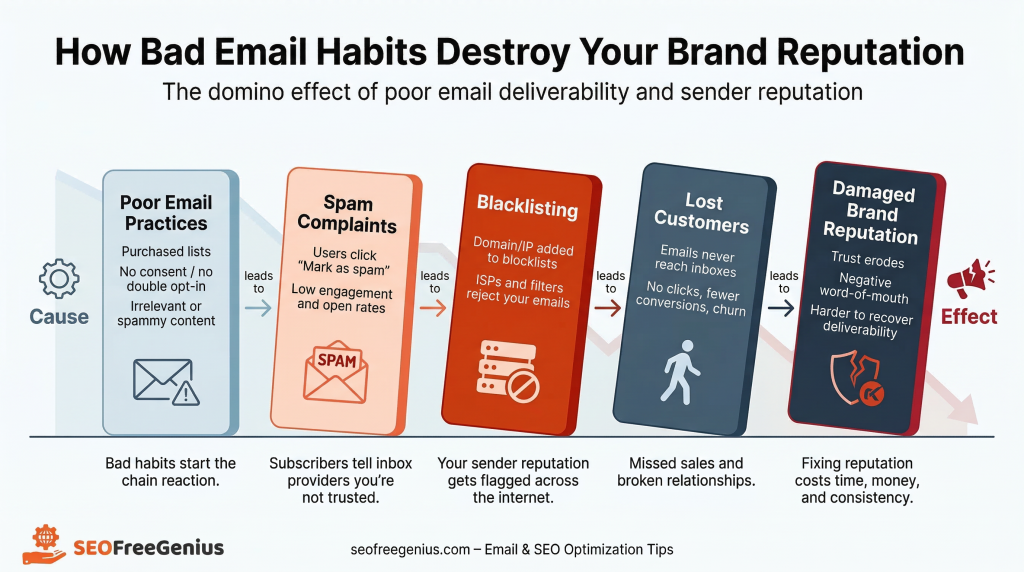
If your emails are landing in spam folders instead of inboxes, you’re not just losing potential revenue. You’re damaging your brand’s credibility, frustrating your customers, and quietly eroding the digital reputation you’ve worked so hard to build. For website owners, bloggers, and small business owners, email deliverability isn’t just a technical metric—it’s the lifeline of customer communication.
The good news? Poor email deliverability isn’t a death sentence. With the right diagnostic tools and strategic actions, you can rescue your sender reputation, clean up your email practices, and ensure your messages reach their intended destination. In this comprehensive guide, we’ll walk you through exactly how to diagnose deliverability problems, fix them at the root, and maintain a healthy domain reputation for the long term.

Why Email Deliverability Matters for Your Business Reputation
Email deliverability refers to your ability to successfully land messages in recipients’ inboxes rather than spam folders or, worse, getting blocked entirely. According to recent industry data, businesses with poor deliverability can lose up to 20% or more of their email volume to spam filters. [Dotdigital].
When emails consistently fail to reach your audience, the consequences ripple far beyond just missed messages:
- Lost revenue opportunities: Promotional emails, abandoned cart reminders, and sales announcements never reach potential buyers
- Damaged brand trust: Customers who expect communications from you may think you’ve disappeared or are no longer reliable
- Wasted marketing budget: You’re paying for email service providers and creating content that no one sees
- Declining sender reputation: Each failed delivery or spam complaint further damages your domain’s credibility with major email providers like Gmail, Outlook, and Yahoo
Your domain reputation—essentially your email “credit score”—determines whether inbox providers trust your messages. A poor reputation doesn’t just affect email. It can cast doubt on your entire online presence, making customers question whether your website, services, and business practices are legitimate.
How to Check Your Current Domain Health: Diagnosis Using Free Tools
Before you can fix email deliverability problems, you need to understand exactly what’s wrong. Many business owners assume their emails are fine until they notice dramatically lower engagement rates. Don’t wait for disaster—proactive monitoring is essential.
The first step in diagnosing deliverability issues is checking whether your domain or IP address has been blacklisted and ensuring your mail server is functioning properly. Fortunately, you don’t need expensive enterprise software to do this. Free tools like those available on seofreegenius.com can provide immediate insights into your email health.
Email blacklists (also called DNSBLs—DNS-based blackhole lists) are databases that track IP addresses and domains known for sending spam or suspicious content. If you’re on one of these lists, major email providers will automatically filter or block your messages.[Mailtrap].
How to check if you’re blacklisted:
- Visit the Blacklist Lookup tool on seofreegenius.com
- Enter your domain name (e.g., yourbusiness.com) or your sending IP address
- Click “Submit” to scan your domain against multiple blacklist databases
- Review the results to see if you appear on any lists
If your domain or IP shows up on one or more blacklists, note which specific lists have flagged you. Each blacklist has its own removal process, typically requiring you to identify and fix the underlying problem (like compromised accounts or spammy content) before requesting delisting.
Common blacklists include:
- Spamhaus: One of the most influential blacklists used by major email providers
- Barracuda: Tracks domains with poor sending practices
- SORBS: Monitors open relays and spam sources
- SpamCop: Community-driven spam reporting system
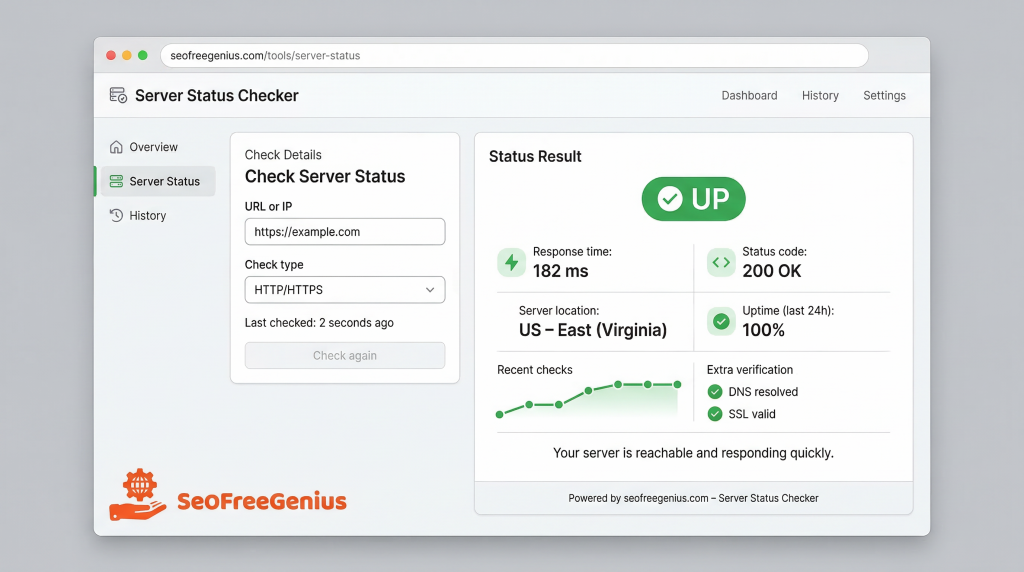
Step 2: Verify Your Server Status
Even if your domain isn’t blacklisted, email deliverability can suffer if your mail server experiences downtime or connectivity issues. Server outages mean emails can’t be sent at all, leading to bounced messages and frustrated customers. [USAVPS].
How to check your server uptime:
- Navigate to the Server Status Checker on seofreegenius.com
- Enter your mail server domain or website URL
- Run the status check to verify whether your server is online and responding correctly
- Monitor response times to ensure optimal performance
If the tool reports that your server is down or experiencing slow response times, contact your hosting provider immediately. Consistent server problems not only prevent email delivery but can also signal to email providers that your infrastructure is unreliable.
Pro tip: Set up regular monitoring (weekly or monthly) using these diagnostic tools. Catching problems early—before customers start complaining—can save your sender reputation and prevent major deliverability crises.
Understanding the Root Causes of Poor Email Deliverability
Once you’ve diagnosed your current domain health, it’s time to understand why deliverability problems happen in the first place. Email providers like Gmail and Outlook use sophisticated algorithms to determine whether your messages deserve inbox placement. Several factors can trigger spam filters or damage your sender reputation:
1. Poor List Hygiene and Invalid Email Addresses
Sending emails to invalid, outdated, or non-existent addresses generates “hard bounces”—permanent delivery failures. A bounce rate above 2% is a major red flag to email providers and suggests you’re not maintaining your list properly. [Prospeo].
Common list hygiene problems:
- Purchased or scraped email lists: These contain outdated addresses and spam traps that will destroy your reputation
- Old, inactive contacts: Subscribers who haven’t engaged in 90+ days may have abandoned those addresses
- Typos and fake emails: Users entering “fakeemail@example.com” to access gated content
- Role-based addresses: Emails like info@, admin@, or sales@ often have low engagement and higher complaint rates
2. Spammy Content and Trigger Words
Email filters analyze your message content, subject lines, and formatting for spam signals. While algorithms have become more sophisticated, certain patterns still raise red flags.[Meettie].
Content elements that trigger spam filters:
- Excessive use of sales language: ALL CAPS, multiple exclamation marks!!!, “FREE,” “Act Now,” “Limited Time”
- Misleading subject lines: Subject lines that don’t match the email content
- Too many links: Especially shortened links or links to suspicious domains
- Image-heavy emails with little text: Spammers hide text in images to evade filters
- Poor HTML formatting: Broken code, invisible text, or suspicious CSS
Modern email providers prioritize engagement metrics. If recipients consistently ignore, delete, or mark your emails as spam, algorithms learn that your content isn’t valuable and will increasingly filter your messages. [Allegrow].
Engagement signals that impact deliverability:
- Open rates: Are people opening your emails?
- Click-through rates: Do recipients engage with your content?
- Spam complaints: How many people mark you as spam?
- Unsubscribe rates: Are people opting out in large numbers?
- Deletion without reading: Are emails immediately deleted?
Gmail’s Postmaster Tools, a free service provided by Google, offers invaluable insights into these metrics for Gmail users specifically [EmailLabs].
Monitoring your domain and IP reputation through Google Postmaster Tools can help you understand how Gmail perceives your sending practices.
4. Missing or Misconfigured Email Authentication
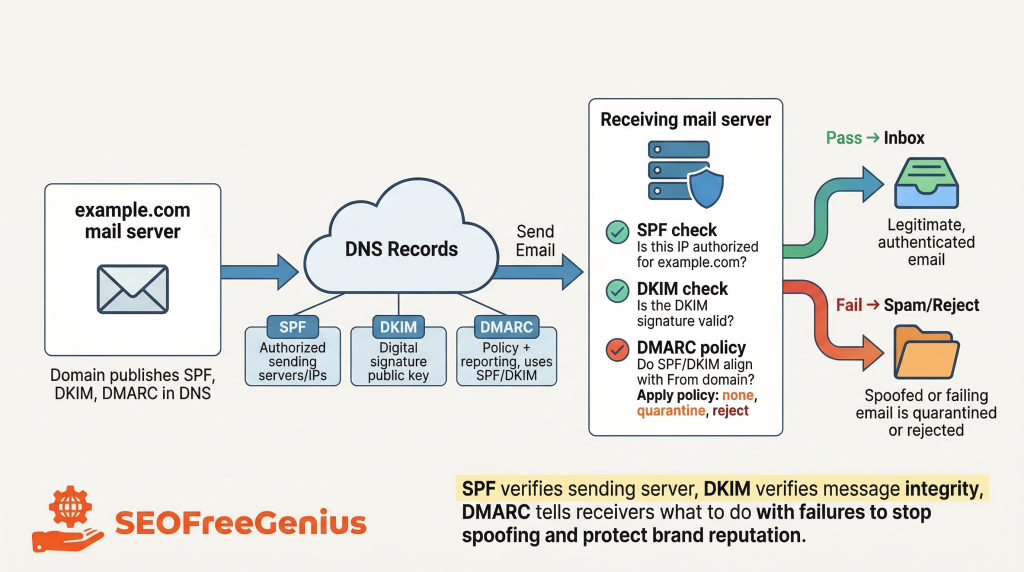
Email authentication protocols—SPF (Sender Policy Framework), DKIM (DomainKeys Identified Mail), and DMARC (Domain-based Message Authentication, Reporting, and Conformance)—verify that your emails are legitimately from you and haven’t been spoofed or tampered with. [Valimail].
Without proper authentication:
- Email providers can’t verify your identity
- Your messages are more likely to be filtered as suspicious
- Scammers can more easily impersonate your domain
- Your sender reputation suffers
What each protocol does:
- SPF: Specifies which mail servers are authorized to send email on behalf of your domain
- DKIM: Adds a digital signature to your emails to verify authenticity and integrity
- DMARC: Tells receiving servers what to do with emails that fail SPF or DKIM checks and provides reporting on authentication failures
Actionable Solutions: How to Fix Email Deliverability Problems
Now that you understand the common causes of poor deliverability, let’s walk through concrete steps to clean up your email practices and rebuild your sender reputation.
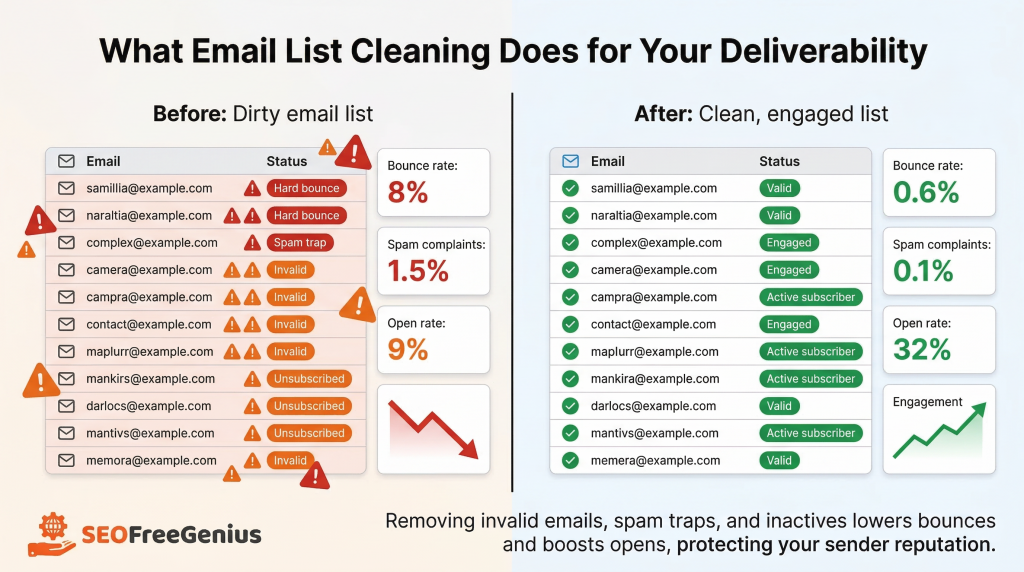
Solution 1: Clean Your Email List Regularly
List hygiene should be an ongoing priority, not a one-time task. Implement these practices immediately:
- Remove hard bounces immediately: Any email that generates a permanent failure should be deleted from your list after the first bounce.
- Segment inactive subscribers: Identify contacts who haven’t opened or clicked in 90-180 days. Send them a re-engagement campaign (“Do you still want to hear from us?”) before removing them entirely.
- Use double opt-in for new subscribers: Require users to confirm their email address before being added to your list. This dramatically reduces fake signups and typos.
- Validate email addresses at signup: Use real-time email verification tools to catch typos and invalid domains (like “gmal.com” instead of “gmail.com“) before they enter your database.
- Remove spam traps proactively: Spam traps are email addresses specifically created or recycled to catch spammers. Regular list cleaning and engagement-based segmentation help avoid these hidden landmines.
- Implement a sunset policy: Automatically suppress contacts who haven’t engaged in 6-12 months. Keeping them on your list only hurts your engagement metrics and sender score.
Recommended cleaning schedule:
- After every campaign: Remove hard bounces immediately
- Monthly: Review complaint rates and unsubscribe patterns
- Quarterly: Run full list validation and re-engagement campaigns for inactive subscribers
- Before major campaigns: Validate list health before sending to large segments
Solution 2: Improve Email Content Quality
Create emails that recipients want to open and engage with, rather than messages that trigger spam filters.
Best practices for email content:
- Write clear, honest subject lines: Your subject line should accurately reflect the email content. Avoid clickbait or misleading promises.
- Balance text and images: Maintain a healthy text-to-image ratio. Aim for at least 60% text content.
- Avoid spam trigger words: While not as critical as they once were, excessive use of “Free,” “Guaranteed,” “No cost,” or “Act now” can still raise flags when combined with other negative signals.
- Personalize beyond first names: Use behavioral data, purchase history, or browsing patterns to send relevant content that drives engagement.
- Include a clear unsubscribe link: Making it easy to opt out reduces spam complaints. It’s also legally required in most jurisdictions.
- Test emails before sending: Use spam testing tools to check your content and formatting before launching campaigns.
Solution 3: Implement Proper Email Authentication
If you haven’t already, work with your email service provider or IT team to set up SPF, DKIM, and DMARC records for your domain. This is non-negotiable for serious email marketers in 2026. [Coalition].
How to set up authentication:
- Configure SPF: Add an SPF record to your domain’s DNS settings that lists all authorized mail servers. Check with your email provider for the correct SPF record format.
- Enable DKIM: Generate a DKIM key pair through your email service provider and add the public key to your DNS records. This creates a cryptographic signature for your emails.
- Set up DMARC: Create a DMARC policy in your DNS that tells receiving servers how to handle emails that fail authentication (quarantine or reject) and where to send reports.
- Test your authentication: Use free tools to verify that your SPF, DKIM, and DMARC records are correctly configured and functioning.
For detailed technical guidance on implementing these protocols, refer to authoritative resources like the Coalition Guide to Email Authentication or your email service provider’s documentation.
Solution 4: Warm Up New Sending Domains and IPs
If you’re using a new domain or IP address for email, don’t immediately blast your entire list. Email providers need to see consistent, positive sending behavior before they trust you.
Email warm-up process:
- Start with your most engaged subscribers (those who opened emails in the last 30 days)
- Send to a small segment (500-1,000 contacts) on day one
- Gradually increase volume by 20-50% every 1-2 days, monitoring bounce and complaint rates closely
- Maintain consistent sending patterns (don’t send on random days or in irregular bursts)
- Continue for 3-4 weeks until you’ve reached your full sending volume
Target benchmarks during warm-up: bounce rate below 2%, spam complaint rate under 0.1%, and open rates above 20%. [Lúgh Studio].
Solution 5: Monitor Engagement and Adjust Strategy
Deliverability isn’t a “set it and forget it” task. Continuously monitor your email performance metrics and adjust your strategy based on engagement signals.
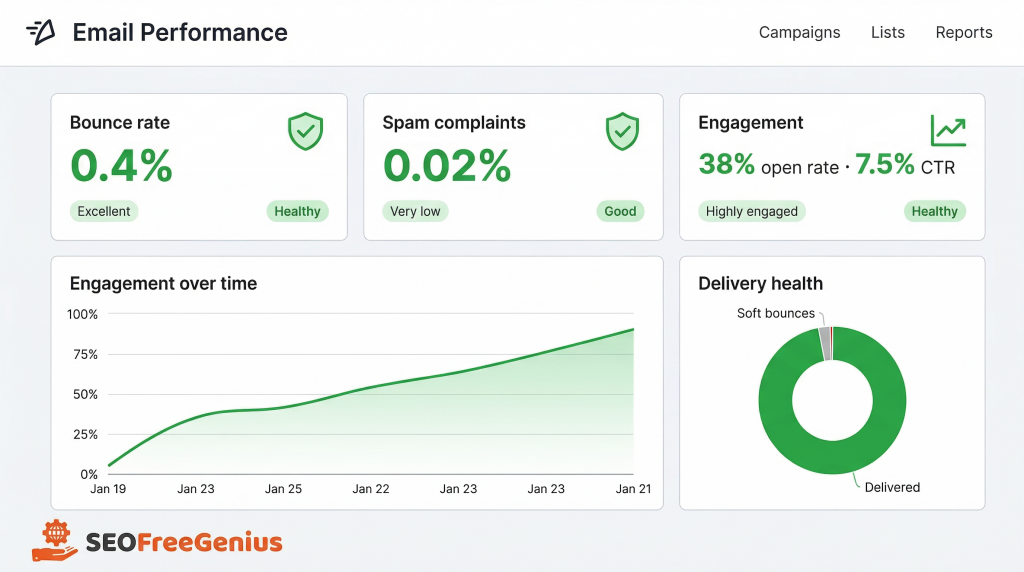
Key metrics to track:
| Metric | Healthy Target |
| Bounce Rate | Below 2% |
| Spam Complaint Rate | Below 0.1% |
| Open Rate | Above 20% |
| Click-Through Rate | Above 2-3% |
| Unsubscribe Rate | Below 0.5% |
Table 1: Email deliverability benchmark metrics
If any of these metrics fall outside healthy ranges, pause and investigate. High bounce rates may indicate list quality issues. High complaint rates suggest your content or frequency needs adjustment. Low engagement signals that your messages aren’t resonating with your audience.
The Broader Impact: How Email Reputation Affects Your Overall Web Presence
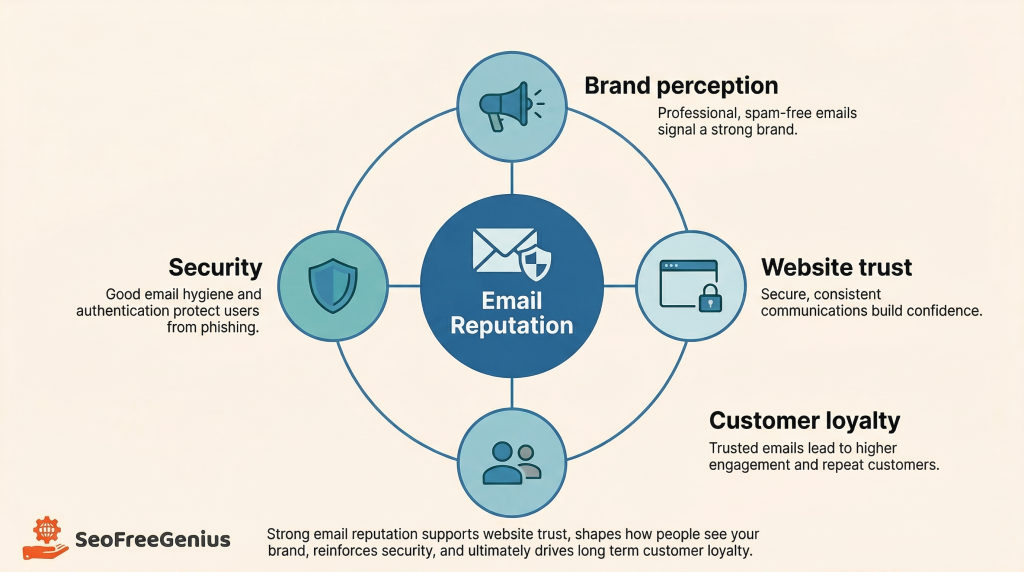
While email deliverability problems primarily affect your inbox placement, the consequences can extend to your broader online reputation and business credibility.
Domain Reputation and Brand Trust
Your domain’s email reputation is increasingly tied to your overall brand perception. If customers consistently can’t receive your emails—or worse, if your domain gets flagged for spam—they may question:
- Whether your website is secure and trustworthy
- If your business is legitimate or professional
- Whether they should continue doing business with you
- If they should report your domain as suspicious
This erosion of trust can indirectly impact website traffic, conversion rates, and customer lifetime value. A domain flagged for spam emails may also face challenges with other digital services, from payment processors to advertising platforms.
While email deliverability doesn’t directly impact search engine rankings, there are indirect connections. If your domain develops a poor reputation due to spam or malicious activity:
- Users may be less likely to click search results from your domain
- Your brand searches may be accompanied by negative reviews or warnings
- Reduced engagement and traffic signals to search engines that your content may be less valuable
- Security warnings in browsers can appear if your domain is flagged for suspicious activity
Maintaining a clean domain reputation across all channels—email, web, DNS—creates a cohesive picture of a trustworthy, professional business.
Protecting Your Infrastructure
Regular monitoring using tools like the Blacklist Lookup tool and Server Status Checker doesn’t just help with email deliverability. These diagnostics can also reveal:
- Security compromises: If your domain suddenly appears on blacklists, it may indicate your email accounts or server have been hacked and are sending spam without your knowledge
- DNS issues: Server status problems can point to broader DNS configuration errors affecting multiple services
- Infrastructure weaknesses: Consistent uptime issues may reveal hosting problems that need immediate attention
By treating email deliverability as part of your overall domain health strategy, you protect not just your inbox placement but your entire digital infrastructure.
Conclusion: Take Control of Your Email Deliverability Today
Email deliverability problems don’t fix themselves—they get worse over time as your sender reputation declines. But with the right diagnostic tools and strategic actions, you can reverse poor deliverability, rebuild trust with email providers, and ensure your messages reach the people who matter most to your business.
Here’s your action plan:
- Diagnose your current status: Use the Blacklist Lookup tool and Server Status Checker on seofreegenius.com to identify immediate problems with blacklisting or server issues.
- Clean your email list: Remove hard bounces, invalid addresses, and inactive subscribers. Implement double opt-in for new signups.
- Improve content quality: Write honest subject lines, balance text and images, personalize your messaging, and make unsubscribing easy.
- Implement authentication: Set up SPF, DKIM, and DMARC records to verify your sending identity and protect against spoofing.
- Monitor continuously: Check your domain health, engagement metrics, and sender reputation regularly. Catching problems early prevents major deliverability crises.
- Stay educated: Email deliverability best practices evolve as email providers update their algorithms. Stay informed about changes from major platforms like Gmail, Outlook, and Yahoo.
Remember: every email that lands in a spam folder is a missed opportunity to connect with your audience, drive revenue, and build your brand. By prioritizing deliverability and maintaining a healthy domain reputation, you ensure that your carefully crafted messages actually reach the inboxes they’re intended for.
Start improving your email deliverability today by running a free diagnostic check on seofreegenius.com. Your inbox placement—and your business—will thank you.
Samir H. M. — SEO Expert
5+ years building SEO tools. SEOFreeGenius creator—50+ sites to #1.
All Articles →
Samir H. M. is the creator of [seofreegenius.com], offering 66+ free SEO tools from Riyadh. He’s hands-on tested and built features like plagiarism checkers and backlink tools, plus 36 guides to help sites rank better. Practical, no-BS advice for real users.