
Published: March 20, 2026
Author: SEO Free Genius Team
Reading time: 8–10 minute
You shouldn’t have to pay an agency a monthly retainer just to help customers find your café, plumbing business, or medical clinic in your city.
If you run a local business, local SEO is simply the process of showing up when people search things like “café near me,” “emergency plumber in my city,” or “family clinic open now.” When your business appears in those moments, you get more calls, bookings, and walk‑ins without buying ads or signing long contracts. In this guide, you’ll follow a simple 4‑phase DIY process using free tools from SEOFreeFenius (https://seofreegenius.com/). You don’t need to be “technical” or hire an agency. You just need a bit of time, a clear process, and the right tools.
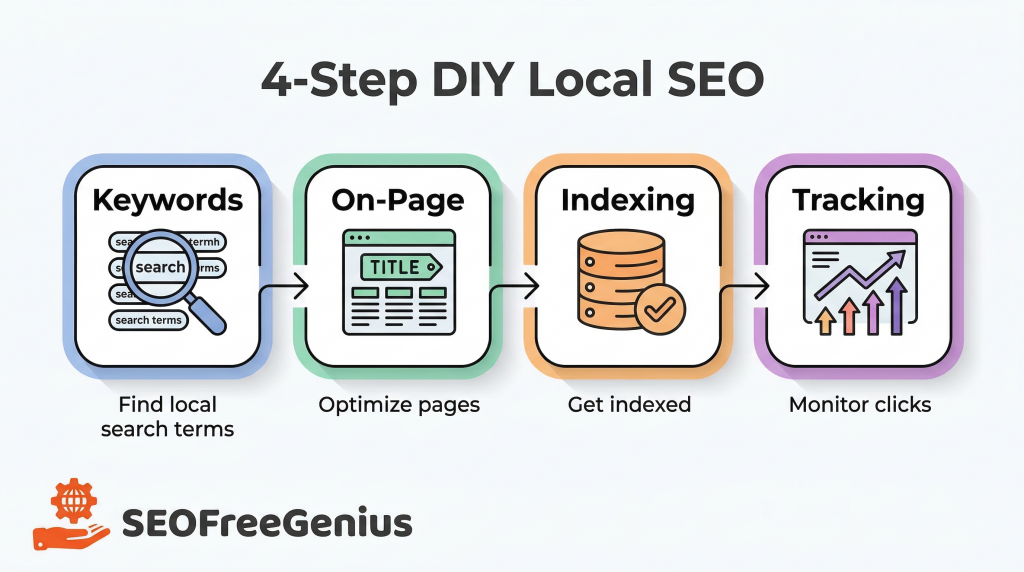
Phase 1: Discovering the Right Local Keywords
Why guessing keywords hurts your local SEO
Most small business owners assume “people will just search for my brand name” or they target very broad terms like “café” or “plumber.” The problem is:
- Your brand name searches only reach people who already know you.
- Broad terms are competitive and often dominated by big brands or directories.
- Local customers actually search with specific, location‑based phrases.
Someone looking for a nearby clinic is more likely to type “affordable clinic in my city” or “family doctor near me” than just “clinic.” When your website uses the same language your customers use, you have a much better chance of showing up for those searches.
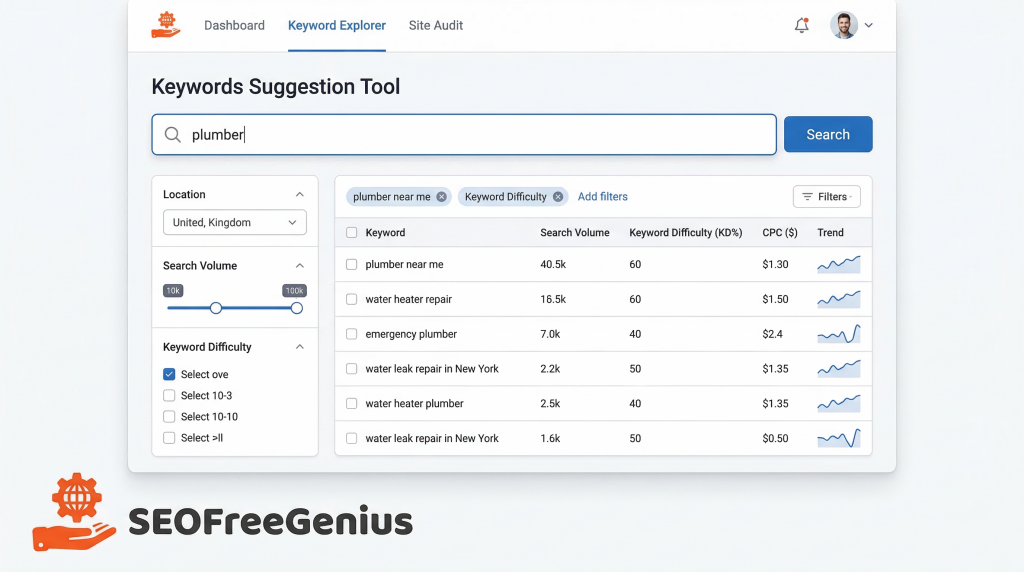
Step 1: Use the Keywords Suggestion Tool
Start by building a list of real local phrases your customers might type.
- Go to the Keywords Suggestion Tool.
- Enter a broad seed keyword that describes your service.
- Look specifically for location‑based and problem‑based suggestions.
Here are some practical examples:
- Plumber
- Type: “plumber”
- Look for suggestions like:
- “plumber near me”
- “emergency plumber in my city”
- “water leak repair near me”
- “water heater repair in [your city]”
- Café
- Type: “café”
- Look for suggestions like:
- “specialty coffee in my city”
- “café with wifi near me”
- “best karak chai near me”
- “study friendly café in [your city]”
- Medical clinic
- Type: “clinic” or “medical clinic”
- Look for suggestions like:
- “general practitioner in my city”
- “family clinic near me”
- “pediatric clinic in [your city]”
- “walk‑in clinic open now”
As you find good ideas, copy them into a spreadsheet or note. Group similar phrases together (e.g., all “emergency” plumbing terms in one small list).
Step 2: Turn messy keywords into clean clusters
Raw keyword lists can quickly become messy and overwhelming. To turn them into an actual strategy, you need to group similar keywords into clusters based on:
- Service type (e.g., “emergency plumbing,” “bathroom installation”)
- Location (e.g., “near me,” “[your city] downtown”)
- Intent (e.g., “booking,” “information,” “pricing”)
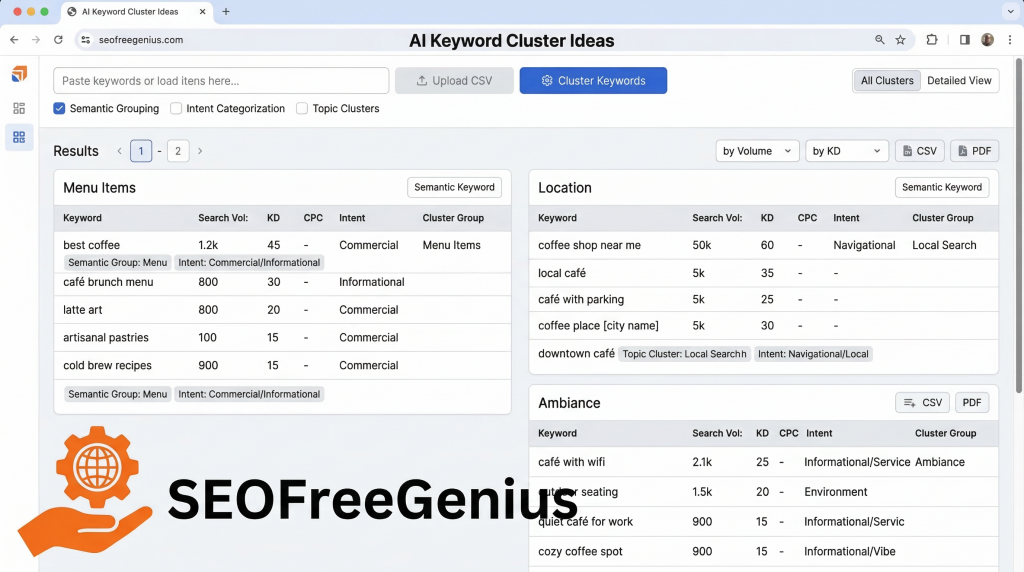
Instead of doing this manually, you can use the AI Keyword Cluster Ideas tool.
- Take your list of local keywords for your business.
- Paste them into the AI Keyword Cluster Ideas tool.
- Let the tool automatically group them into meaningful themes such as:
- Service Pages (e.g., “emergency plumber in my city,” “water heater repair near me”)
- Location Pages (e.g., “[your city] café,” “coffee shop in [neighborhood]”)
- Blog Topics (e.g., “how to choose a family clinic,” “signs you need a plumber urgently”)
- FAQ Content (e.g., “how much does a plumber cost,” “is my clinic covered by insurance”)
For example:
- A plumber might end up with clusters like “Emergency Services,” “Bathroom Installation,” and “Water Heater Repair.”
- A café might get clusters like “Menu Items,” “Work or Study,” and “Location & Parking.”
- A clinic might see clusters like “Family & General Care,” “Children’s Health,” and “Insurance & Pricing.”
These clusters become the blueprint for your website pages and content.
Phase 2: Optimizing Your On‑Page Assets (Meta Tags)
Why keywords alone don’t move the needle
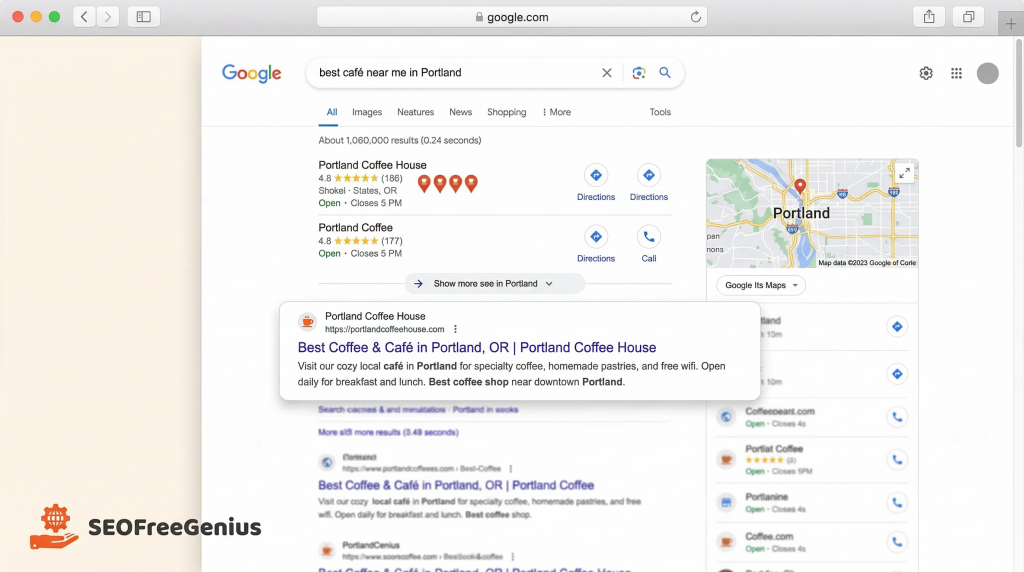
Having the right keywords is not enough. If you never place them in the key parts of your website—where search engines look first—Google will struggle to understand what each page is about.
Two critical elements you control on every page are:
- Title tag – the main headline that appears in Google’s search results.
- Meta description – the short description under the title in the search results.
These elements influence both your ranking potential and how likely people are to click.
Step 1: Assign keyword clusters to specific pages
Take the clusters you created and map them onto your website:
- Plumber website
- “Emergency plumber near me,” “24/7 plumber in my city” → Emergency Services page.
- “water heater repair in [your city]” → Water Heater Repair page.
- Café website
- “specialty coffee in my city,” “best coffee beans” → Home page and Menu page.
- “café with wifi near me,” “study café in [your city]” → dedicated “Work & Study” page or a blog post.
- Clinic website
- “family clinic in my city,” “general practitioner near me” → Home page.
- “pediatric clinic in my city,” “pediatrician near me” → “Children’s Health” or “Our Doctors” page.
The goal is one main topic per page, not one page trying to rank for everything.
Step 2: Write optimized titles and meta descriptions
Use your primary keyword cluster naturally in both the title tag and meta description.
Example for a clinic’s “Our Doctors” page targeting pediatric care:
- Title tag:
- “Pediatrician in [Your City] – Family‑Friendly Children’s Clinic”
- Meta description:
- “Looking for a pediatrician in [your city]? Our family clinic offers gentle, expert care for children of all ages. Book your appointment online today.”
Example for a café’s signature drinks blog post about karak chai:
- Title tag:
- “Best Karak Chai in [Your City] – Our Signature Café Drinks”
- Meta description:
- “Discover the best karak chai in [your city] at our cozy café. Learn what makes our signature tea special and plan your next visit.”
Step 3: Test your meta tags with the Meta Tags Analyzer
To make sure your titles and descriptions look good in Google’s previews (and are not cut off), use the Meta Tags Analyzer.
- Copy your page URL, or paste your draft title and description.
- Check:
- Character length (not too short or too long).
- Whether your main keyword appears naturally.
- How the preview might look in search results.
This ensures your pages are both search‑friendly and click‑worthy before you publish.
Phase 3: Technical Foundation & Indexing
Why indexing matters before rankings
You can write perfect content and optimize every meta tag—but if Google hasn’t added your pages to its index, they simply will not appear in search results. Think of indexing like being added to Google’s massive library. If your book (website) isn’t on the shelf, no one can “borrow” it.
Step 1: Understand and prepare your sitemap
A sitemap is a simple file that lists important pages on your website so search engines can find and crawl them more efficiently. It’s especially useful for small businesses that have added new service pages or updated their structure.
You can prepare one using the XML Sitemap Generator. Once generated, you can later submit it to Google Search Console to help Google discover all your important pages.
Step 2: Check if your pages are indexed
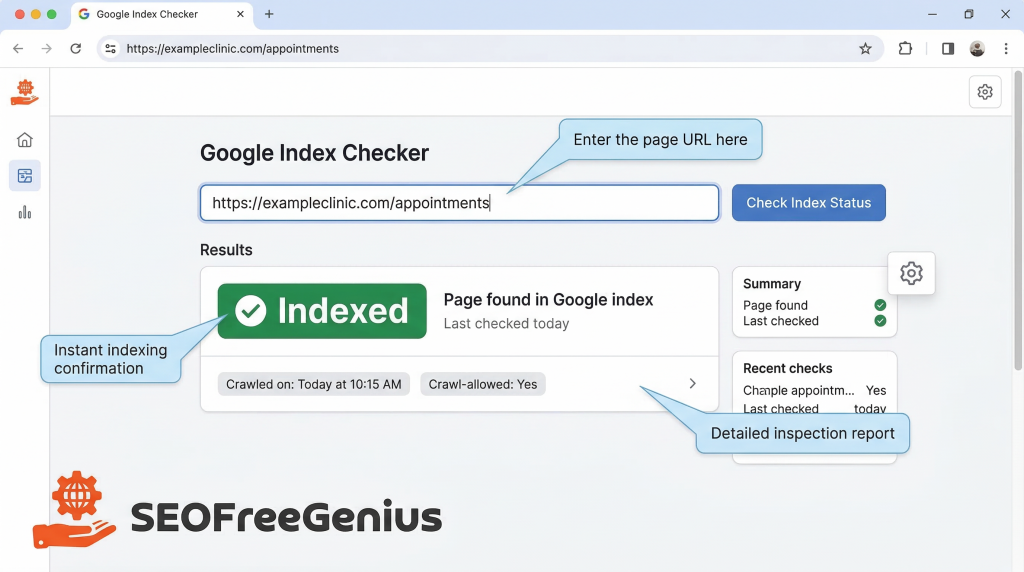
Next, you want to see whether key pages are actually in Google’s index. Use the Google Index Checker.
- Take the URL of an important page:
- Plumber: “/emergency-plumber-in-your-city”
- Café: “/cafe-with-wifi-in-your-city”
- Clinic: “/book-appointment” or “/pediatrician-in-your-city”
- Paste the URL into the Google Index Checker.
- See if the tool reports the page as Indexed or Not Indexed.
If it is indexed, that means Google already knows about it and can show it in search results.
Step 3: Request indexing if needed
If an important page is not indexed, you can request indexing through Google Search Console:
- Go to Google Search Console (you can learn more from Google’s official help documentation at https://support.google.com/webmasters/answer/9128668).
- Enter the URL in the “URL Inspection” tool.
- Click “Request indexing.”
This does not guarantee immediate ranking, but it ensures your pages are in Google’s queue to be crawled and added to the index.
Phase 4: Tracking Your First Local Clicks
Why tracking matters more than vanity rankings
The real goal of local SEO is not just to “rank number 1.” Your real goals are:
- More calls.
- More bookings and form submissions.
- More foot traffic to your location.
You can start simple:
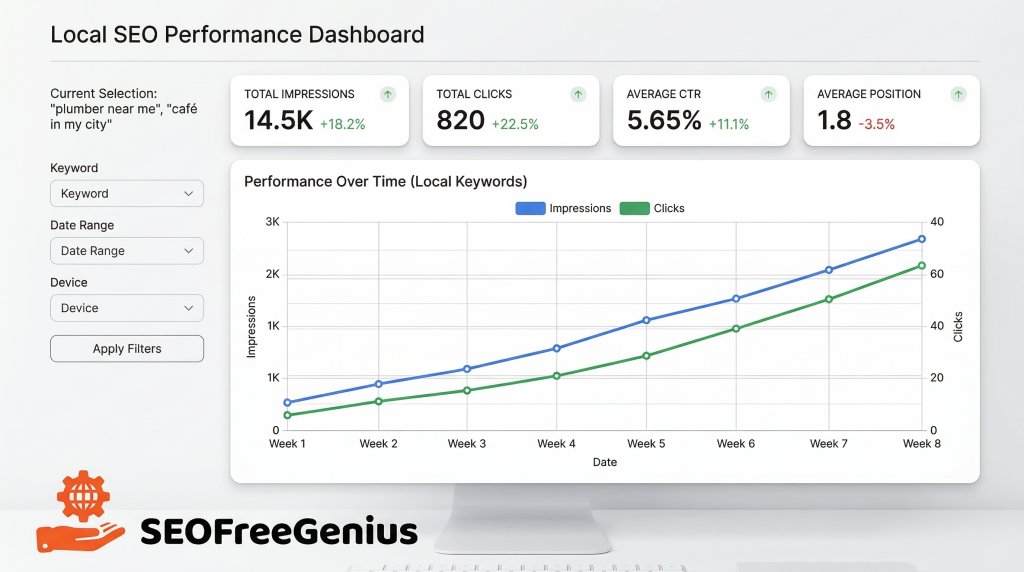
- Use Google Search Console to see which local keywords are bringing impressions and clicks to your site (e.g., “plumber near me,” “café in my city”).
- Use Google Analytics (or a similar tool) to check which pages get the most traffic and whether visitors are taking actions like calling, filling out forms, or clicking maps directions.
Over time, you should see:
- New impressions for your local keywords.
- Steady growth in clicks for key service pages.
- More engagement with high‑intent pages (e.g., “emergency plumber,” “book appointment,” “menu & reservations”).
Resources like BrightLocal’s blog (https://www.brightlocal.com/learn/local-seo/) and Search Engine Journal’s local SEO articles (https://www.searchenginejournal.com/category/seo/local-search/) can deepen your understanding of how local visibility and clicks translate into real‑world customers.
Bringing It All Together: A DIY Blueprint
You don’t need a big budget or a long‑term contract with an agency to get your local business found online. You just need a repeatable process and the right free tools.
Here’s your 4‑phase DIY local SEO blueprint:
- Phase 1 – Research
Use the Keywords Suggestion Tool to discover how people in your city actually search, then organize those terms with AI Keyword Cluster Ideas.
- Phase 2 – Optimize
Assign keyword clusters to specific pages and write clear, compelling title tags and meta descriptions. Test them with the Meta Tags Analyzer.
- Phase 3 – Submit
Ensure your site is technically visible. Generate a sitemap with the XML Sitemap Generator and check important pages with the Google Index Checker, then use Google Search Console to request indexing if needed.
- Phase 4 – Monitor
Watch your impressions, clicks, and calls grow over time using free analytics and search tools. Adjust content and pages based on what’s working.
With our free SEO tools on SEOFreeGenius (https://seofreegenius.com/) and a few hours each week, you can take control of your local visibility and stop relying solely on word‑of‑mouth or expensive agencies.

Samir H. M. is the creator of [seofreegenius.com], offering 66+ free SEO tools from Riyadh. He’s hands-on tested and built features like plagiarism checkers and backlink tools, plus 36 guides to help sites rank better. Practical, no-BS advice for real users.