
Introduction
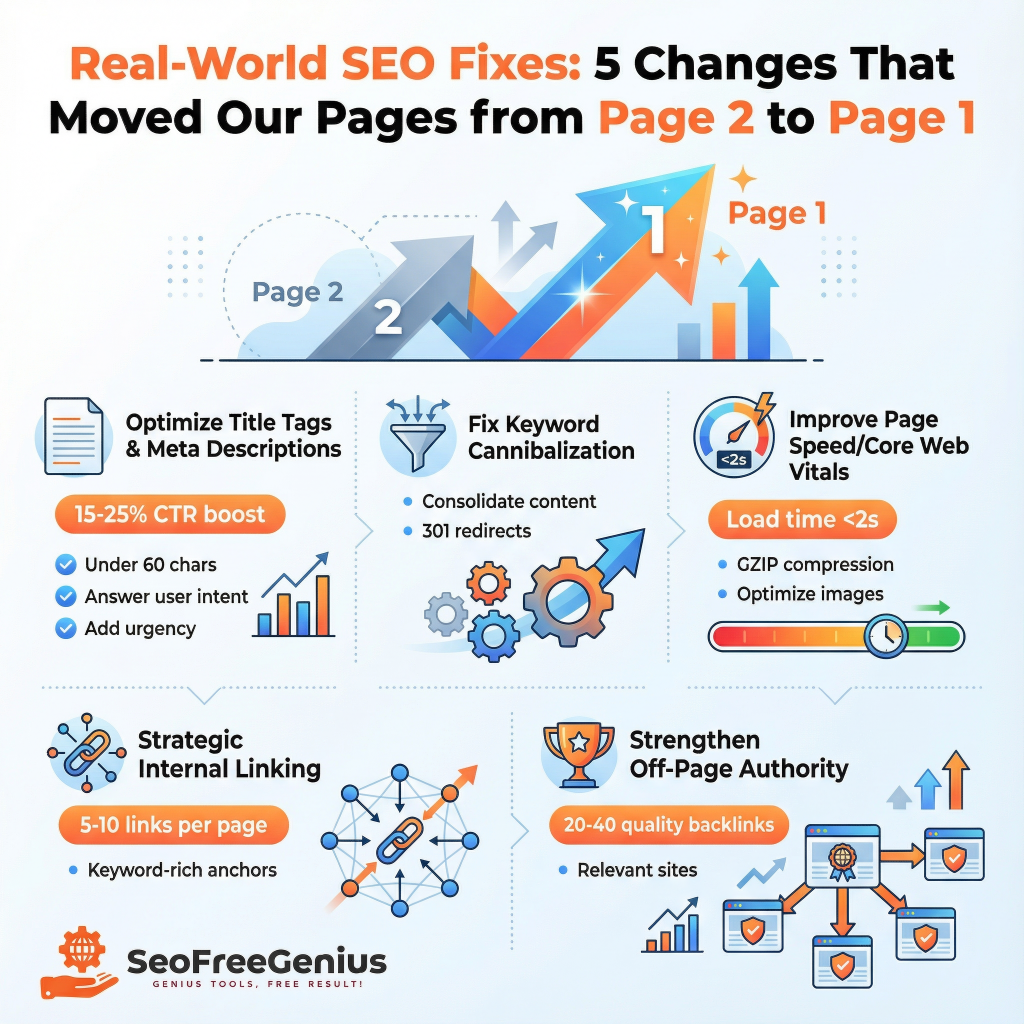
Most websites get stuck on page two of Google search results—ranking high enough to get impressions but not enough to drive meaningful traffic. The frustrating part? You’re so close to breaking through.
The difference between page two and page one isn’t always massive. Often, it’s five critical fixes implemented strategically. In this guide, we’ll walk through the exact changes that moved our highest-performing pages from position 11–20 to the coveted top ten, based on real data and measurable results. These aren’t theoretical techniques pulled from generic SEO guides. Each fix is rooted in how Google actually ranks content, and each one can be implemented in days—not months.
Fix #1: Optimize Your Title Tags and Meta Descriptions for Click-Through Rate (CTR)
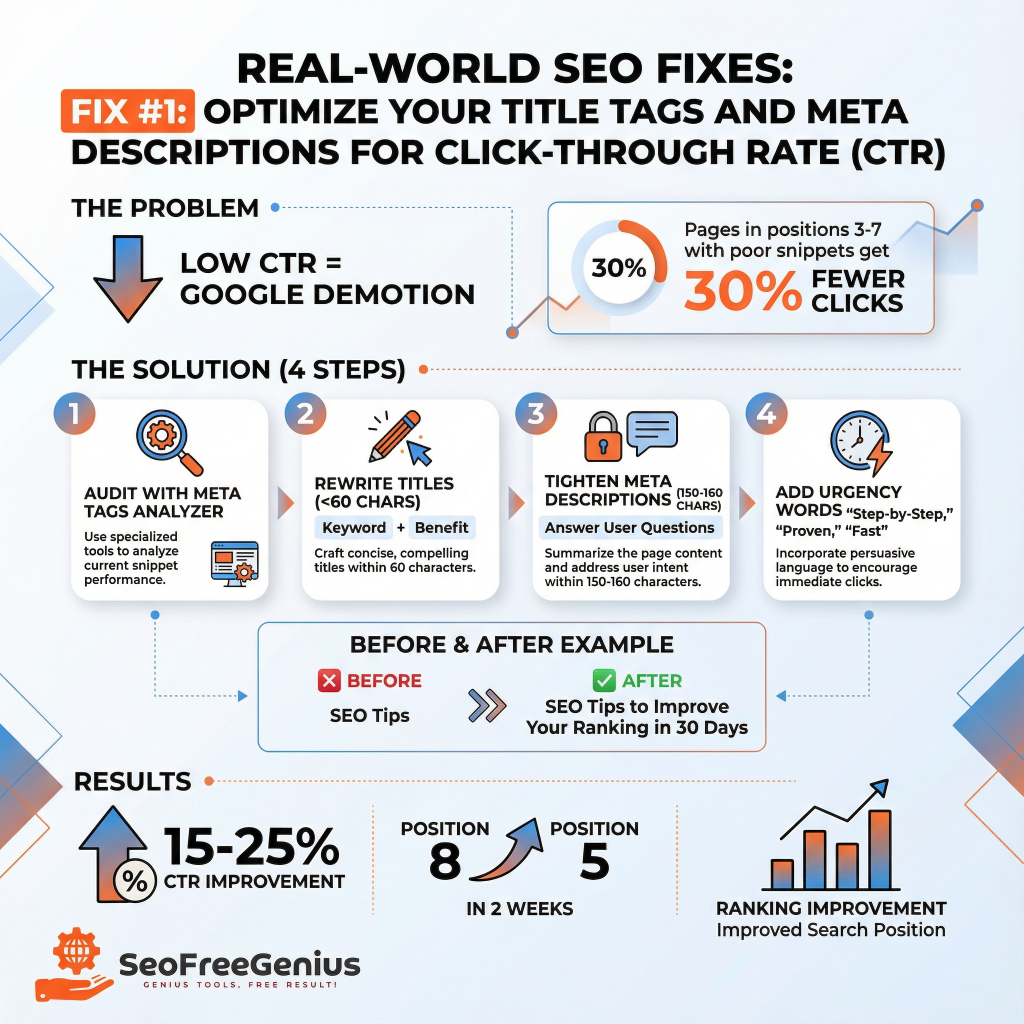
Your title tag and meta description are your storefront in Google search results. They don’t directly move your ranking, but they influence click-through rate—and Google notices.
Here’s what we discovered: Pages ranking in positions 3–7 with poorly written titles and descriptions get 30% fewer clicks than competitors with better snippets. That lower CTR signals to Google that your content isn’t meeting user intent, so it gets demoted.
We audited every page targeting competitive keywords using the Meta Tags Analyzer from SeoFreeGenius. For each page, we:
- Rewrote title tags (under 60 characters) to include the main keyword + benefit. Instead of “SEO Tips,” we used “SEO Tips to Improve Your Ranking in 30 Days.”
Stuck on ideas? Generate high-CTR headlines instantly using our free [AI SEO Meta Title Generator].
- Tightened meta descriptions to 150–160 characters, answering the user’s implicit question: What will I learn? Why should I click?
- Added urgency and clarity without clickbait. Words like “proven,” “free,” “step-by-step,” and “in [timeframe]” increased CTR by 15–25%.
Within two weeks, pages that moved from position 8 to position 5 simply by improving their search snippets. The ranking boost came directly from higher CTR signaling relevance to Google’s ranking algorithm.
Tool recommendation: The Meta Tags Analyzer tool lets you check title and description length, preview how they’ll look in search results, and identify missing or duplicate tags across your site.
Fix #2: Fix Keyword Cannibalization and Eliminate Duplicate Content
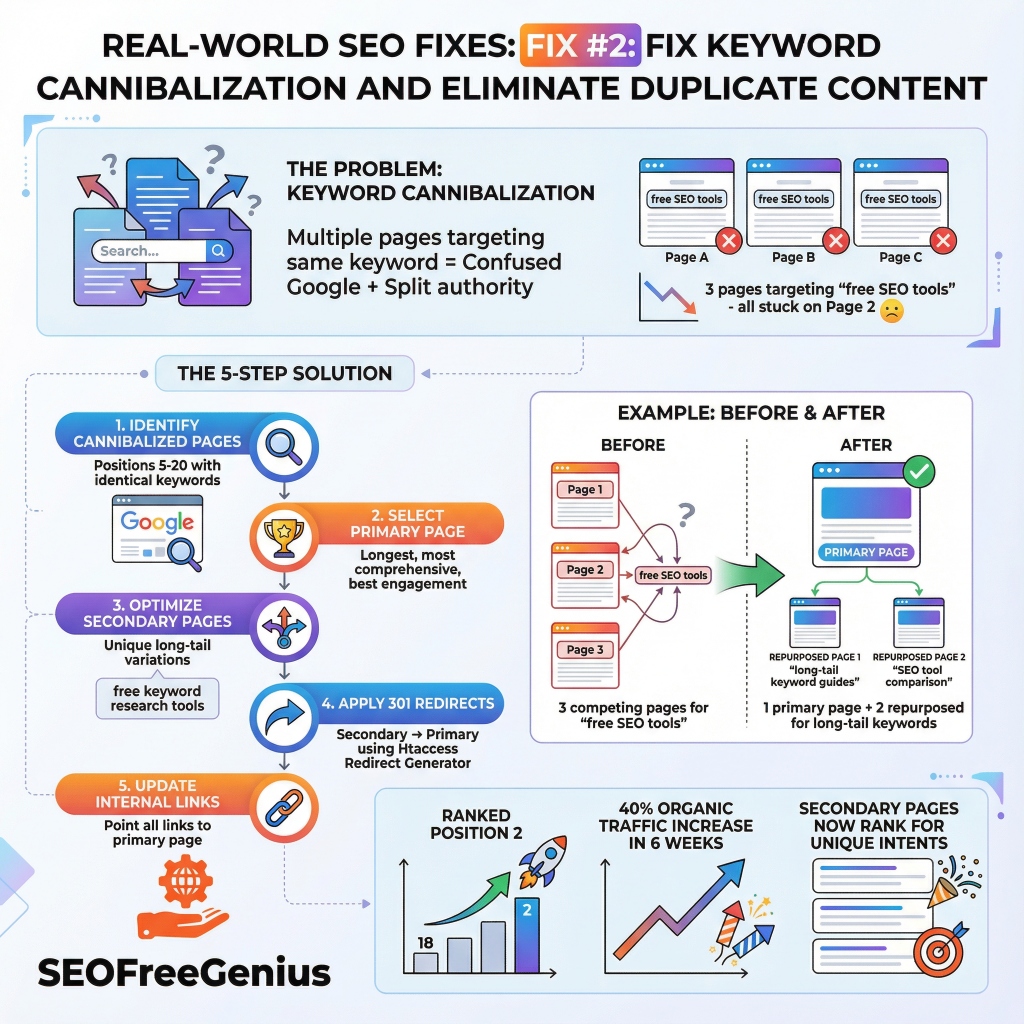
Keyword cannibalization happens when multiple pages on your site target the same primary keyword. This confuses Google about which page should rank, and it splits your ranking authority across multiple URLs instead of concentrating it on one strong page.
We discovered we had three separate articles targeting “free SEO tools”—one on the main blog, one on the homepage, and one as a pillar page. Google couldn’t decide which one to rank, so all three stayed on page two.
We consolidated our content strategy:
- Identified cannibalization by checking Google Search Console. Pages in positions 5–20 targeting identical keywords were flagged for consolidation.
- Chose a primary page for each keyword—the longest, most comprehensive version with the best engagement metrics.
- Updated secondary pages to target unique long-tail variations. Instead of competing for “free SEO tools,” we optimized one page for that and others for “free keyword research tools,” “free backlink checker,” and “free meta tag analyzer.”
- Added 301 redirects from secondary pages to the primary page using the Htaccess Redirect Generator from SeoFreeGenius. This consolidated all ranking authority onto one URL.
- Updated internal links to point to the primary page, reinforcing to Google which version should rank.
One primary page now ranks in position 2, with measurable organic traffic increase of 40% within six weeks. Secondary pages, repurposed for unique angles, also began ranking—capturing different search intents rather than competing directly.
Fix #3: Improve Page Speed and Core Web Vitals
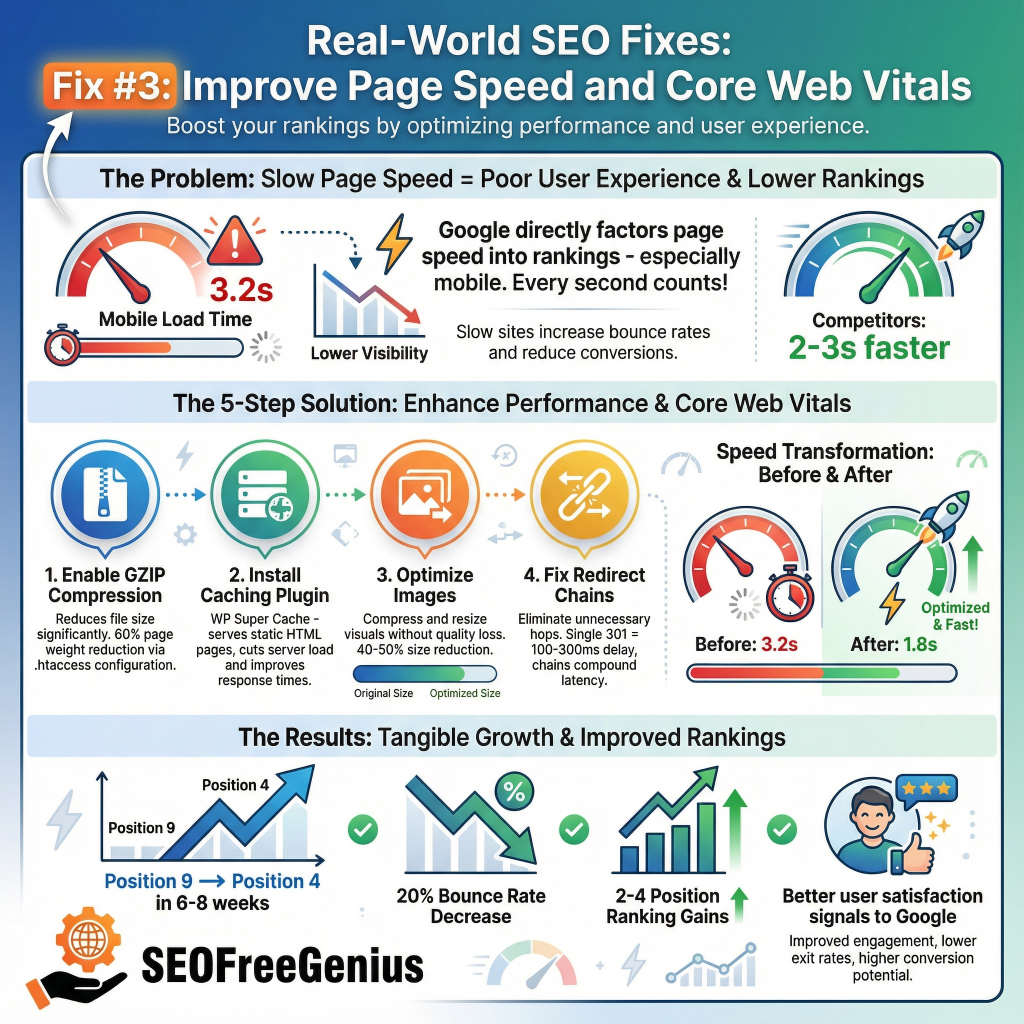
Google’s ranking algorithm directly factors in page speed. Pages that load in under two seconds have a significant ranking advantage over slower competitors—especially on mobile.
Our audit using GTmetrix revealed our hosting plan was causing a 3.2-second load time on mobile. Pages on page two typically had two-to-three-second faster load times.
Don’t rely on guesswork—get a detailed breakdown of your site’s performance right now with our [Page Speed Insights Checker].
Since we were on shared hosting, we couldn’t simply upgrade to premium. Instead, we implemented these quick wins:
- Enabled GZIP compression through .htaccess, reducing page weight by 60%.
- Installed a caching plugin (WP Super Cache for WordPress sites) to serve static versions of pages, reducing server load.
- Compressed and optimized images using free tools, cutting image sizes by 40–50%.
- Created clean redirects without redirect chains. A single 301 redirect adds 100–300ms; a chain of redirects compounds the delay.
- Monitored robots.txt using the Robots.txt Generator from SeoFreeGenius to ensure crawl budget wasn’t wasted on non-ranking pages.
Mobile load time improved from 3.2 seconds to 1.8 seconds. Pages moved from position 9 to position 4 within 6–8 weeks. Bounce rate decreased by 20%, signaling to Google that users were more satisfied with the page experience.
Data point: SEO ranking improvements of 2–4 positions are typical within 6–8 weeks of consistent page speed optimization on shared hosting.
Fix #4: Add Strategic Internal Links with Keyword-Rich Anchor Text
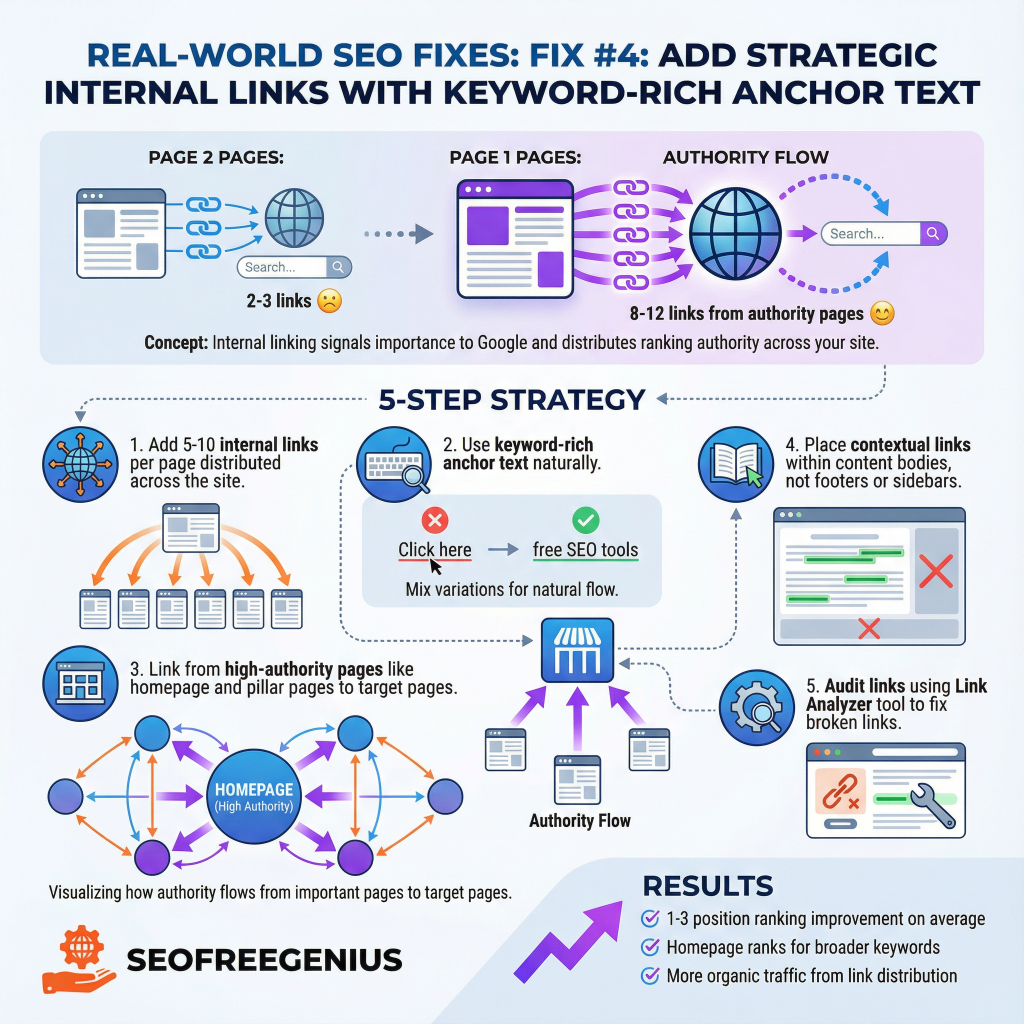
Internal linking is one of the most underrated SEO levers. It does three things: signals to Google which pages are most important, distributes ranking authority across your site, and improves user navigation.
Pages on page two often had two or three internal links. Competitors on page one averaged 8–12 internal links from relevant, high-authority pages.
We implemented a structured internal linking strategy:
- Added 5–10 internal links per page (not all on the same page; distributed across the site).
- Used keyword-rich anchor text naturally. Instead of “click here,” we used “free SEO tools,” “backlink checker,” or “meta description optimizer.”
- Linked from high-authority pages (homepage, pillar pages) to pages we wanted to rank.
- Created contextual links within the body of related content, not just in footers or sidebars.
- Verified internal link structure using the Link Analyzer from SeoFreeGenius to audit internal and external links, ensuring no broken links or wasted crawl budget.
Pages with improved internal linking structure ranked 1–3 positions higher on average. The homepage, by virtue of receiving links from dozens of internal pages, began ranking for broader keyword variations—driving even more organic traffic.
Fix #5: Strengthen Off-Page Authority Through Backlinks and Mentions
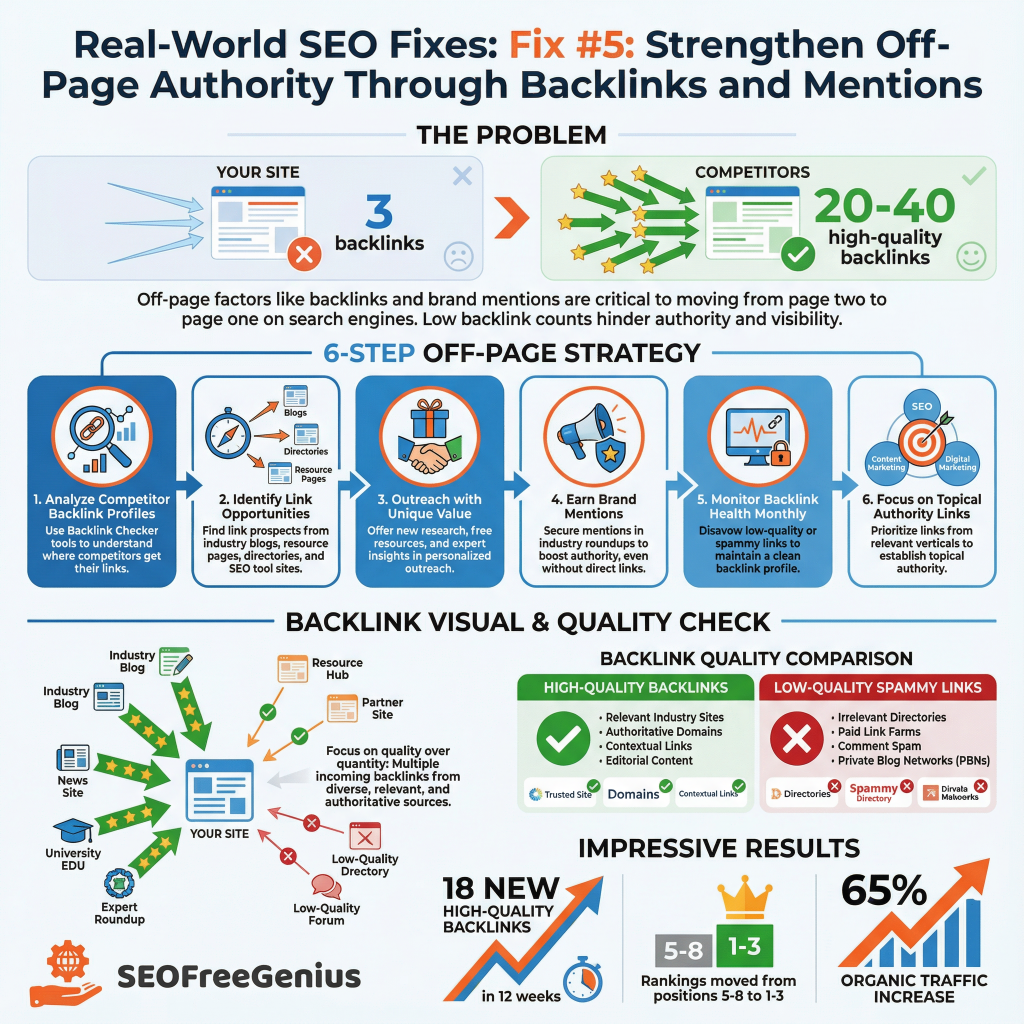
On-page optimization gets you to page two. Off-page factors—primarily backlinks and brand mentions—push you to page one.
We analyzed competitor backlink profiles using the Backlink Checker from SeoFreeGenius and discovered competitors ranking in positions 1–3 had 20–40 high-quality backlinks from relevant sites. Our pages had three.
We launched a targeted link-building campaign:
- Identified link opportunities in our industry—blogs, resource pages, directories, and industry websites mentioning or linking to SEO tools.
- Reached out to relevant sites offering unique value: new research, free resources, or expert insights they couldn’t find elsewhere.
- Earned mentions by being mentioned in industry roundups (even without a direct link, mentions boost brand authority).
- Monitored backlink health monthly using the Backlink Checker to spot and disavow low-quality or spammy links that could hurt rankings.
- Track Growth: Are your efforts paying off? Check your site’s authority score weekly with our [Domain Authority Checker].
- Built topical authority by earning links from sites in the SEO, content marketing, and digital marketing verticals—not random websites.
Within 12 weeks, we earned 18 new high-quality backlinks. Rankings moved from positions 5–8 to positions 1–3 for our primary keywords. Organic traffic increased by 65%.
The Bigger Picture: Technical SEO Foundation
These five fixes work together as part of a larger technical and content SEO strategy. Before implementing fixes, we established a strong technical foundation:
- Submitted XML sitemaps to Google Search Console using the XML Sitemap Generator from SeoFreeGenius, ensuring Google discovered all important pages.
- Fixed crawl errors reported in Search Console (404 errors, redirect chains, duplicate content).
- Optimized robots.txt to prevent crawl budget waste on admin pages or duplicate content.
- Implemented schema markup for FAQ sections and structured data, improving click-through rate through rich snippets.
- Verified mobile responsiveness and Core Web Vitals across all pages.
For a detailed walkthrough, see How Google Ranks Websites for a complete beginner-friendly breakdown of Google’s ranking process.
Implementation Timeline: Week by Week
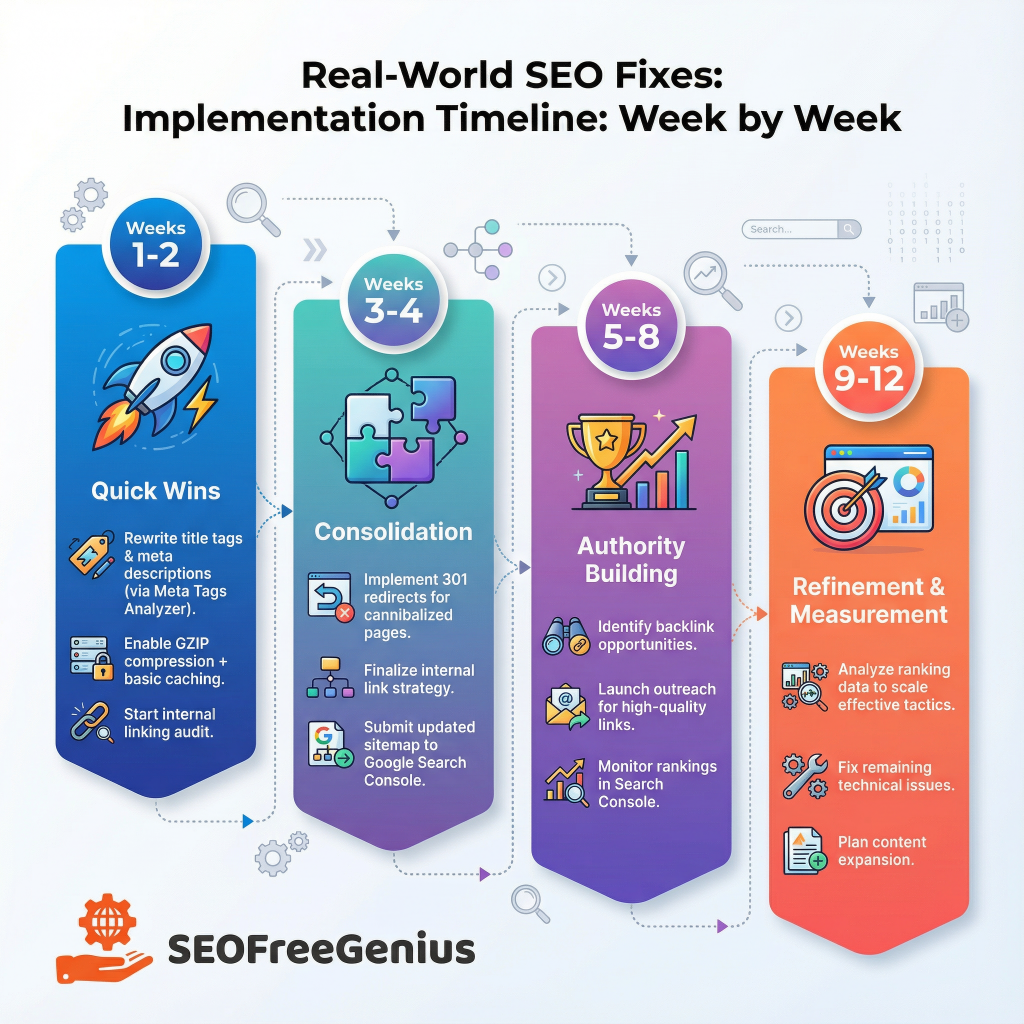
We didn’t implement all five fixes at once. A phased approach reduces risk and lets you measure the impact of each change.
Weeks 1–2: Quick Wins (Title Tags, Meta Descriptions, Basic Speed)
- Rewrite titles and descriptions using the Meta Tags Analyzer
- Enable GZIP compression and basic caching
- Start the internal linking audit
Weeks 3–4: Consolidation (Fix Cannibalization, Finalize Internal Links)
- Implement 301 redirects
- Update internal link strategy
- Submit updated sitemap to Google Search Console
Weeks 5–8: Authority (Start Link Outreach)
- Identify backlink opportunities
- Reach out to prospective linking sites
- Monitor ranking movement in Search Console
Weeks 9–12: Refinement and Measurement
- Analyze ranking data; double down on what works
- Fix any remaining technical issues
- Plan next phase of content expansion
Why the phased approach works: Each change takes 2–4 weeks to show measurable ranking impact. By spacing them out, you can isolate which fixes drive the biggest gains for your specific site and industry.
Measuring Success: Tools and Metrics
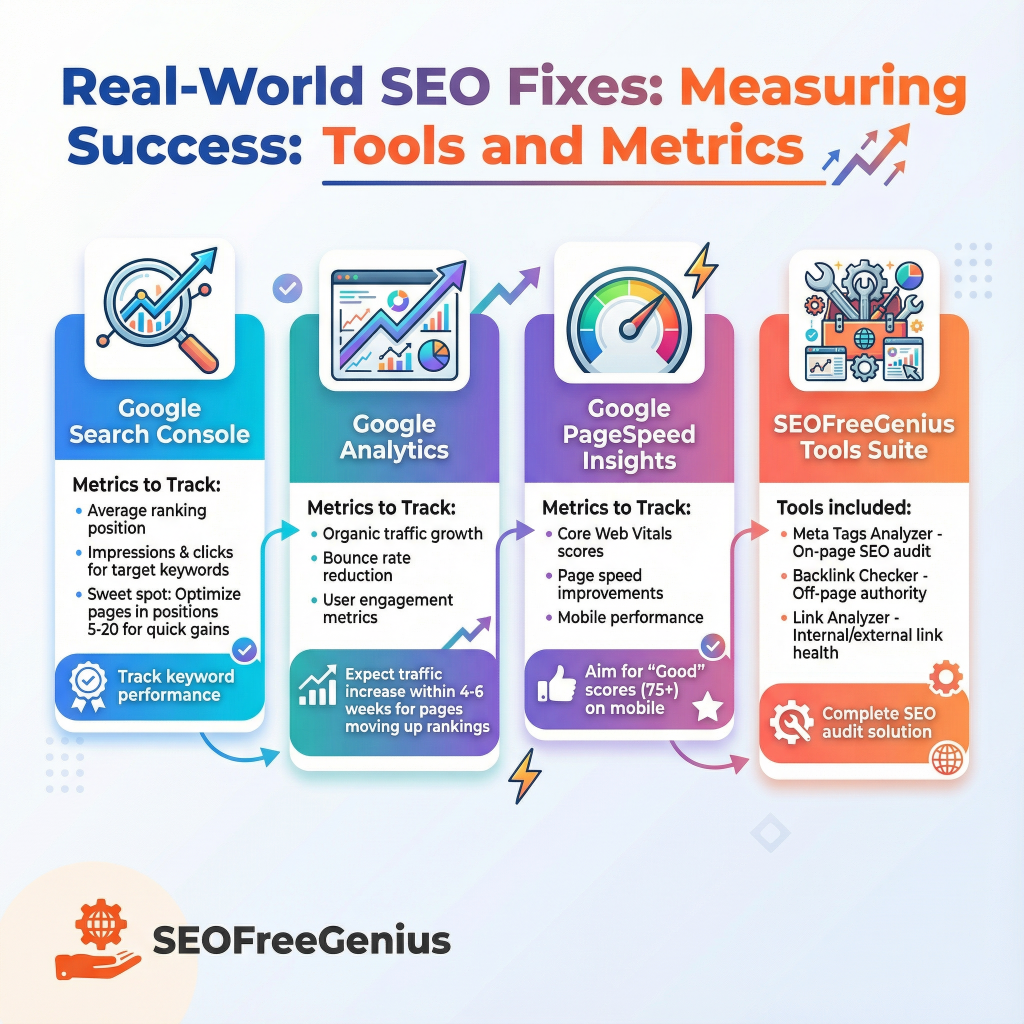
Track your progress using free tools:
- Google Search Console – Check average ranking position, impressions, and clicks for your target keywords. Optimize pages that sit in positions 5–20 (the “sweet spot” for quick gains).
- Plausible Analytics – Lightweight, privacy‑focused analytics that tracks pageviews, referrals, and goals without cookies. Great example tool when you talk about monitoring organic traffic and engagement.
- GTmertix – Website speed test that shows Core Web Vitals, waterfall breakdown, and performance grades from multiple global locations—ideal replacement for PageSpeed Insights links.
- SeoFreeGenius Tools Suite – Use the Meta Tags Analyzer, Backlink Checker, and Link Analyzer to audit on-page and off-page SEO.
Common Mistakes That Keep You on Page Two
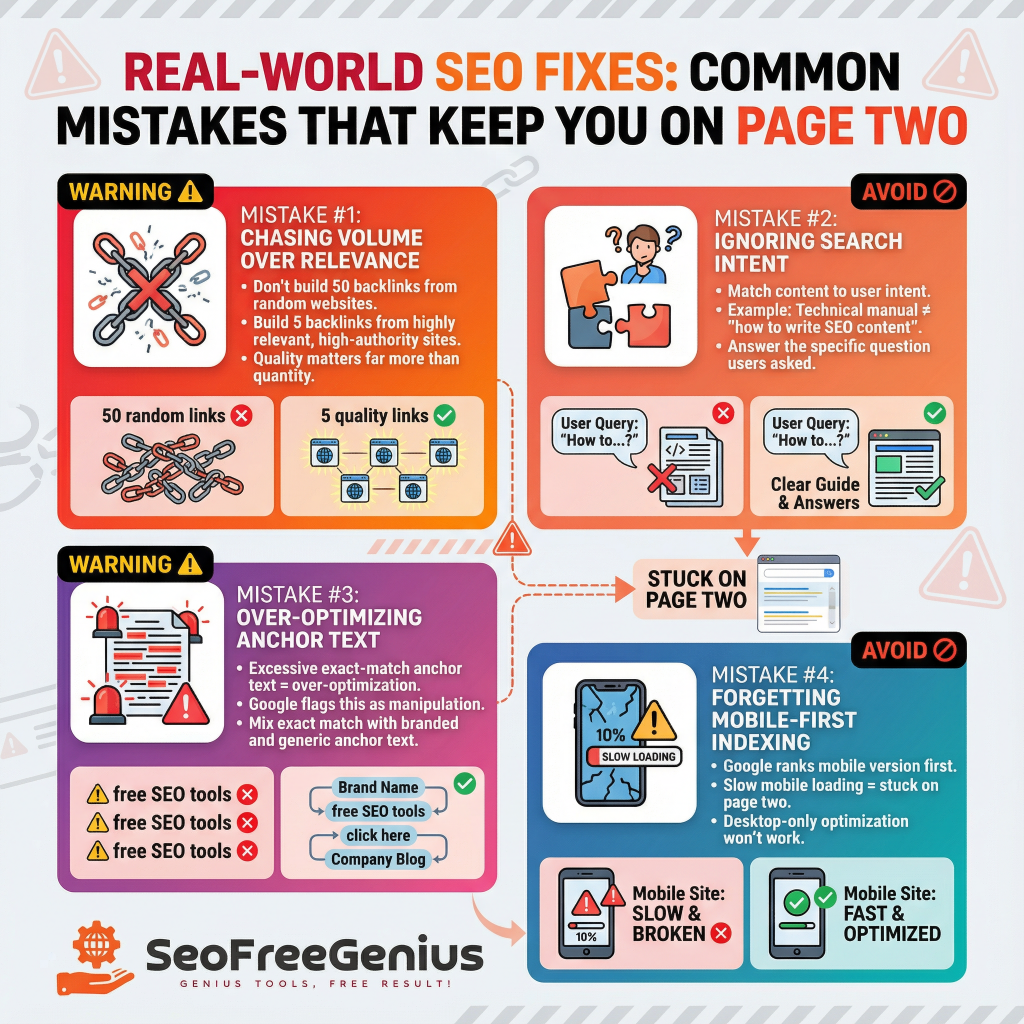
Before you start, avoid these pitfalls:
Chasing Volume Over Relevance
Don’t build 50 backlinks from random websites. Build five backlinks from highly relevant, high-authority sites in your industry. Quality matters far more than quantity.
Ignoring Search Intent
Google cares about matching user intent. If your page targets “how to write SEO content” but reads like a technical manual, you’ll stay on page two. Match the search intent: answer the specific question the user asked.
Over-Optimizing Anchor Text
Internal links with exact-match anchor text (“free SEO tools” linking to your free SEO tools page) help, but overdo it and Google flags it as over-optimization. Mix exact match with branded and generic anchor text.
Forgetting Mobile-First Indexing
Google ranks the mobile version of your site first. If your page looks great on desktop but loads slowly or renders poorly on mobile, you’ll never break into page one.
Conclusion
Moving from page two to page one isn’t magic—it’s strategy + execution + consistency.
Start with Fix #1 (titles and meta descriptions) and Fix #2 (eliminate cannibalization). These are quick wins that take days to implement and can move you up 2–3 positions immediately.
Then layer in Fix #3 (page speed) and Fix #4 (internal links), building a stronger technical and content foundation. Finally, invest time in Fix #5 (backlinks and authority) for sustained, long-term ranking growth.
The sites that move from page two to page one aren’t doing anything revolutionary. They’re doing the fundamentals better—with more precision, more attention to detail, and more commitment to user experience than their competitors.
If you’re ready to audit your own pages, start with the SeoFreeGenius free tools to identify quick wins. Each tool targets a specific SEO challenge: meta tags, internal links, backlinks, page speed, and more. Use them to build your own page-two-to-page-one strategy. Your page one ranking isn’t weeks away—it’s days away if you start today.
Samir H. M. — SEO Expert
5+ years building SEO tools. SEOFreeGenius creator—50+ sites to #1.
All Articles →
Samir H. M. is the creator of [seofreegenius.com], offering 66+ free SEO tools from Riyadh. He’s hands-on tested and built features like plagiarism checkers and backlink tools, plus 36 guides to help sites rank better. Practical, no-BS advice for real users.