
Published: March 5, 2026
Author: SEO Free Genius Team
Reading time: 10 minutes
Introduction
You’ve published what you believe is a great piece of content. It’s well-researched, clearly written, and addresses your audience’s needs. Yet weeks pass, and it barely appears in Google search results. Traffic remains disappointingly low, and your competitors with seemingly inferior content consistently outrank you.
The problem isn’t your content quality—it’s likely your on-page SEO. Even the most valuable content will struggle to rank without proper optimization of titles, meta descriptions, headings, and keyword placement. According to recent SEO research, on-page optimization remains one of the strongest ranking signals Google uses to understand and rank content.
The good news? On-page SEO is entirely within your control, and you don’t need expensive tools to get it right. In this comprehensive guide, you’ll learn a systematic approach to auditing and optimizing every critical on-page element using free tools from SEOFreeGenius. By the end of this article, you’ll have a repeatable checklist for optimizing titles, descriptions, headings, content structure, and keyword usage—ensuring every page you publish has the best possible chance of ranking well and attracting organic traffic.
Why On-Page SEO Still Matters in 2026
Despite Google’s increasingly sophisticated algorithms and emphasis on content quality and user experience, traditional on-page SEO elements remain foundational ranking factors.
How Google Uses On-Page Signals
Google’s algorithms analyze on-page elements to understand what your content is about and whether it matches user search intent. According to Google’s SEO Starter Guide, title tags and headings are among the first elements crawlers examine when evaluating a page.
When you optimize these elements properly:
- Google understands your topic clearly, making it easier to match your content to relevant searches
- Your pages appear more relevant for target keywords, improving rankings
- Click-through rates increase because compelling titles and descriptions attract more clicks from search results
- User experience improves as clear headings and structure make content easier to scan and read
The Cost of Poor On-Page Optimization
Pages with weak on-page SEO face multiple disadvantages:
- Lower rankings even with quality content, as Google struggles to identify relevance
- Reduced click-through rates from search results due to generic or truncated titles and descriptions
- Higher bounce rates when visitors land on poorly structured content
- Missed long-tail opportunities when headings and subheadings don’t target related keywords
According to on-page SEO research, pages that follow on-page best practices see 25-40% higher organic traffic compared to identical content with poor optimization.
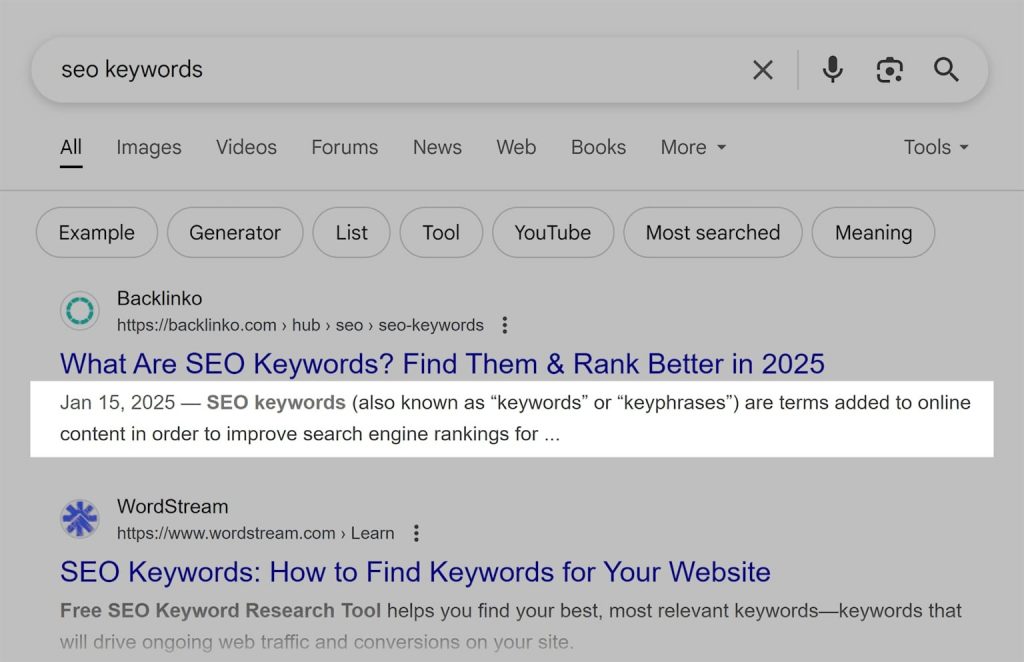
Figure 1: Example of properly optimized meta tags showing title and description
The Balance Between SEO and User Experience
Modern on-page SEO isn’t about keyword stuffing or gaming algorithms—it’s about creating content that serves both users and search engines. According to 2026 SEO best practices, the best approach is to:
- Write for humans first (clear, valuable, well-structured content)
- Optimize for search engines second (proper titles, descriptions, keywords)
- Ensure technical elements don’t detract from readability
When done correctly, on-page SEO enhances rather than compromises user experience.
Step 1: Audit Your Current Meta Tags
Before making any changes, you need to understand where your pages currently stand. The Meta Tags Analyzer from SEOFreeGenius provides instant visibility into your existing on-page elements.
- Navigate to seofreegenius.com/meta-tags-analyzer
- Enter the URL of the page you want to audit
- Click Analyze or Submit
- Review the comprehensive report showing all meta tags and SEO elements
The tool extracts and analyzes:
- Title tag (character count, keyword presence)
- Meta description (length, uniqueness)
- Meta keywords (if present, though largely obsolete)
- Open Graph tags (og:title, og:description, og:image for social sharing)
- Twitter Card tags (twitter:title, twitter:description, twitter:image)
- Canonical tag (URL canonicalization)
- Robots meta tag (indexing directives)
- Viewport tag (mobile responsiveness indicator)
Critical issues to address immediately:
| Issue | Why It Matters |
| Missing title tag | Pages without titles rarely rank; Google generates generic titles |
| Title too long (>60 chars) | Truncated in search results, reducing click-through rates |
| Duplicate titles | Multiple pages competing for same keywords; confuses Google |
| Missing meta description | Google generates snippets from content, often poorly |
| Description too long (>160 chars) | Truncated in search results, message incomplete |
| Missing or broken canonical | Potential duplicate content issues |
| Noindex tag present | Page excluded from search results (verify this is intentional) |
Table 1: Common meta tag issues and their impacts
Important best practices covered in the Meta Tags Masterclass:
- Every page needs a unique title with target keyword near the beginning
- Meta descriptions should be compelling and include a call-to-action
- Open Graph tags improve social sharing appearance and click-through rates
- Canonical tags prevent duplicate content penalties

Figure 2: Google search results snippet showing how title and description appear to users
Prioritize Pages for Optimization
Not all pages require immediate attention. Focus first on:
- Top-performing pages (already ranking positions 5-15, optimization can push them higher)
- High-value pages (product pages, service pages, key landing pages)
- Recently published content (establish good optimization habits from the start)
- Pages with traffic but poor CTR (improve titles/descriptions to increase clicks)
Step 2: Write Compelling, Optimized Titles
Your title tag is the single most important on-page SEO element. It appears as the blue clickable link in search results and is the first thing both users and search engines see.
Title Tag Best Practices for 2026
According to current meta title research, optimal titles follow these guidelines:
Length: 50-60 characters (approximately 600 pixels)
- Titles longer than 60 characters get truncated with “…” in search results
- Mobile displays are even more limited, so front-load important information
- Google measures by pixel width, not character count, but 50-60 chars is a safe range
Structure: Primary keyword + modifier + branding (optional)
Examples of well-optimized titles:
- “On-Page SEO Checklist: 15 Steps to Higher Rankings”
- “How to Fix Broken Links Without Expensive Tools”
- “Keyword Research Guide for Beginners | SEOFreeGenius”
Keyword placement: Target keyword should appear in the first 50-60% of the title
According to SEO title research, titles with keywords at the beginning perform 15-20% better in click-through rates than titles with keywords at the end.
Common Title Mistakes to Avoid
- Keyword stuffing: “SEO Tips, SEO Guide, SEO Tutorial, Best SEO” – unnatural and penalized
- Generic titles: “Home” or “Services” – provides no context or value
- Duplicate titles: Multiple pages with identical titles compete against each other
- All caps: “BEST SEO GUIDE” – looks spammy and reduces readability
- Missing punctuation: “Best SEO Guide How to Rank” – hard to scan and understand
Use Meta Tag Generator for Quick Optimization
The Meta Tag Generator tool helps you create properly formatted, optimized meta tags:
- Visit seofreegenius.com/meta-tag-generator
- Enter your desired title (preview character count in real-time)
- Add meta description
- Include your target keywords
- Generate the HTML code
- Copy and paste into your page’s <head> section or CMS
The tool automatically formats tags correctly and warns you if lengths exceed recommended limits.
Step 3: Craft Click-Worthy Meta Descriptions
While meta descriptions aren’t a direct ranking factor, they significantly impact click-through rates from search results. According to Yoast’s meta description research, pages with optimized descriptions see 5-15% higher CTR than those with auto-generated snippets.
Meta Description Best Practices
Optimal length: 140-160 characters
- Google typically displays 140-160 characters on desktop
- Mobile displays show even less, around 120 characters
- Descriptions longer than 160 characters get truncated with “…”
Structure: Value proposition + benefit + call-to-action
Example well-optimized descriptions:
- “Learn how to fix broken links using free tools. Improve SEO, save crawl budget, and protect rankings. Step-by-step guide with screenshots.”
- “Complete on-page SEO checklist for 2026. Optimize titles, descriptions, headings, and content to rank higher. Free tools included.”
Writing Compelling Descriptions
Include these elements:
- Target keyword (Google bolds matching terms in search results)
- Clear benefit (what the user will gain from clicking)
- Action word (learn, discover, find, get, download)
- Unique value (what makes your content different/better)
Avoid these mistakes:
- Duplicate descriptions across multiple pages
- Keyword stuffing that reads unnaturally
- Generic language like “Welcome to our website”
- Missing descriptions (letting Google generate them automatically)
- Misleading promises that don’t match page content (causes high bounce rates)
According to meta description best practices, descriptions that include numbers, questions, or power words (“proven,” “complete,” “ultimate,” “step-by-step”) consistently achieve higher click-through rates.
Step 4: Optimize Headings and Content Structure
Proper heading hierarchy (H1, H2, H3, etc.) helps both users and search engines understand your content structure. Well-organized content with clear headings ranks better and keeps readers engaged longer.
H1 (Main Heading):
- One H1 per page (your main topic/title)
- Should include your primary target keyword
- Typically 20-70 characters
- Should be unique across your entire site
H2 (Section Headings):
- Break content into major sections
- Can include secondary keywords and related terms
- Help users scan content quickly
- Aim for one H2 every 300-500 words
H3-H6 (Subsections):
- Further break down H2 sections when needed
- Create logical nested structure
- Include long-tail keyword variations
How Google Uses Heading Structure
According to Google’s guidance and on-page SEO research, headings serve multiple purposes:
- Signal content hierarchy – What topics are most important
- Identify topic relevance – Which keywords and themes are covered
- Improve accessibility – Screen readers use headings for navigation
- Enhance featured snippet eligibility – Well-structured content is more likely to be featured
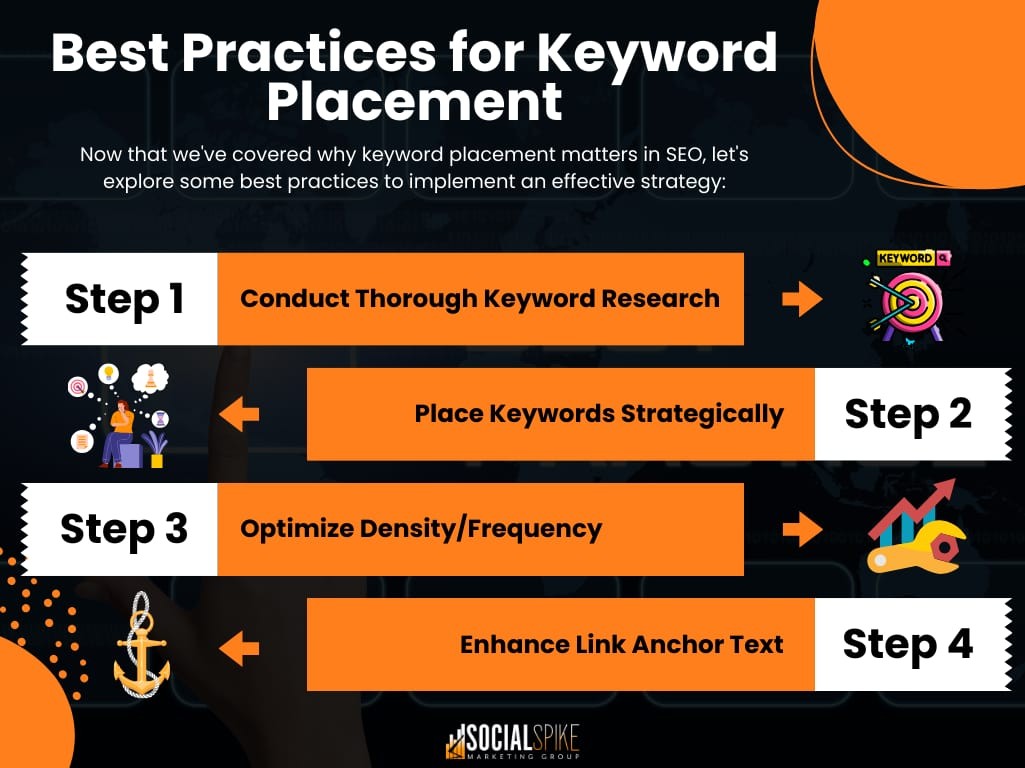
Figure 3: Infographic showing best practices for keyword placement in content structure
Content Structure Best Practices
Optimal page structure:
- Introduction (100-200 words) – Hook reader, preview content
- Multiple H2 sections – Each covering a distinct subtopic
- H3 subsections as needed – Further break down complex topics
- Short paragraphs (2-4 sentences) – Improve readability and scanning
- Bullet points and numbered lists – Break up dense text
- Visuals and examples – Illustrate key concepts
- Conclusion – Summarize and provide next steps
According to content optimization research, pages with 3-7 H2 headings and logical subheadings consistently rank higher than pages with poor structure.
Step 5: Check Keyword Density and Placement
Keyword optimization has evolved significantly from the early days of SEO. Today, it’s about strategic placement and natural usage rather than hitting arbitrary density targets.
The Truth About Keyword Density in 2026
According to recent keyword density research, the average keyword density for top-ranking pages is surprisingly low:
- Top 10 results: Average 0.04% keyword density (about 1-2 times per 1000 words)
- No magic number: Density varies widely based on topic and content type
- Context matters more: Related terms and semantic relevance trump exact keyword repetition
This represents a major shift from older SEO advice that recommended 2-3% keyword density. Modern Google algorithms understand semantic relationships and context, making keyword stuffing both unnecessary and counterproductive.
Use Keyword Density Checker Wisely
The Keyword Density Checker tool helps you analyze your current keyword usage:
- Visit seofreegenius.com/keyword-density-checker
- Enter your page URL or paste your content
- Specify your target keyword
- Click Check Density
- Review the frequency and percentage of keyword occurrences
What to look for:
- Primary keyword appears 3-5 times in a 1000-word article (approximately 0.3-0.5%)
- No single keyword exceeds 1-2% (anything higher risks appearing spammy)
- Related terms and variations present (semantic richness)
- Natural distribution throughout content (not clustered in one paragraph)
Priority locations for your target keyword:
| Location | Importance | Best Practice |
| Title tag | Critical | Include near the beginning (first 50% of title) |
| H1 heading | Critical | Include naturally, avoid forcing |
| First 100 words | High | Use in opening paragraph to establish topic |
| At least one H2 | High | Shows topical relevance and structure |
| Meta description | Medium | Helps CTR; bolds in search results |
| Image alt text | Medium | When relevant to image content |
| URL slug | Medium | Short, readable, includes keyword |
| Throughout content | Medium | Natural mentions as context requires |
Table 2: Keyword placement priority by location According to on-page SEO techniques research, pages with keywords in these strategic locations rank significantly higher than pages with higher overall density but poor placement.
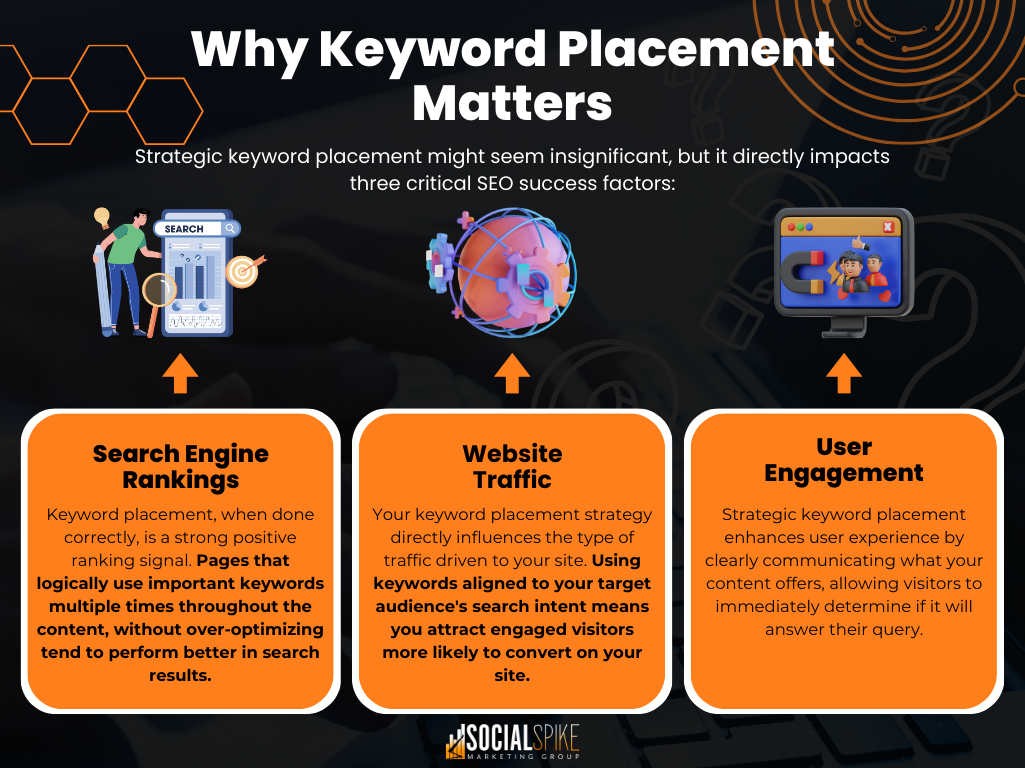
Figure 4: Infographic explaining why strategic keyword placement matters more than density
Focus on Semantic SEO and Related Terms
Modern Google algorithms use natural language processing to understand topic comprehensiveness. Instead of repeating the same keyword, include:
- Synonyms (e.g., “SEO optimization,” “search engine optimization,” “organic search”)
- Related terms (e.g., for “SEO,” also mention “rankings,” “SERP,” “keywords,” “backlinks”)
- Long-tail variations (e.g., “how to improve SEO,” “SEO best practices,” “SEO for beginners”)
- Questions users ask (e.g., “What is SEO?” “How does SEO work?”)
This semantic approach signals comprehensive topic coverage and matches a wider range of user search queries.
Step 6: Verify Word Count and Content Depth
Content length isn’t a direct ranking factor, but comprehensive content that thoroughly answers user questions tends to rank better. According to word count optimization research, content length correlates with rankings—but only when the length adds value.
Use Word Counter to Track Length
The Word Counter tool provides instant analysis of your content:
- Visit seofreegenius.com/word-counter
- Paste your content or upload a file
- View word count, character count, and reading time
- Review keyword frequency and density
Recommended Content Lengths by Page Type
| Page Type | Target Length | Reasoning |
| Blog posts (general) | 1000-1500 words | Enough depth without overwhelming readers |
| Pillar content/guides | 2000-3000+ words | Comprehensive coverage of broad topics |
| Product pages | 300-800 words | Balance detail with scanability |
| Service pages | 500-1000 words | Explain offering, benefits, process |
| Landing pages | 300-700 words | Focus on conversion over depth |
| FAQ pages | 500-1500 words | Multiple questions answered clearly |
Important caveat: These are guidelines, not rules. According to SEO best practices, content length should be determined by:
- User intent – What does the searcher actually need?
- Competition – How comprehensive is competing content?
- Topic complexity – Does the subject require extensive explanation?
- Content format – Lists, guides, comparisons require different lengths
When More Content Hurts Instead of Helps
Avoid these common mistakes:
- Fluff and filler – Adding words without adding value
- Repeating information – Saying the same thing multiple ways to hit word counts
- Over-explaining simple topics – 3000 words on “What is a URL?” is excessive
- Burying the answer – Making users scroll through irrelevant content
According to content optimization research, pages that directly answer user questions near the top perform better than longer pages that delay the answer.
Step 7: Track Your Rankings After Optimization
After implementing your on-page SEO improvements, you need to monitor whether they’re actually working. The Keyword Position Checker allows you to track ranking changes over time.
- Visit seofreegenius.com/keyword-position-checker
- Enter your website URL
- Add the target keywords you optimized for
- Select your target country/region
- Click Check Rankings
- Review current positions for each keyword
For systematic monitoring, create a simple spreadsheet:
| Page URL | Keyword | Before | After | Change | Date |
| /seo-guide | on-page SEO | 25 | 12 | +13 | Mar 15 |
| /broken-links | fix broken links | 8 | 5 | +3 | Mar 15 |
| /meta-tags | meta description | 45 | 38 | +7 | Mar 15 |
Table 3: Sample ranking tracking spreadsheet
Check rankings:
- Immediately before optimization – Establish baseline
- 2 weeks after changes – First indicator of impact
- 4-6 weeks after changes – More stable ranking positions
- Monthly thereafter – Ongoing monitoring
According to SEO optimization research, on-page optimization typically shows results within:
- 2-4 weeks: Initial ranking improvements for less competitive keywords
- 4-8 weeks: More substantial movements for moderately competitive terms
- 2-3 months: Rankings stabilize; true impact becomes clear
Signs your optimization is working:
- Gradual upward movement in rankings (even small gains are positive)
- Increased impressions in Google Search Console
- Higher click-through rates from search results
- More organic traffic to optimized pages
- Lower bounce rates (improved relevance and user experience)
If you don’t see improvements after 6-8 weeks, revisit your keyword targeting—you may be targeting terms that are too competitive or not aligned with actual search intent.
Complete On-Page SEO Checklist
Use this comprehensive checklist every time you publish or optimize content:
Meta Tags:
- Title tag present and unique (50-60 characters)
- Target keyword appears in first 50% of title
- Meta description written (140-160 characters)
- Description includes keyword and call-to-action
- Open Graph tags added (og:title, og:description, og:image)
- Canonical tag points to correct URL
- No noindex tag (unless intentional)
Content Structure:
- One H1 heading with primary keyword
- 3-7 H2 section headings with related keywords
- H3 subsections used where appropriate
- Logical heading hierarchy (no skipping levels)
- Short paragraphs (2-4 sentences)
- Bullet points or numbered lists for scanability
Keywords and Content:
- Primary keyword in first 100 words
- Keyword density below 1-2% (natural usage)
- Related terms and synonyms included
- Long-tail variations present in headings
- Content length appropriate for topic (typically 1000+ words for blog posts)
- Images include descriptive alt text with keywords where relevant
- Internal links to related content (3-5 per page)
- External links to authoritative sources where appropriate
Technical Elements:
- URL is clean and includes target keyword
- Page loads quickly (under 3 seconds)
- Mobile-friendly design and formatting
- No broken links (internal or external)
- Images compressed for fast loading
Post-Publication:
- Submitted URL to Google Search Console for indexing
- Shared on social media with optimized Open Graph tags
- Rankings tracked for target keywords
- Performance monitored in Google Search Console (impressions, clicks, CTR)
Conclusion
On-page SEO is the foundation of search visibility. No amount of backlinks or domain authority can compensate for poorly optimized pages that fail to clearly signal relevance to search engines and users. By systematically auditing and optimizing your titles, meta descriptions, headings, keyword usage, and content structure using the free tools from SEOFreeGenius, you give every page its best chance to rank well and attract organic traffic.
The workflow you’ve learned today—audit current state with Meta Tags Analyzer, optimize titles and descriptions with Meta Tag Generator, verify keyword usage with Keyword Density Checker, confirm content length with Word Counter, and track results with Keyword Position Checker—is repeatable for every page on your site.
Start with your highest-value pages: product pages, service pages, and top-performing blog posts. Even minor improvements to titles and descriptions can yield immediate increases in click-through rates and traffic. As you systematically optimize more pages, you’ll see compound benefits across your entire site’s organic performance.
Remember that on-page SEO is not a one-time task. As search trends evolve, competition changes, and Google’s algorithms advance, regularly revisiting and refining your optimization ensures you maintain and improve rankings over time.
Take action today: run the Meta Tags Analyzer on your homepage and top five pages. You’ll likely find several quick optimization opportunities that can be implemented in minutes but deliver lasting SEO benefits. For more in-depth SEO guides and free optimization tools, visit the SEOFreeGenius blog and explore the complete toolkit at seofreegenius.com.
Samir H. M. — SEO Expert
5+ years building SEO tools. SEOFreeGenius creator—50+ sites to #1.
All Articles →
Samir H. M. is the creator of [seofreegenius.com], offering 66+ free SEO tools from Riyadh. He’s hands-on tested and built features like plagiarism checkers and backlink tools, plus 36 guides to help sites rank better. Practical, no-BS advice for real users.