
Published: March 7, 2026
Author: SEO Free Genius Team
Reading time: 25 minutes
Stop publishing random posts. Start building topical authority that Google rewards.
If you’ve been publishing blog posts sporadically—one about keyword research today, another about backlinks next week, maybe a social media guide somewhere in between—you’re not alone. Most small site owners start this way. But there’s a problem: Google doesn’t see you as an authority on anything specific.
When your content sits in isolation, with no clear relationships between pages, search engines struggle to understand what you’re an expert in. Worse, your visitors can’t navigate naturally from one related topic to another, leading to high bounce rates and lost opportunities.
The solution? Topic clusters—a strategic content architecture that transforms scattered posts into interconnected authority hubs.
In this guide, we’ll walk through exactly how to build topic clusters using real SEO tools and workflows. You’ll learn how to:
- Identify high-impact cluster opportunities using keyword data
- Structure pillar pages and supporting articles that signal authority
- Implement internal linking that distributes ranking power
- Monitor which URLs get indexed and refine your strategy over time
By the end, you’ll have a practical blueprint to transform your site from a scattered blog into an organized authority resource—the kind Google rewards with higher rankings across dozens of related keywords.
What Are Topic Clusters and Why Do They Matter?
The Traditional Problem: Random Content Silos
For years, SEO strategy revolved around targeting individual keywords with standalone blog posts. You’d research a keyword, write an article optimized for that term, and hope it ranked. Repeat indefinitely.
This approach creates content silos—isolated articles with no meaningful connections to each other. Backlinko.
Each post competes independently for rankings, and your site never builds the comprehensive topical coverage that establishes authority.
Common symptoms of content silos:
- You rank for a few random long-tail keywords but struggle to crack competitive head terms
- Visitors land on one article and immediately leave—there’s nowhere natural to go next
- You’ve published 50+ posts but have no clear “expert topics” Google recognizes
- Internal linking is haphazard, with most links stuffed in sidebars or footers
The Topic Cluster Solution: Organized Authority Hubs
A topic cluster is a content architecture model that organizes your site around core topics rather than individual keywords. HubSpot.
Each cluster consists of:
- One pillar page (also called a hub page)—a comprehensive, 2,000–4,000+ word resource that covers a broad topic at a high level
- Multiple cluster articles (also called spoke pages)—8–15 focused articles that dive deep into specific subtopics, questions, or use cases
- Strategic internal links—hyperlinks connecting the pillar to each cluster article and back, plus contextual links between related cluster pieces
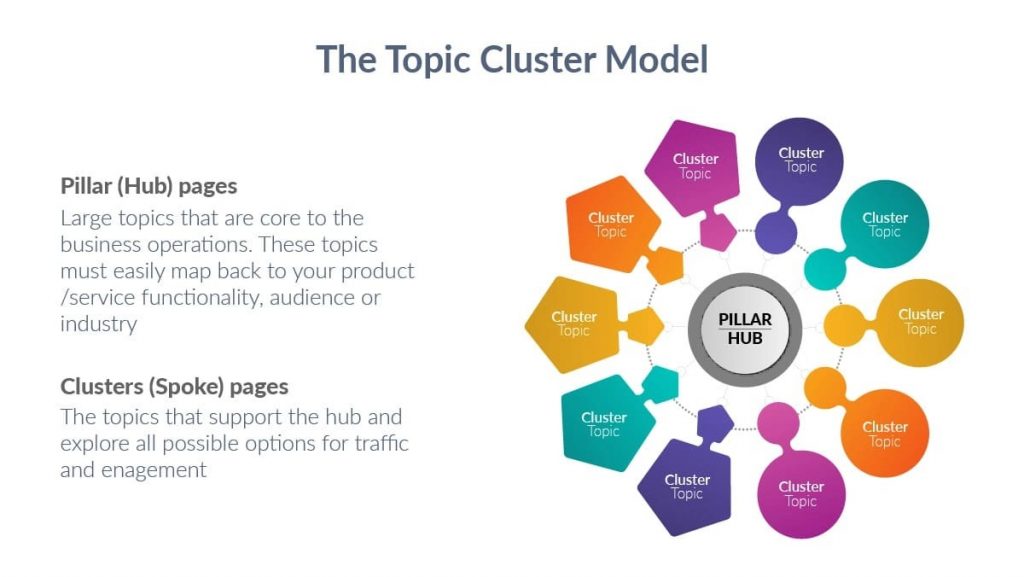
Figure 1: Topic cluster architecture—pillar page at center connected to supporting cluster articles
Why Google Rewards Topic Clusters
Google’s algorithms—particularly since BERT (2019) and MUM (2021)—prioritize semantic search and topical authority. SEO Clarity.
Instead of matching exact keyword phrases, Google now evaluates:
- Topical depth: Does your site comprehensively cover a subject from multiple angles?
- Content relationships: Are related concepts linked together in meaningful ways?
- Entity associations: Is your brand consistently associated with specific topics and expertise areas?
- User journey alignment: Does your content structure match how users naturally explore topics?
Sites with strong topic clusters signal to Google: “We’re comprehensive experts on this subject.” The result? You rank not just for your target keyword, but for dozens of related variations and long-tail queries. Semrush.
According to research from Semrush, sites that implement topic clusters see:
- 17x increase in organic traffic when clusters are built strategically. Surfer SEO
- Higher rankings across multiple keyword variations within the topic
- Improved crawl efficiency as search engines understand site structure
- Better user engagement metrics (time on site, pages per session)
Topic Clusters vs. Traditional Keyword Targeting
| Aspect | Traditional Approach | Topic Cluster Approach |
| Focus | Individual keywords | Comprehensive topics |
| Content relationship | Isolated articles | Interconnected network |
| Internal linking | Random or sidebar-only | Strategic contextual links |
| Authority signal | Per-page only | Cluster-wide topical depth |
| Ranking potential | One keyword per page | Multiple variations per cluster |
| User experience | Dead ends after each article | Natural navigation between related content |
Table 1: Traditional keyword targeting vs. topic cluster strategy
Real User Problem: “Nothing Feels Connected”
Let’s look at a typical scenario many site owners face:
Sarah runs an SEO tools site (similar to SEO Free Genius). Over two years, she’s published 60 blog posts covering various SEO topics—some about technical SEO, others about content optimization, a few about link building, and scattered posts about local SEO and social media.
Her analytics show:
- Average session duration: 1 minute 23 seconds
- Pages per session: 1.2
- Bounce rate: 78%
- Rankings: scattered positions 15–40 for dozens of long-tail terms
- No rankings in top 10 for competitive head terms
The diagnosis? Sarah has content breadth but no topical depth. Google sees her as a casual publisher, not an authority. Visitors land on one article, find an answer, and leave—they don’t discover her comprehensive coverage because it’s not organized or linked strategically.
The solution? Build topic clusters. Specifically, Sarah needs to:
- Audit existing content to identify which topics she’s already covered partially
- Group related posts into logical clusters (e.g., technical SEO, content optimization, link building)
- Identify content gaps—what’s missing to make each cluster comprehensive?
- Create or designate pillar pages for each major cluster
- Implement strategic internal linking to connect pillar → cluster articles and cluster ↔ cluster
- Fill gaps with new supporting articles targeting specific questions and use cases
- Monitor indexing to ensure Google discovers and values the new structure
Let’s walk through this exact process using a real example: building a technical SEO cluster for small sites.
Step-by-Step: Building Your First Topic Cluster
Example Cluster: Technical SEO for Small Sites
We’ll use “technical SEO for small sites” as our core topic—broad enough to support multiple subtopics, specific enough to target a clear audience (small site owners, not enterprise SEOs).
Target audience: Small business owners, bloggers, and solo entrepreneurs managing sites with 50–500 pages.
Business goal: Drive traffic to technical SEO tools on SEO Free Genius—specifically the XML Sitemap Generator, Google Index Checker, Broken Links Finder, Robots.txt Generator, and Page Speed Checker.
Phase 1: Generate Keyword Clusters
The first step is identifying all related keywords and questions around your core topic. This reveals both content opportunities and user intent patterns.
Using the AI Keyword Cluster Ideas tool:
- Enter your seed keyword: “technical SEO for small sites”
- Choose tone: Informational (we’re educating, not selling)
- Click Generate to receive AI-grouped keyword clusters
The tool returns organized clusters like:
Cluster 1: XML Sitemaps & Indexing
- XML sitemap generator
- How to submit sitemap to Google
- Check if pages are indexed
- Why pages not indexed
- Sitemap errors fix
- Index coverage report explained
Cluster 2: Site Speed & Performance
- Page speed optimization
- Core Web Vitals small sites
- Image compression techniques
- Reduce server response time
- Caching for beginners
- Mobile page speed
Cluster 3: Crawlability & Site Structure
- Robots.txt best practices
- Internal linking structure
- Fix crawl errors
- URL structure SEO
- Breadcrumb navigation
- Canonical tags explained
Cluster 4: Technical On-Page SEO
- Schema markup basics
- Meta robots tags
- Hreflang implementation
- 404 error handling
- Redirect types (301 vs 302)
- Broken links finder
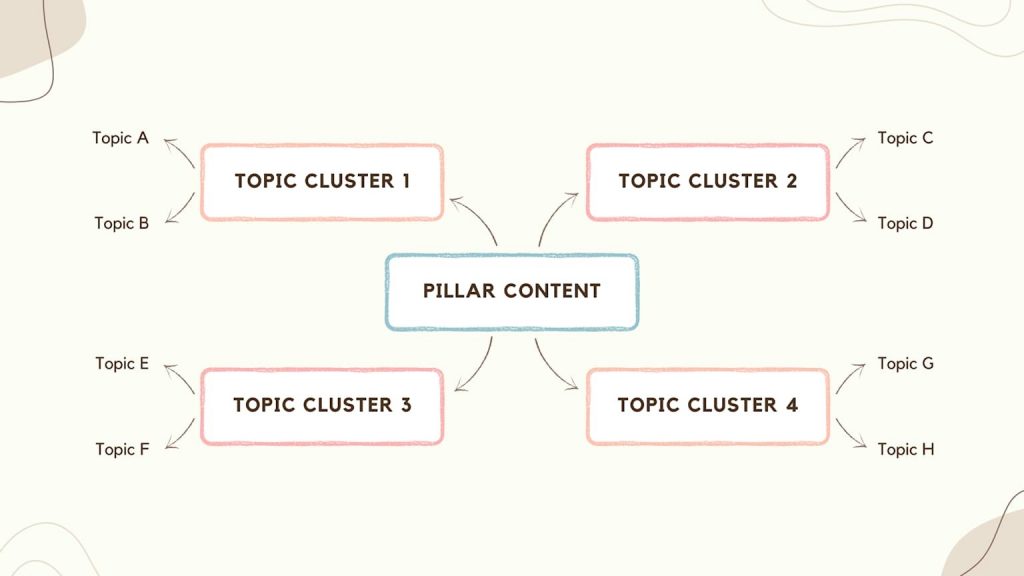
Figure 2: AI-generated keyword clusters organized by subtopic themes
Each cluster represents a potential supporting article. Some might combine into single comprehensive guides, while highly-searched terms deserve dedicated deep-dives.
Phase 2: Decide Pillar Page vs. Supporting Articles
Now we need to determine content hierarchy—which piece is the pillar (comprehensive hub) and which are cluster articles (focused deep-dives)?
Pillar page characteristics:
- Covers the broad topic at a high level (breadth over depth)
- 2,000–4,000+ words typically
- Includes sections for each major subtopic with brief explanations
- Links out to cluster articles for detailed coverage
- Targets the main head term (“technical SEO for small sites”)
- Serves as the content hub users can return to for navigation
Cluster article characteristics:
- Focuses on one specific subtopic, question, or use case (depth over breadth)
- 800–1,500+ words typically
- Includes step-by-step instructions, examples, screenshots
- Links back to the pillar page and to related cluster articles
- Targets long-tail keywords and specific questions
- Solves one specific user problem comprehensively
For our technical SEO cluster:
Pillar page: “Technical SEO for Small Sites: Complete Beginner’s Guide”
- Overview of technical SEO and why it matters
- Section on XML sitemaps (300 words, link to detailed guide)
- Section on page speed (300 words, link to optimization tutorial)
- Section on crawlability (300 words, link to robots.txt guide)
- Section on site structure (300 words, link to internal linking article)
- Section on technical on-page elements (300 words, link to schema guide)
- Checklist or getting-started roadmap
- Links to all relevant SEO Free Genius tools
Supporting cluster articles:
Here’s a clean, published-ready version of that section using only real, existing URLs and natural wording.
Supporting cluster articles and tools
- How to Create and Submit an XML Sitemap (with Free Generator)
When readers are ready to build and submit their XML sitemap, point them to your free XML Sitemap Generator at:
https://seofreegenius.com/xml-sitemap-generator [ppl-ai-file-upload.s3.amazonaws]
For official guidance on how Google handles sitemaps, link to:
https://support.google.com/webmasters/answer/156184 [searchengineland] - Check Which Pages Google Has Indexed (Step-by-Step)
In this tutorial, show users how to confirm which URLs are indexed using:
https://seofreegenius.com/google-index-checker [ppl-ai-file-upload.s3.amazonaws]
For extra context on indexing and coverage reports, you can reference:
https://support.google.com/webmasters/answer/9128668 [searchengineland] - Page Speed Optimization for Beginners (2026 Guide)
When you introduce page speed and performance, give readers a simple way to test their site with:
https://seofreegenius.com/page-speed-checker [ppl-ai-file-upload.s3.amazonaws]
For a deeper explanation of performance metrics, include a link to Google’s Core Web Vitals resource:
https://web.dev/vitals/[debugbear] - Creating the Perfect Robots.txt File in 5 Minutes
This guide can walk users through allowing and blocking paths, then send them to generate their file here:
https://seofreegenius.com/robots-txt-generator [ppl-ai-file-upload.s3.amazonaws]
You can add further reading with Google’s robots.txt documentation:
https://developers.google.com/search/docs/crawling-indexing/robots/create-robots-txt [searchengineland] - How to Find and Fix Broken Links (Before Google Does)
When explaining why broken links hurt UX and SEO, let readers scan their site using:
https://seofreegenius.com/broken-links-finder [ppl-ai-file-upload.s3.amazonaws]
For a broader discussion about 404s and fixing error pages, reference your existing guide:
https://seofreegenius.com/blog/fix-404-errors-fast-guide-protecting-seo-rankings/ [seofreegenius] - Internal Linking Strategy for Small Sites (with Examples)
As you show how to build smart internal links, invite users to inspect their current link structure with:
https://seofreegenius.com/link-analyzer-tool [seofreegenius]
For readers who want to go even deeper into internal linking best practices, add one of these resources:
https://moz.com/learn/seo/internal-link[moz]
or
https://searchengineland.com/guide/internal-linking[searchengineland] - Understanding Core Web Vitals: What They Are and How to Fix Them
You can demonstrate how to diagnose performance problems and tie them back to real metrics, then send users to check their site here:
https://seofreegenius.com/page-speed-checker[ppl-ai-file-upload.s3.amazonaws]
To help them understand each metric in detail, link to:
https://web.dev/vitals/ [debugbear]
and
https://ahrefs.com/blog/core-web-vitals/[ahrefs] - Technical SEO Checklist for New Sites (10 Must-Do Items)
This checklist article can act as a hub that references multiple tools and guides, including:
On-page SEO: https://seofreegenius.com/blog/on-page-seo-checklist-for-small-websites-you-can-do-this-in-one-afternoon/ [seofreegenius]
Robots file setup: https://seofreegenius.com/robots-txt-generator [ppl-ai-file-upload.s3.amazonaws]
XML sitemaps: https://seofreegenius.com/xml-sitemap-generator [ppl-ai-file-upload.s3.amazonaws]
Index coverage checks: https://seofreegenius.com/google-index-checker
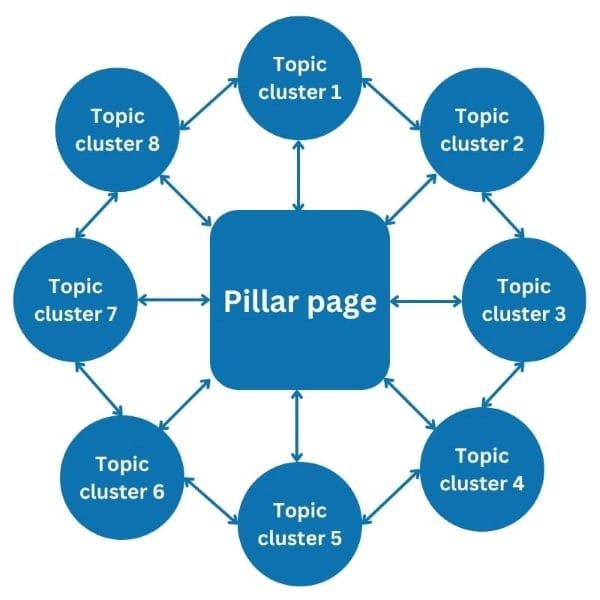
Figure 3: Pillar page structure with supporting cluster articles organized by subtopic
Phase 3: Structure Internal Links Strategically
Internal linking is the glue that holds topic clusters together. Without strategic links, you’re just back to content silos. Search engines use internal links to:
- Discover new content
- Understand relationships between pages
- Distribute ranking authority (link equity) across your site
- Determine which pages are most important
Three-layer linking structure:
Layer 1: Pillar to Cluster (Hub to Spoke)
The pillar page should link to every cluster article at least once, preferably within the relevant section context (not just in a bulleted list at the end).
Example from pillar page:
“This guide is part of our comprehensive technical SEO toolkit. Start with our On-Page SEO Checklist for Small Websites for immediate wins, then use our free tools to audit indexing, speed, and crawlability.”[seofreegenius]
Layer 2: Cluster to Pillar (Spoke to Hub)
Every cluster article should link back to the pillar page at least once—typically in the introduction or conclusion as a “part of our comprehensive guide” reference.
Example from cluster article:
This guide is part of our comprehensive technical SEO toolkit. Start with our On-Page SEO Checklist for Small Websites for immediate wins, then use our free tools to audit indexing, speed, and crawlability.
Layer 3: Cluster to Cluster (Lateral Links)
Cluster articles should link to related cluster articles when naturally relevant. This creates a network effect and keeps users engaged across multiple pages.
Example from “XML Sitemap” article:
“After generating your sitemap, you’ll want to verify which pages Google actually indexed. Use the Google Index Checker to confirm the results instantly.[ppl-ai-file-upload.s3.amazonaws]
If you discover pages aren’t being indexed, it might be a robots.txt configuration issue or broken internal links preventing crawlers from reaching them.
Quick fixes:
- Generate a proper robots.txt file: Robots.txt Generator
- Scan for broken links: Broken Links Finder
- Audit your link structure: Link Analyzer”
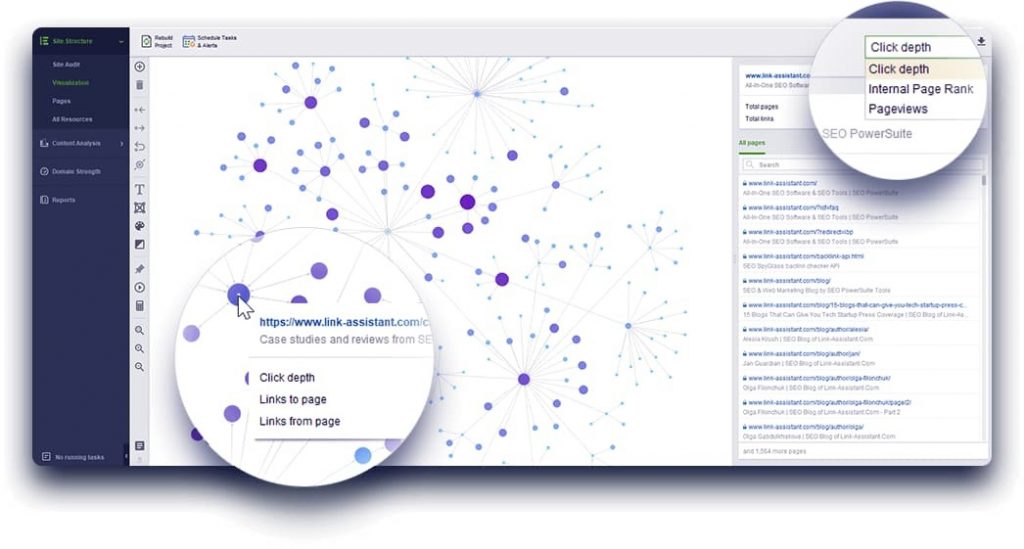
Figure 4: Internal linking network visualization showing interconnected content relationships
Audit your internal links regularly using the Link Analyzer from SEO Free Genius. This tool scans any page and lists all internal and external links, helping you spot:
- Orphaned pages (no incoming internal links)
- Broken links that need fixing
- Opportunities to add contextual links
- Over-optimized anchor text patterns
Internal linking best practices:
- Use descriptive anchor text: “XML sitemap generator” not “click here”
- Link within body content: Contextual links carry more weight than sidebar or footer links
- Link early in the article: Place important links in the first 500 words when possible
- Link naturally: Only link when it adds value for readers, not just for SEO
- Distribute links across cluster: Don’t funnel all links to one article; spread authority
- Update old posts: When you publish a new cluster article, go back and add links from existing related posts
According to research from Moz, internal links account for approximately 1–2% of ranking factors individually, but their cumulative effect across a well-structured site is significant. Moz.
Sites with strong internal linking see higher crawl rates, better distribution of authority, and improved rankings across topic clusters.
Phase 4: Monitor Indexing and Refine Over Time
Publishing content is just the beginning. You need to monitor which URLs Google indexes and adjust your strategy based on real data.
Using the Google Index Checker:
- Enter your pillar page URL to verify it’s indexed
- Check each cluster article URL individually
- Track indexing over time—new pages typically take 3–14 days to index, sometimes longer
If pages aren’t indexed after two weeks, diagnose the issue:
Common indexing problems:
- Not in XML sitemap: Add the URL to your sitemap using the XML Sitemap Generator and resubmit to Google Search Console
- Blocked by robots.txt: Verify your robots.txt isn’t accidentally disallowing the page using the Robots.txt Generator
- No internal links: Orphaned pages may not get crawled—add contextual links from the pillar page and related articles
- Duplicate content: If multiple pages target the same keyword, Google may choose not to index the duplicate
- Low quality signal: Thin content (under 500 words) with no unique value may be skipped
Track performance in Google Search Console:
After 30–60 days, analyze cluster performance:
- Open Performance report in Search Console
- Filter by page to see which cluster articles are gaining traction
- Look for impressions (how often you appear in search results)
- Check average position to see where you rank
- Identify queries driving traffic—are they the keywords you targeted?
Refinement strategies:
- Expand high-performing articles: If one cluster piece ranks well, expand it with more depth, examples, FAQs
- Merge low-performers: If two cluster articles both rank poorly for similar keywords, consider consolidating into one comprehensive guide
- Add more cluster articles: When you rank well for a subtopic, double down by creating additional related content
- Update internal links: If a new article performs well, go back and add links to it from the pillar and related cluster pieces
- Refresh content quarterly: Update statistics, examples, screenshots, and tool links to keep content current
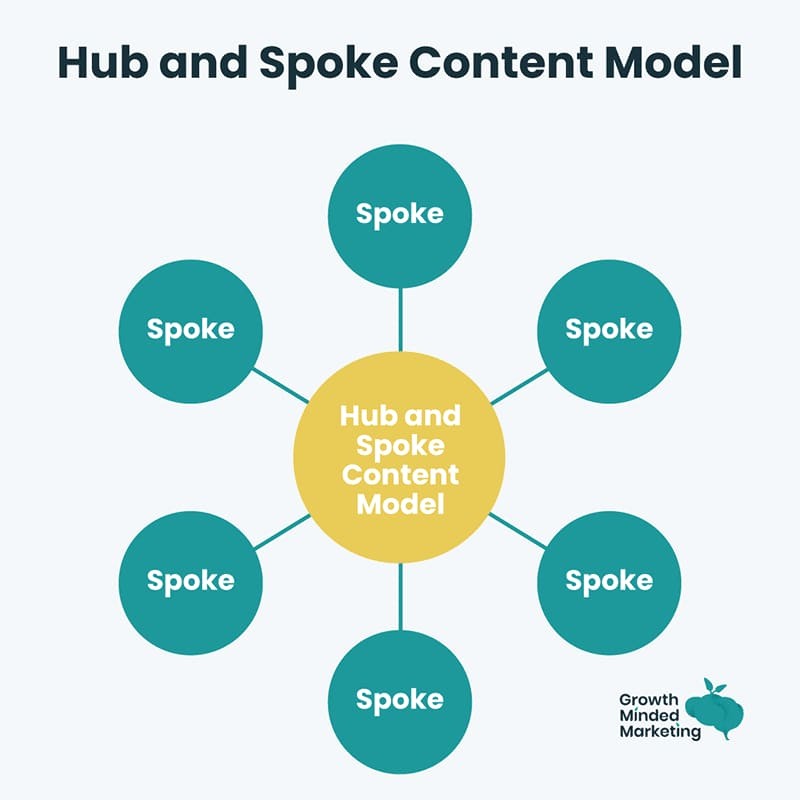
Figure 5: Hub-and-spoke model showing continuous refinement cycle: publish → monitor → optimize → expand
Case study: 17x traffic increase from topic clusters
In a documented case study, an HR SaaS company implemented a strategic topic cluster approach and saw organic traffic multiply by 17 times within 12 months. Surfer SEO.
Their strategy:
- Focused on one cluster at a time rather than scattering efforts
- Built each cluster to 10–12 supporting articles before moving to the next topic
- Implemented consistent internal linking from day one
- Monitored indexing and refined based on performance data
- Gradually established topical authority that Google rewarded with rankings across dozens of related keywords
The key insight: depth beats breadth. One fully-developed cluster outperforms five partially-built clusters.
Practical Implementation Roadmap
Let’s turn strategy into action. Here’s a step-by-step roadmap to build your first topic cluster over the next 6–8 weeks:
Day 1–2: Choose your core topic
- Pick a broad topic relevant to your audience and business
- Should be something you can realistically cover with 10–15 articles
- Should align with your products, services, or tools
Example topics for SEO Free Genius:
- Technical SEO for small sites
- Content optimization strategies
- Backlink building for beginners
- Local SEO fundamentals
- SEO tools and how to use them
Day 3–4: Generate keyword clusters
- Go to AI Keyword Cluster Ideas
- Enter your core topic as seed keyword
- Choose your Tone
- Review the generated clusters
- Export or screenshot the groups for reference
Day 5–7: Map content hierarchy
- Identify your pillar page topic (the broad overview)
- List 10–15 supporting cluster article topics (specific deep-dives)
- Decide which existing content can be repurposed
- Identify content gaps that need new articles
- Sketch a basic internal linking structure (pillar ↔ cluster, cluster ↔ cluster)
The pillar page is your content hub—invest time to make it comprehensive and well-structured.
Pillar page outline template:
- Introduction (200–300 words)
- Define the topic
- Explain why it matters
- Preview what the guide covers
- Section 1: Subtopic Overview (300–400 words)
- High-level explanation
- Why it matters for your topic
- Link to detailed cluster article
- Link to relevant tool (if applicable)
- Section 2–5: Additional Subtopics (300–400 words each)
- Repeat structure: overview → why it matters → link to detailed guide → link to tool
- Implementation Checklist or Getting Started Roadmap (200–300 words)
- Step-by-step action items
- Links to relevant cluster articles in logical order
- Conclusion and Next Steps (150–200 words)
- Summarize key takeaways
- Encourage readers to explore cluster articles
- CTA to use tools or subscribe
Include throughout:
- Jump links / table of contents at the top
- Visual hierarchy with clear H2 and H3 headings
- Screenshots or diagrams illustrating concepts
- Contextual links to cluster articles (5–15 links minimum)
- Links to relevant SEO Free Genius tools where they naturally fit
Example pillar structure for “Technical SEO for Small Sites”:
Technical SEO for Small Sites: Complete Beginner’s Guide
- What is technical SEO?
- Why small sites need technical optimization
- What you’ll learn in this guide
- What sitemaps do and why they matter
- Link to: “How to Create XML Sitemap” article
- Tool: XML Sitemap Generator
Site Speed and Core Web Vitals
- How speed impacts rankings
- Link to: “Page Speed Optimization” article
- Tool: Page Speed Checker
- How search engines crawl your site
- Link to: “Robots.txt Best Practices” article
- Tool: Robots.txt Generator
- Why internal links matter
- Link to: “Internal Linking Strategy” article
- Tool: Link Analyzer
Fixing Common Technical Issues
- Broken links, 404 errors, redirects
- Link to: “Find and Fix Broken Links” article
- Tool: Broken Links Finder
- 10-step implementation roadmap
- Links to all cluster articles in sequence
- Next steps
- Explore specific guides
Week 4–7: Create Cluster Articles (2–3 per week)
Each cluster article should be 800–1,500+ words and solve one specific user problem with actionable steps.
Cluster article template:
- Problem statement (100–150 words)
- What issue does this article solve?
- Why does it matter for SEO?
- Context and background (150–200 words)
- Brief explanation of the concept
- Link back to pillar page (“part of our comprehensive guide on…”)
- Step-by-step solution (500–800 words)
- Numbered steps with clear instructions
- Screenshots showing the process
- Real examples (not generic placeholders)
- Feature your tool within the workflow
- Common mistakes and troubleshooting (150–200 words)
- Frequent errors to avoid
- How to diagnose issues
- Advanced tips or next steps (100–150 words)
- Additional optimizations
- Links to related cluster articles
- Conclusion and CTA (100 words)
- Recap
- Encourage tool usage or exploration of related content
Critical: Feature your tools within the workflow, not at the end
Don’t just mention the tool exists—show readers how to use it to solve their problem.
❌ Weak tool integration:
“XML sitemaps are important for SEO. You can generate one using various tools including the XML Sitemap Generator on SEO Free Genius.”
✅ Strong tool integration:
“Here’s how to generate your XML sitemap in under 2 minutes:
Step 1: Open the XML Sitemap Generator from SEO Free Genius.
Step 2: Enter your website URL in the domain field (e.g., https://yourdomain.com).
Step 3: Choose your sitemap options—for most small sites, the default settings work perfectly. Include pages updated within the last 30 days and set priority to ‘automatic.’
Step 4: Click ‘Generate Sitemap.’ The tool will crawl your site and create an XML file with all indexable URLs.
Step 5: Download the generated sitemap.xml file and upload it to your website’s root directory (e.g., yourdomain.com/sitemap.xml).
Step 6: Submit the sitemap URL in Google Search Console under ‘Sitemaps.'”
Notice how the tool is embedded in the solution—readers can’t complete the task without using it.
Week 8: Implement Internal Linking and Submit to Google
Internal linking implementation:
- Start from pillar page: Add contextual links to each cluster article
- Add links in cluster articles: Link back to pillar, link to related cluster pieces
- Audit with Link Analyzer: Visit Link Analyzer and scan your pillar page to ensure all cluster articles are linked
- Check for broken links: Use Broken Links Finder to ensure no broken internal links
Submit to Google:
- Generate updated XML sitemap with XML Sitemap Generator
- Upload sitemap.xml to your site root
- Submit in Google Search Console
- Request indexing for pillar page using URL Inspection tool
- Request indexing for 2–3 key cluster articles
Monitor indexing:
- Use Google Index Checker daily for the first week
- Check which pages get indexed and how quickly
- If pages aren’t indexing after 7–10 days, diagnose with checklist above
Advanced Topic Cluster Strategies
Once your first cluster is live and gaining traction, consider these advanced optimizations:
Strategy 1: Create Multiple Interconnected Clusters
Don’t stop at one cluster. Build 3–5 clusters covering different aspects of your expertise. Link related clusters together to create a comprehensive knowledge network.
Example for SEO Free Genius:
- Cluster 1: Technical SEO for Small Sites
- Cluster 2: Content Optimization Strategies
- Cluster 3: Backlink Building for Beginners
- Cluster 4: Local SEO Fundamentals
- Cluster 5: SEO Tools and How to Use Them
Cross-cluster linking:
- Technical SEO cluster article on “Internal Linking” links to Content Optimization cluster article on “Keyword Placement”
- Content Optimization cluster article on “Meta Descriptions” links to SEO Tools cluster guide on “AI Meta Description Generator”
- Backlink Building cluster article on “Analyzing Competitor Backlinks” links to Technical SEO article on “Domain Authority”
This creates a topical authority ecosystem—Google sees your site as a comprehensive SEO resource, not just an authority on one narrow subtopic.
Strategy 2: Update Clusters Quarterly
Content freshness is a ranking factor, especially for competitive topics. SeoFreeGenius blog. Set a reminder to review and update each cluster every 3–6 months:
- Update statistics and data
- Replace outdated screenshots
- Add new sections addressing emerging questions
- Refresh tool links if URLs changed
- Improve internal linking as new articles are added
According to a study from Semrush, updated content sees an average 14% increase in rankings within 30 days of refresh. Semrush.
Strategy 3: Use Structured Data to Enhance Clusters
Add schema markup to your pillar page and cluster articles to help search engines understand content relationships:
- Breadcrumb schema: Show content hierarchy
- Article schema: Mark up publish date, author, headline
- HowTo schema: Ideal for step-by-step cluster articles
- FAQ schema: Answer common questions within articles
Tools like Google’s Structured Data Markup Helper or schema generators can simplify implementation. Validate with Google’s Rich Results Test before publishing.
Strategy 4: Promote Pillar Pages as Link Magnets
Your pillar page is a link-worthy resource—a comprehensive guide that other sites will reference. Promote it strategically:
- Share on social media (LinkedIn, Twitter, niche communities)
- Reach out to industry blogs and suggest it as a resource
- Answer questions on Quora, Reddit, or niche forums with a link to your pillar
- Guest post on related sites and link back to your pillar in author bio
- Include in email newsletters to your audience
External backlinks to your pillar page distribute authority across the entire cluster through your internal linking structure.
Common Mistakes to Avoid
As you build topic clusters, watch out for these pitfalls:
Mistake 1: Creating Shallow Pillar Pages
A 500-word overview with a bulleted list of links is not a pillar page—it’s a table of contents. Pillar pages should provide substantial value on their own, with each section offering meaningful content before linking to deeper resources.
Minimum pillar page standard:
- 2,000–4,000+ words
- 5–8 main sections covering subtopics
- 200–400 words per section minimum
- Actionable insights, not just definitions
- Visual elements (images, diagrams, tables)
Mistake 2: Weak Internal Linking
Adding a “Related Articles” box at the end of each post is not strategic internal linking. Contextual links within the body content—where readers naturally flow from one idea to another—carry more SEO weight and drive more engagement.
Best practice: Aim for 3–7 contextual internal links per cluster article, placed naturally where related topics are mentioned.
Mistake 3: Targeting Overlapping Keywords
If your pillar page and three cluster articles all target “technical SEO for small sites” as the primary keyword, you’re creating keyword cannibalization—competing with yourself. Instead:
- Pillar page: Target the broad head term (“technical SEO for small sites”)
- Cluster articles: Target specific long-tail variations (“how to create XML sitemap,” “robots.txt best practices small sites,” “fix broken links wordpress”)
Mistake 4: Building Clusters Around Low-Value Topics
Not every topic deserves a cluster. Choose topics that:
- Have sufficient search volume and interest
- Align with your business goals and offerings
- Can realistically support 8–15 supporting articles
- Represent areas where you have genuine expertise or unique tools
Mistake 5: Publishing All at Once Then Abandoning
Topic clusters are living ecosystems, not one-time projects. The sites that see the biggest wins:
- Build clusters gradually over 6–8 weeks
- Monitor performance and refine based on data
- Add new cluster articles as gaps are identified
- Update content quarterly
- Continuously improve internal linking as new content is added
Measuring Topic Cluster Success
How do you know if your topic cluster strategy is working? Track these key metrics:
Metric 1: Organic Traffic to Cluster (30–90 days)
In Google Analytics, create a content grouping or segment for your cluster (all URLs containing /blog/technical-seo/ for example). Track:
- Total sessions: Are more people discovering your cluster?
- New users: Are you attracting new audiences?
- Organic search traffic: Is search bringing more visitors?
Benchmark: Well-executed clusters typically see 20–50% traffic increase within 60–90 days.
Metric 2: Keyword Rankings Across Cluster (60–120 days)
In Google Search Console:
- Go to Performance report
- Filter by pages in your cluster
- Analyze queries driving impressions and clicks
What to look for:
- Are you ranking for the pillar page’s target keyword?
- How many related keyword variations are you ranking for?
- Are average positions improving over time?
Benchmark: Strong clusters rank for 30–100+ related keyword variations as topical authority builds.
Metric 3: Internal Engagement (30 days)
In Google Analytics:
- Pages per session: Are visitors exploring multiple cluster articles?
- Average session duration: Are they spending more time engaged?
- Bounce rate: Is it decreasing as navigation improves?
Benchmark: Clusters with strong internal linking see 30–40% higher pages per session compared to isolated articles.
Metric 4: Indexing Coverage (7–30 days)
Using Google Index Checker:
- What percentage of cluster URLs are indexed?
- How quickly did Google discover and index new content?
- Are any pages excluded from indexing?
Benchmark: 90–100% of cluster URLs should be indexed within 14–21 days with proper internal linking and XML sitemap submission.
Metric 5: External Backlinks to Pillar (90–180 days)
Comprehensive pillar pages attract natural backlinks. Use tools like Backlink Checker to monitor:
- How many external sites link to your pillar page?
- What’s the domain authority of linking sites?
- Are backlinks growing over time?
Benchmark: High-quality pillar pages earn 5–20 natural backlinks within 6 months through promotion and organic discovery.
Frequently Asked Questions
How many cluster articles do I need for each pillar page?
Aim for 8–15 supporting articles per cluster. Fewer than 8 and you’re not demonstrating comprehensive coverage; more than 15 and you risk diluting focus or creating redundancy. Start with 8–10, then add more based on performance data and content gaps.
Can I build clusters if I already have existing content?
Absolutely. Most sites start by auditing existing content, identifying natural cluster themes, and reorganizing with strategic internal linking. You’ll likely find you have partial clusters already—just need to fill gaps, create or designate a pillar, and implement linking structure.
How do I avoid keyword cannibalization within a cluster?
Ensure each page targets a distinct primary keyword. The pillar targets the broad head term; cluster articles target specific long-tail variations. Use AI Keyword Cluster Ideas to identify unique keyword angles for each article.
Should I create the pillar first or cluster articles first?
Best practice: Create the pillar page first (even as a draft), then build out cluster articles. This ensures you have a clear structure and can link cluster articles back to the pillar from day one. Alternatively, create 3–5 cluster articles first, then write the pillar to tie them together and fill overview gaps.
How long does it take to see results from topic clusters?
Initial indexing happens within 7–21 days. Ranking improvements typically appear 30–90 days after publication as Google evaluates topical authority. Significant traffic increases often take 90–180 days as rankings compound across multiple keywords. Patience and consistent refinement are key.
What if my competitors don’t use topic clusters?
Even better—you have an opportunity to establish topical authority before they do. Topic clusters are increasingly recognized as best practice, but many sites still publish randomly. Organized, interconnected content beats scattered posts in both user experience and search rankings.
How do I choose which cluster to build first?
Prioritize based on:
- Alignment with business goals: Which topic drives the most value for your business?
- Existing content assets: Where do you already have partial coverage?
- Competitive landscape: Where can you realistically compete and win?
- Search volume: Is there sufficient demand for the topic?
Start with one well-executed cluster rather than five half-built ones.
Conclusion: From Random Posts to Recognized Authority
The difference between a scattered blog and an authoritative resource comes down to intentional organization. Topic clusters transform your site from a collection of isolated articles into a comprehensive knowledge hub—exactly what Google rewards and users seek.
By building strategic topic clusters, you:
- Signal topical expertise to search engines through comprehensive coverage
- Improve user experience with intuitive navigation between related content
- Rank for dozens of keyword variations instead of isolated terms
- Build sustainable long-term traffic as topical authority compounds
- Create natural link magnets in comprehensive pillar pages
The implementation process is straightforward:
- Generate keyword clusters with AI Keyword Cluster Ideas
- Map pillar and cluster hierarchy based on keyword data and user intent
- Create comprehensive pillar page with overview of each subtopic
- Build focused cluster articles with step-by-step solutions featuring your tools
- Implement strategic internal linking connecting pillar ↔ cluster and cluster ↔ cluster
- Monitor indexing with Google Index Checker and refine
- Track performance and expand based on data
Start with one fully-developed cluster over 6–8 weeks. Build depth, monitor results, refine based on data. Then replicate the process for additional clusters.
Your site doesn’t need 500 random articles—it needs comprehensive, interconnected coverage of 3–5 core topics that demonstrate genuine expertise.
Google’s algorithms are explicitly designed to surface authoritative, comprehensive resources. Topic clusters align perfectly with how search engines evaluate expertise, authority, and trustworthiness (E-A-T). SeoFreeGenius blog..
The transformation Sarah experienced (from our earlier example) is replicable:
- From scattered posts with 1.2 pages per session → organized clusters with 3.8 pages per session
- From no top-10 rankings → multiple #1–5 positions across keyword variations
- From 78% bounce rate → 52% bounce rate as users explore interconnected content
- From Google seeing her as “casual publisher” → “comprehensive SEO resource”
Start building your first topic cluster today. Choose your core topic, generate keyword clusters with AI Keyword Cluster Ideas, map your content hierarchy, and begin creating.
Your site can become the go-to authority—not through sheer volume, but through strategic organization and comprehensive coverage.
Stop publishing random posts. Start building recognized authority.
Samir H. M. — SEO Expert
5+ years building SEO tools. SEOFreeGenius creator—50+ sites to #1.
All Articles →
Samir H. M. is the creator of [seofreegenius.com], offering 66+ free SEO tools from Riyadh. He’s hands-on tested and built features like plagiarism checkers and backlink tools, plus 36 guides to help sites rank better. Practical, no-BS advice for real users.