
Published: March 9, 2026
Author: SEO Free Genius Team
Reading time: 12 minutes
Introduction
If you’ve been working on your website’s SEO, you’ve probably heard: “Build more backlinks!” But here’s what most guides don’t tell you upfront: Not all backlinks help your rankings. Some can actively hurt them.
Many website owners wake up to traffic drops, disappearing rankings, or worse—a manual penalty notice in Google Search Console. The culprit? A toxic backlink profile they didn’t even know existed.
The fear is real: “Are my backlinks helping or hurting? Could I get penalized without even knowing it?”
This anxiety stops thousands of website owners from doing any link building at all, which is equally damaging. Backlinks remain one of Google’s top ranking factors, accounting for approximately 13% of ranking weight in 2025-2026, but Google’s algorithms now prioritize link quality, relevance, and diversity over raw quantity.
The good news: You can audit your backlink health systematically using free tools, identify potential problems before they cause penalties, and build a clean, natural link profile that strengthens your rankings without risk. In this guide, you’ll learn how to check your existing backlinks for quality, analyze the links on your pages for SEO health, understand when to disavow toxic links, and build authority safely using white-hat strategies.
Understanding Backlink Health: The Basics
Before you can check your backlink health, you need to understand what makes a backlink “healthy” versus “toxic.”
What Makes a Backlink Valuable?
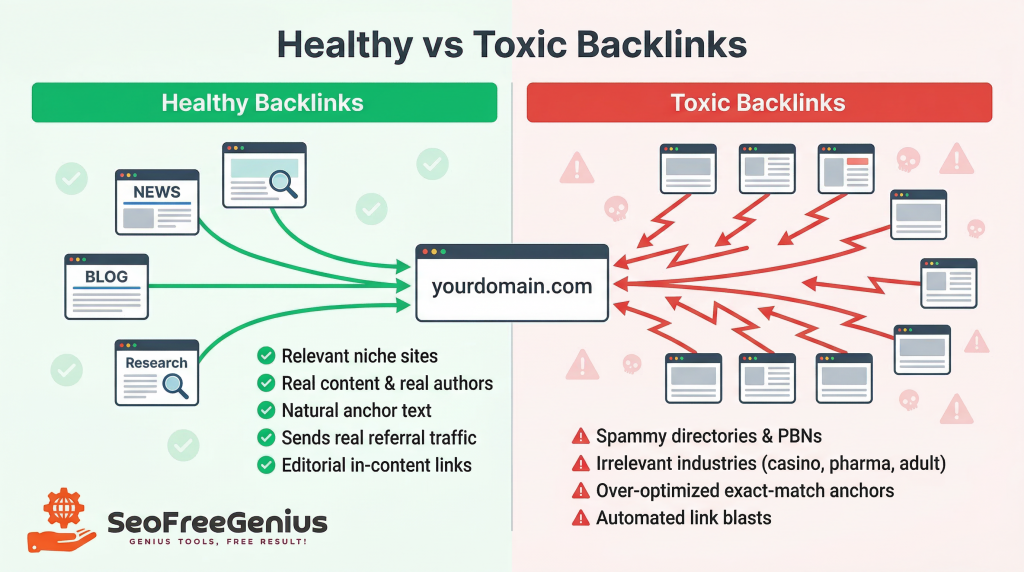
According to the comprehensive backlink analysis guide from SEO Free Genius, high-quality backlinks share these characteristics:
- Relevance: The linking website operates in your industry or a closely related niche
- Authority: The linking domain has genuine authority and trust with real content and authors
- Contextual Placement: The link appears naturally within content, not stuffed in footers or sidebars
- Natural Anchor Text: The clickable text varies across your profile and reads naturally
- Referral Traffic: Valuable backlinks send real visitors to your site
What Makes a Backlink Toxic?
Toxic backlinks exhibit warning signs that can trigger Google’s spam detection:
- Spammy domains: Link farms, private blog networks (PBNs), or sites created solely to sell links
- Irrelevant industries: Links from completely unrelated niches (gambling sites linking to health blogs)
- Over-optimized anchor text: 80%+ of backlinks use exact-match keywords
- Suspicious patterns: Hundreds of backlinks appearing overnight from identical IP ranges
- Paid link schemes: Links purchased from networks that violate Google’s link spam policies
According to Search Engine Land’s guide to disavowing backlinks, Google is actually quite good at ignoring low-quality links automatically. You only need to take action when:
- You have a manual action penalty in Google Search Console explicitly mentioning unnatural links
- You participated in a link scheme and accumulated many toxic backlinks
- You’re the victim of a negative SEO attack with deliberate spammy links
If none of these apply, Google is likely already ignoring your few random spammy backlinks.
Manual Penalties vs Algorithmic Filtering
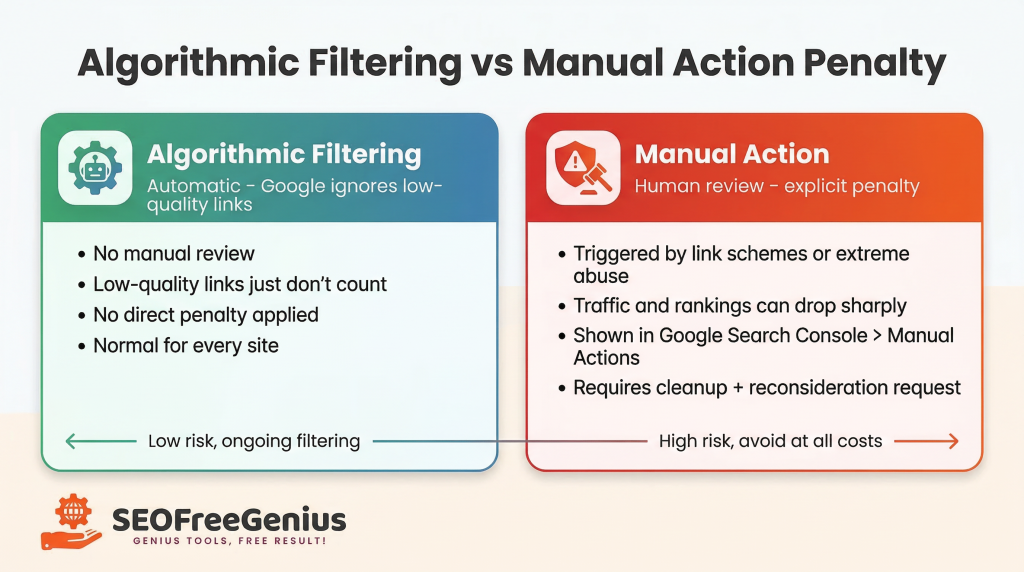
Algorithmic filtering (common): Google’s algorithms automatically detect and ignore low-quality links. Your site isn’t penalized; those links simply don’t help. This is normal.
Manual action penalties (rare): A human reviewer determines your site violated guidelines and applies a penalty that can devastate rankings. This only happens in cases of deliberate, large-scale link manipulation.
The goal of a backlink health check is to stay in the first category and never enter the second.
Step 1: Audit Your Existing Backlink Profile
The first step is understanding exactly which sites are linking to you right now.
Why This Matters
You can’t fix problems you can’t see. According to the real-world SEO fixes case study on SEO Free Genius, one key success factor was “monitoring backlink health monthly using the Backlink Checker to spot and disavow low-quality or spammy links.”
How to Check Your Backlinks
Use the Backlink Checker on SEO Free Genius to get a quick snapshot:
- Go to https://seofreegenius.com/backlink-checker
- Enter your full domain (e.g., https://yourdomain.com)
- Click Submit and wait for the scan
The tool returns a list showing source URL, anchor text, link type (follow/nofollow), and discovery date.
Baseline Metrics to Track
Document these critical metrics in a spreadsheet:
| Metric | Track This |
| Total backlinks | Overall count |
| Unique referring domains | More important than total count |
| Follow vs nofollow ratio | Target: 60-80% follow |
| Anchor text diversity | Avoid 80%+ exact-match keywords |
| Link velocity | New links per month |
Pro tip: One hundred links from one website = one vote. One link each from 100 different quality websites = one hundred votes.
Identifying Red Flags
As you review backlinks, flag these warning signs:
Immediate red flags: – Links from known link farms or PBNs – Links from completely unrelated industries (casino, pharma linking to your business blog) – Dozens of links appearing suddenly from the same IP range – Over-optimized anchor text in every link
Yellow flags (monitor): – Low-authority sites (not harmful unless spammy) – Old, outdated links from inactive sites – Social bookmarking sites or low-quality directories
Green lights (keep): – Links from industry blogs, news sites, or authoritative resources in your niche – Natural editorial links from people citing your content – Guest posts you wrote for legitimate blogs
The backlink analysis guide recommends asking: “Would my target audience find this website credible?” If no, the backlink is likely low-quality.
Cross-Reference with Google Search Console
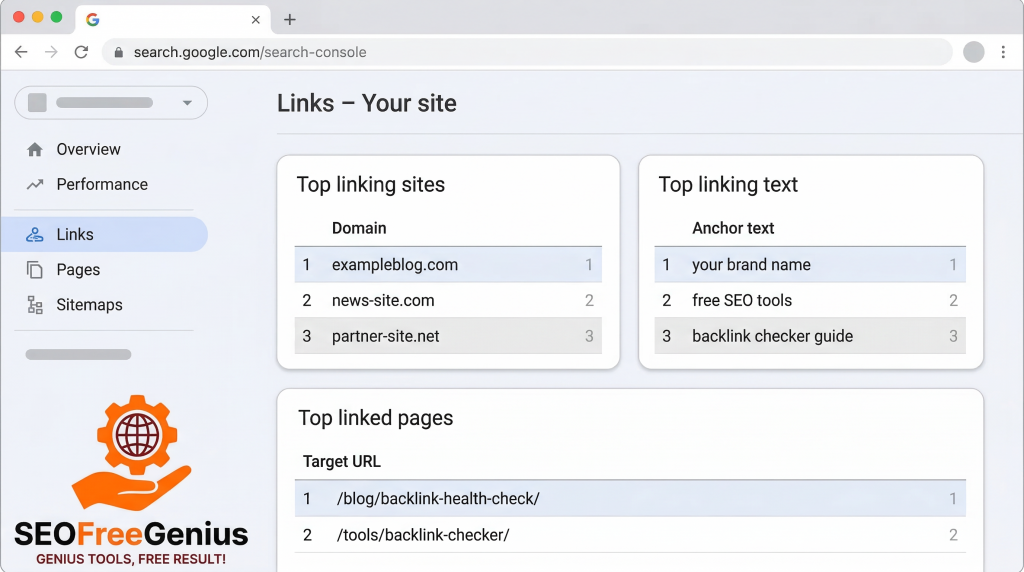
Check Google Search Console > Links to see which backlinks Google has discovered. This official data shows top linking sites, anchor text distribution, and your internal link structure. Trust Google’s data as the source of truth.
Step 2: Analyze Internal and Outbound Links
Backlink health isn’t just about incoming links. The links on your own pages also impact SEO health.
Why These Links Matter
Internal links help Google understand your site structure, distribute ranking power, improve navigation, and reveal orphaned pages. Outbound links signal what topics you cover and can hurt you if you link to spammy or penalized sites.
How to Audit Page Links
Use the Link Analyzer on SEO Free Genius:
- Go to https://seofreegenius.com/link-analyzer-tool
- Enter a key page URL (homepage, main service pages, top blog posts)
- Click Submit
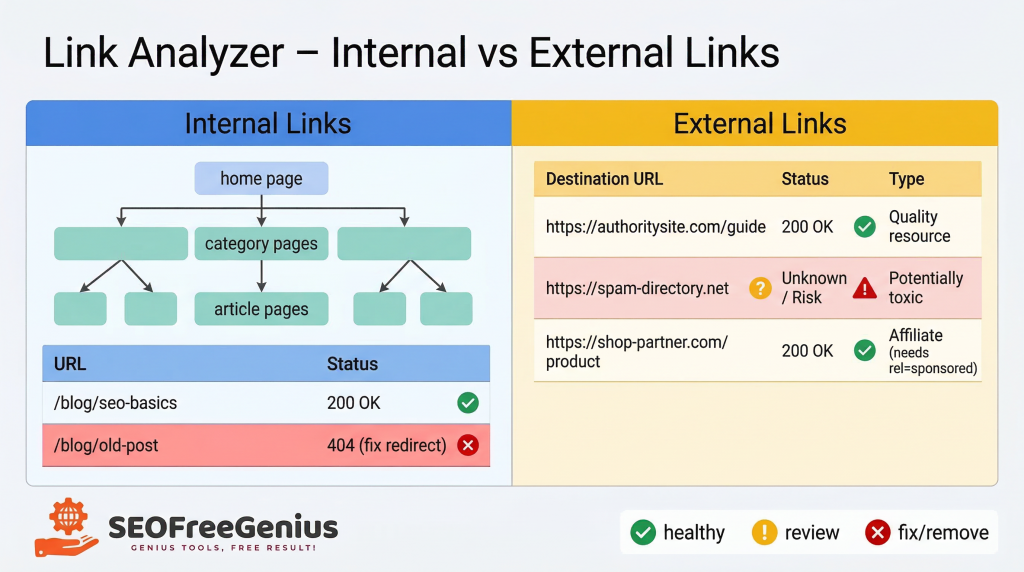
The tool returns lists of internal links and external links.
What to Check in Internal Links
1. Broken internal links (404 errors)
Fix these by updating the link or implementing a 301 redirect using the Htaccess Redirect Generator.
2. Orphaned pages
Important pages with zero internal links from other parts of your site. Add contextual internal links from related articles.
3. Over-optimization
If hundreds of internal links use identical exact-match anchor text, vary it with branded terms, generic phrases, and natural references.
What to Check in Outbound Links
1. Links to penalized or spammy sites
Run suspicious domains through the Backlink Checker to verify quality before linking.
2. Broken external links (404s)
Update the link to a current URL or remove it entirely.
3. Affiliate or paid links without proper disclosure
Add rel=”sponsored” or rel=”nofollow” attributes to comply with Google’s guidelines. The affiliate-friendly SEO guide explains proper disclosure.
Create Your Fix List
After running Link Analyzer on 5-10 important pages:
- Broken internal links to repair
- Orphaned pages to internally link
- Broken external links to update or remove
- Spammy external links to remove or nofollow
- Affiliate links to add proper disclosure
Step 3: Understanding Safe Link Building (And What to Avoid)
Can you actively build new backlinks without risking a penalty? Yes, but only if you follow Google’s guidelines and focus on earning links naturally, not manipulating them artificially.
The Critical Distinction
Earning links naturally (white-hat, safe): – Creating genuinely valuable content people want to reference – Building relationships with bloggers, journalists, and industry experts – Guest posting on legitimate, relevant blogs (not link farms) – Getting featured in industry roundups or news articles – Being cited as an expert or data source
Manipulating links artificially (black-hat, risky): – Buying links from link-selling networks – Reciprocal link exchanges (“I’ll link to you if you link to me”) – Using automated link-building software to spam comments and forums – Publishing on private blog networks (PBNs)
According to Google’s link spam policies, any attempt to manipulate PageRank can result in lower rankings or removal from search results.
White-Hat Link Building Strategies
The ethical link building guide from Digitally Unique and Respona outline safe approaches:
- Create link-worthy content: Comprehensive guides, original research, data-driven case studies, infographics, and tools
- Digital PR and outreach: Reach out with genuinely newsworthy angles and expert commentary
- Guest posting (done right): High-quality guest posts for legitimate blogs in your industry
- Resource page link building: Pitch your tool as a valuable addition to “Best Tools” pages
- Broken link building: Find broken links on relevant websites, notify owners, suggest your content as replacement
- Unlinked brand mentions: Find mentions of your brand without links and request they add one
The key principle: Earn links by providing value, not manipulating rankings.
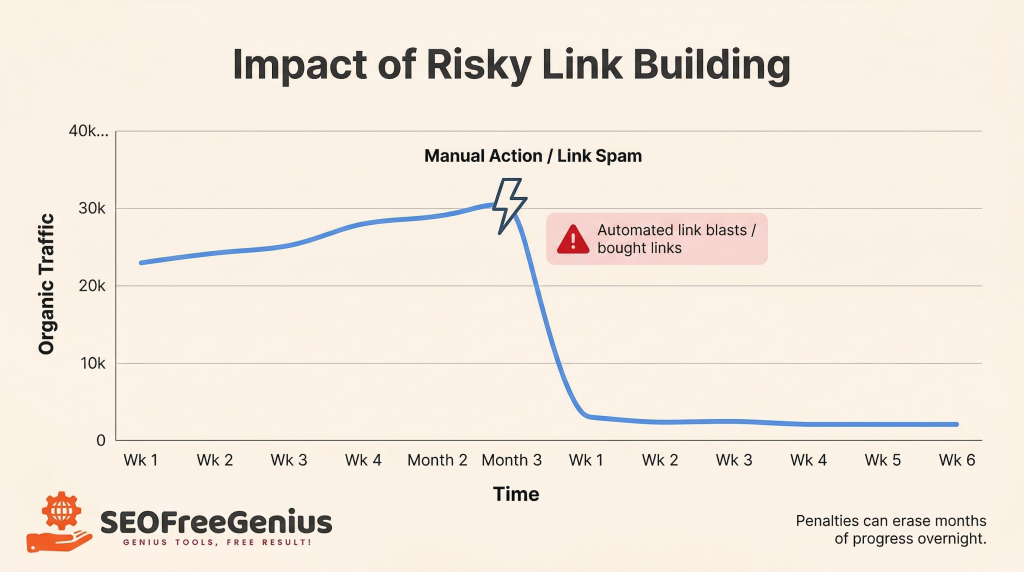
⚠️ Critical Warning About “Quick” Link Building Tools
Many “backlink maker” tools promise to generate dozens or hundreds of backlinks automatically by submitting your site to directories and social bookmarking sites.
These tools should ONLY be used (if at all) for: – Initial citations when launching a site (legitimate directories like Google Business Profile) – Testing purposes in sandbox environments
These tools should NEVER be used for: – Building hundreds of automated backlinks – Long-term link building strategy – “Boosting” rankings on existing sites
Why? The vast majority of automatically generated backlinks are: – Low quality or spam: Links from irrelevant, low-authority sites Google ignores or penalizes – Easy to detect: Google’s algorithms easily identify automated link patterns – High risk, zero reward: At best they do nothing; at worst they trigger manual actions
As noted in the backlink analysis guide, one high-quality backlink from a relevant, authoritative site is worth more than 1,000 automated directory links.Remember: SEO is a long game. Shortcuts lead to penalties that erase months or years of progress overnight.
Step 4: When and How to Disavow Toxic Backlinks
If your audit reveals a significant number of toxic links, you may need to use Google’s Disavow Tool.
Understanding the Disavow Tool
The Google Disavow Tool tells Google to ignore specific backlinks when calculating rankings.
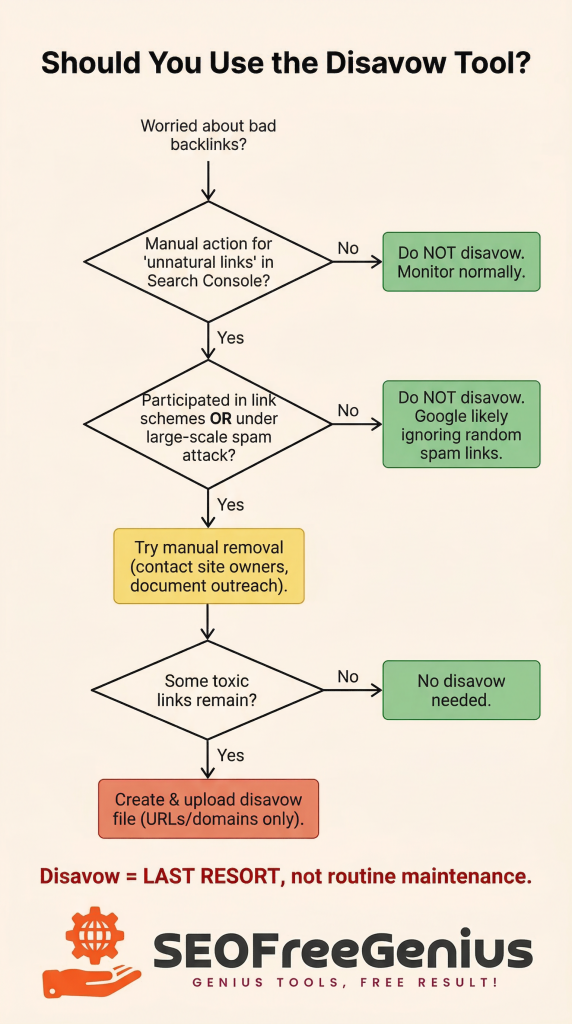
⚠️ Important: According to Search Engine Land and Semrush, you should only disavow links when absolutely necessary. Google is very good at automatically ignoring spammy links, so aggressive disavowing can do more harm than good.
When You SHOULD Disavow
Disavow links only if:
- You have a manual action penalty in Google Search Console specifically mentioning “unnatural links”
- You participated in a link scheme and accumulated many toxic backlinks
- You’re the victim of a negative SEO attack with hundreds or thousands of deliberate spammy links
If your Manual Actions report shows “No issues detected,” do NOT disavow backlinks. A few random low-quality links are normal.
When You Should NOT Disavow
Do NOT disavow if: – Your Search Console shows “No issues detected” – You have a small number of low-quality backlinks (every site has some) – You’re just worried without concrete evidence of problems – You haven’t tried manual removal first
Disavowing should always be your last resort.
How to Disavow (Step-by-Step)
If disavowing is necessary:
Step 1: Export your complete backlink list using the Backlink Checker and Google Search Console.
Step 2: Identify truly toxic links with clear spam characteristics (link farms, PBNs, irrelevant industries, manipulated anchor text).
Step 3: Attempt manual removal first by contacting site owners and requesting link removal. Document your outreach attempts.
Step 4: Create a disavow file (plain text .txt) formatted according to Google’s specifications:
# Disavow links for yourdomain.com
# Submitted on YYYY-MM-DD
# Specific toxic URLs
http://spamsite.com/page1.html
# Entire toxic domains (use sparingly)
domain:toxicdomain.com
Step 5: Submit the file at Google’s Disavow Links Tool.
Step 6: Monitor your backlink profile with the Backlink Checker and update the disavow file if new toxic links appear.
Important: Disavow effects are not immediate. It can take weeks or months for Google to process the changes.
Common Disavow Mistakes to Avoid
- Disavowing too aggressively: Only disavow genuinely spammy links, not just low-authority sites
- Not documenting outreach: Keep records of manual removal attempts for reconsideration requests
- Disavowing entire domains unnecessarily: Only use domain: when the entire site is toxic
- Expecting instant results: Disavowing prevents future harm but isn’t a magic ranking boost
Step 5: Building a Healthy Backlink Profile Going Forward
After cleanup, focus on building a healthy, penalty-proof backlink profile long-term.
The Natural Link Profile Model
A healthy backlink profile exhibits:
1. Link diversity: Links from many different domains, not just a handful
2. Anchor text variety: – 40-50% branded terms – 20-30% generic phrases – 15-25% partial-match keywords – 5-10% exact-match keywords – 5-10% naked URLs
3. Gradual, consistent growth: Backlinks accumulate steadily, not spike overnight
4. Mix of link types: Editorial links, guest posts, directory listings, social mentions, forum references
5. Follow and nofollow balance: Aim for roughly 60-80% follow links and 20-40% nofollow
Monthly Backlink Maintenance
Monthly tasks: – [ ] Run Backlink Checker to identify new backlinks – [ ] Review new backlinks for quality and relevance – [ ] Check Google Search Console for manual action notices – [ ] Use Link Analyzer on new content
Quarterly tasks: – [ ] Export complete backlink list and update baseline metrics – [ ] Analyze anchor text distribution – [ ] Review competitor backlinks for opportunities – [ ] Update disavow file if needed
Annual tasks: – [ ] Comprehensive backlink audit – [ ] Strategic planning: What content attracted the most quality backlinks?
As noted in the real-world SEO fixes case study, “monitoring backlink health monthly” was key to success. Consistency matters.
Focus on Topical Authority
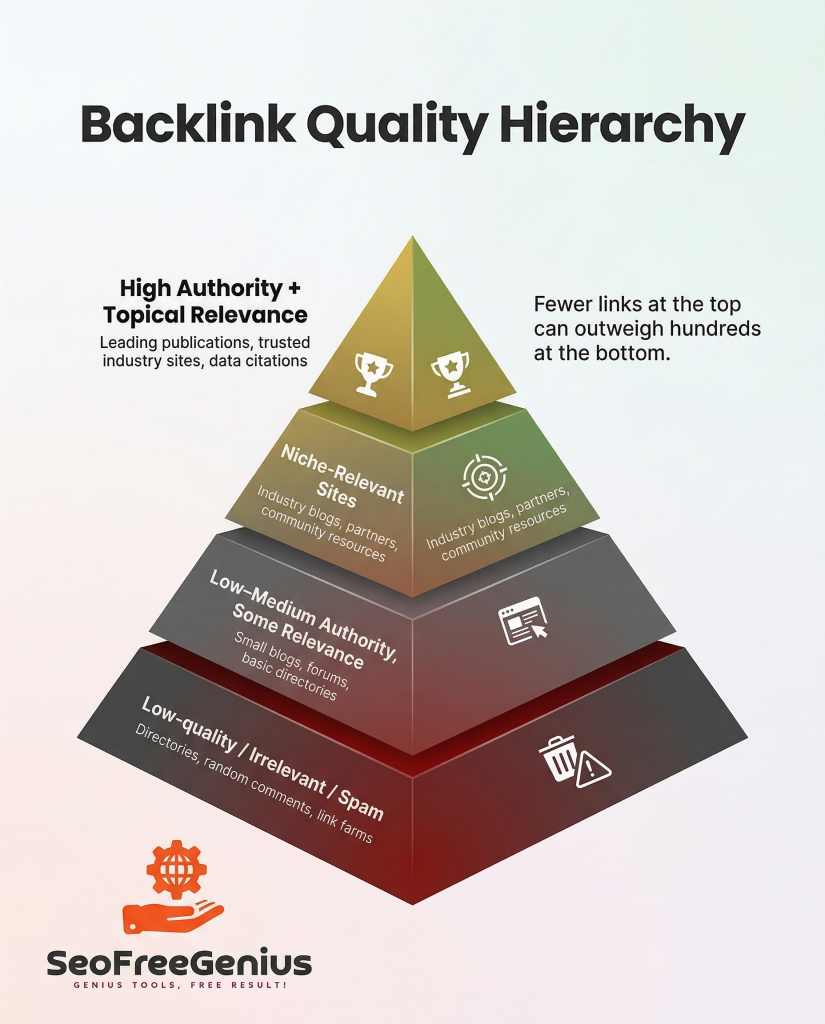
According to the SEO priorities guide, Google’s algorithms now heavily emphasize topical authority—meaning links from sites in your niche matter far more than links from unrelated industries.
Strategic approach: – Prioritize earning links from blogs, news sites, and resources in your specific niche – Build relationships with influencers and bloggers who cover your topics – Create content that becomes the go-to resource for specific subtopics – Link internally to build strong topic clusters.
Quality backlinks from relevant, authoritative sites in your niche will always outperform hundreds of random, low-quality links.
Your 4-Week Action Plan
Week 1: Initial Audit
- Run Backlink Checker on your domain
- Document baseline metrics
- Check Google Search Console > Links and Manual Actions
Week 2: Quality Analysis
- Review backlink list and flag suspicious links
- Categorize: Green (keep), Yellow (monitor), Red (toxic)
- Attempt manual removal for toxic links
Week 3: On-Page Link Audit
- Use Link Analyzer on 10 key pages
- Fix broken internal and external links
- Add proper disclosure to affiliate links
Week 4: Cleanup and Prevention
- Submit disavow file if necessary (manual penalty or large-scale problem)
- Set up monthly monitoring reminders
- Plan white-hat link building strategy
Conclusion: Build Authority Safely and Sustainably
Backlink health isn’t about gaming Google—it’s about building genuine authority while avoiding landmines that can destroy rankings overnight.
You can absolutely build a strong backlink profile without expensive tools or risky tactics. By using free tools like the Backlink Checker to monitor incoming links, the Link Analyzer to audit on-page links, and following Google’s official guidelines, you can systematically improve your site’s authority while staying in Google’s good graces.
Key principles to remember:
- Audit regularly – Check monthly to catch problems early
- Prioritize quality over quantity – One relevant link beats 100 spammy links
- Disavow sparingly – Only when you have a manual penalty or participated in link schemes
- Focus on earning, not manipulating – Create valuable content and build real relationships
- Monitor on-page links too – Internal and outbound link health matters
- Track progress – Document baseline metrics and measure improvements
Start your backlink audit today. Run the Backlink Checker, identify any red flags, and begin cleanup. Then shift focus to building authority the right way: creating valuable content, building relationships, and earning links from sites that matter.
In 3-6 months, you’ll have a fundamentally healthier backlink profile that strengthens rankings, withstands algorithm updates, and positions you for long-term SEO success—without the constant fear of penalties.
Ready to check your backlink health? Use these free tools:
- Backlink Checker – Audit incoming backlinks
- Link Analyzer – Inspect on-page links
- Broken Links Finder – Fix broken links site-wide
- Domain Authority Checker – Check overall authority
- Page Authority Checker – Evaluate page strength
All tools are 100% free at seofreegenius.com.
Need more SEO guidance? Check out:
- Backlink Analysis for Beginners: Complete Guide
- Real-World SEO Fixes: 5 Changes to Rank Page 1
- Fix Broken Links Without Expensive Software
- SEO Priorities for 2025: Beat Algorithm Updates
Samir H. M. — SEO Expert
5+ years building SEO tools. SEOFreeGenius creator—50+ sites to #1.
All Articles →
Samir H. M. is the creator of [seofreegenius.com], offering 66+ free SEO tools from Riyadh. He’s hands-on tested and built features like plagiarism checkers and backlink tools, plus 36 guides to help sites rank better. Practical, no-BS advice for real users.