
Published: March 8, 2026
Author: SEO Free Genius Team
Reading time: 15 minutes
Introduction
If your Google AdSense application was rejected with a vague message about “insufficient content” or “low-value pages,” you’re not alone. Thousands of website owners face the same frustration every month, watching their monetization dreams slip away because of one critical mistake: thin and duplicate content.
Duplicate content and “thin” pages are silent killers of both your Google rankings and your AdSense approval chances. They waste crawl budget, confuse Google about which URL to rank, and send a clear signal that your site does not offer enough original value to users. If most of your pages are short, repetitive, or copied from other sources, AdSense reviewers see a low‑quality site—even if your design looks perfect and your traffic is growing.
What exactly is thin content?
Thin content is any page that offers little unique value to users: very low word count (typically under 300 words), shallow coverage of a topic, or sections that are largely copied or rephrased from other pages. It can be a 200‑word article that barely scratches the surface, a near‑empty category page, or a blog post that says the same thing as three other posts on your domain in slightly different words.
According to Google’s own guidance on duplicate content, while there isn’t a harsh “penalty” in the traditional sense, Google’s algorithms will filter and devalue pages that don’t add sufficient original value. Your content may not be removed entirely, but it will struggle to rank—and AdSense reviewers use similar quality signals when evaluating applications.
The good news: you can systematically fix this. In this guide, you will follow a proven four‑step cleanup process using the free tools available at SEO Free Genius to audit thin pages, detect duplicates, improve your metadata, and decide whether to consolidate, expand, or noindex each problematic URL. By the end, you’ll have a concrete action plan to transform your site from a collection of weak pages into a focused library of valuable, original content that passes both Google’s quality filters and AdSense’s approval process.
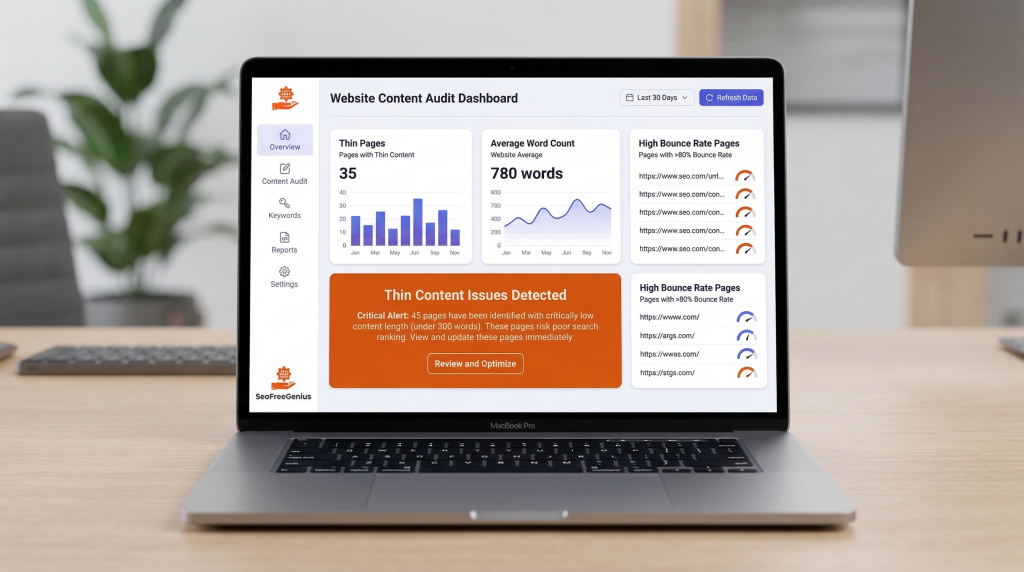
Step 1: Auditing Your Site for “Thin” Pages
Before you can fix anything, you need a clear list of problem URLs. Guessing which pages are weak wastes time; you need objective data that identifies exactly where your content falls short.
Finding Problem Pages
Start with two sources of data:
- Analytics signals (low traffic, high bounce rates, minimal engagement)
- Content signals (very low word count, shallow coverage, obvious duplication)
If you use Google Analytics or a similar tool, export a list of pages that get almost no traffic or have very high bounce rates (above 70%) over the last 3–6 months. These pages are often prime suspects for thin content. Look specifically for:
- Blog posts with zero or near-zero pageviews
- Product or service pages with engagement time under 30 seconds
- Category or tag pages with abnormally high exit rates
If you don’t use analytics yet, you can still audit manually by browsing your site’s posts, product pages, and category pages, noting which ones are short, outdated, or obviously duplicated.
Measuring Content Depth
Next, quantify how thin each page actually is. Gut feeling isn’t enough—you need precise word counts.
Copy the full body content of each suspected URL and paste it into the Word Counter tool on SEO Free Genius. This free tool instantly measures the exact word count, character count, and even provides readability insights.
As a rough benchmark, pages under 300–500 words are often at risk of being categorized as thin—especially if they do not contain unique data, visuals, tools, or original insights. But remember: even a 2,000‑word article can be “thin” if it is mostly fluff, repetitive, or copied from elsewhere. The SEO Free Genius blog on word count optimization explains that quality matters more than raw length, but insufficient length often signals insufficient depth.
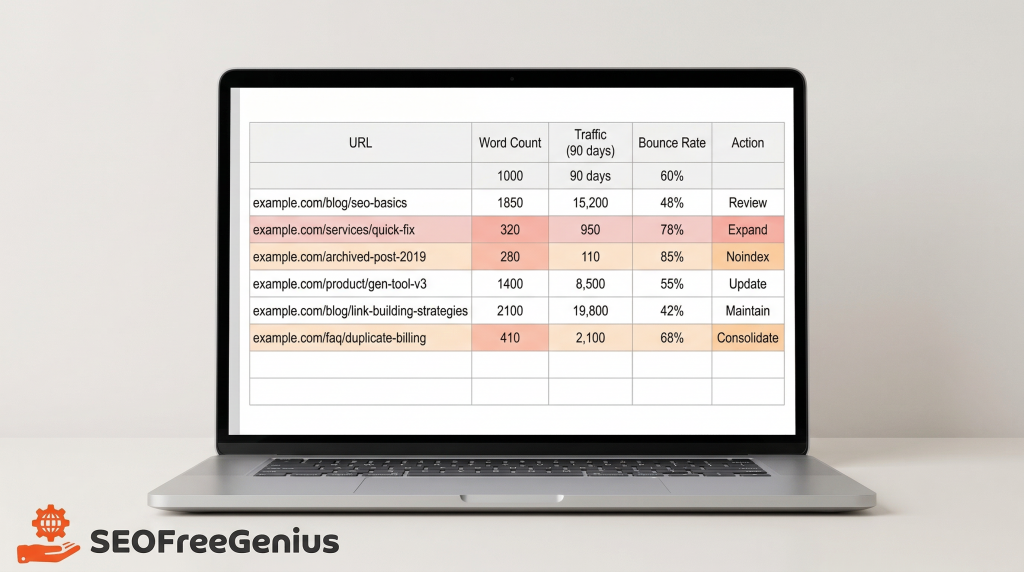
Create Your Audit Spreadsheet
Open a simple spreadsheet (Google Sheets or Excel) and create these columns:
| URL | Word Count | Traffic (last 90 days) | Bounce Rate | Notes |
Use it to classify pages into buckets:
- Under 300 words (high risk)
- 300–800 words (medium risk, needs review)
- 800+ words (usually safe, but check for duplication)
This list becomes the foundation of your cleanup project. Prioritize the pages with the lowest word counts and highest bounce rates first—these are your most critical fixes.
Step 2: Detecting Duplicate and Plagiarized Content
Thin content is not just about length. A 1,000‑word article that repeats the same paragraphs you’ve already published elsewhere on your site—or worse, content copied from other websites—is still low value in Google’s eyes.
Two Types of Duplication to Watch For
- Internal duplication: Similar or identical sections appearing on multiple pages of your own site. This is incredibly common on blogs where you’ve written several short posts answering similar questions in slightly different ways.
- External duplication (plagiarism): Content copied from other websites, whether intentionally or accidentally through excessive paraphrasing.
While Google has stated there is no traditional “duplicate content penalty”, the search engine does filter duplicate pages, often choosing to rank only one version and hiding the others. If you have five similar blog posts competing for the same keyword, Google will pick one (or none) to show in search results. For AdSense reviewers, seeing a site full of near-duplicate posts signals low editorial standards and insufficient unique value.
How to Detect Duplication
Go back to the pages you identified in Step 1. For each suspicious URL:
- Copy a 500–1,000‑word section (or the entire article if it’s short)
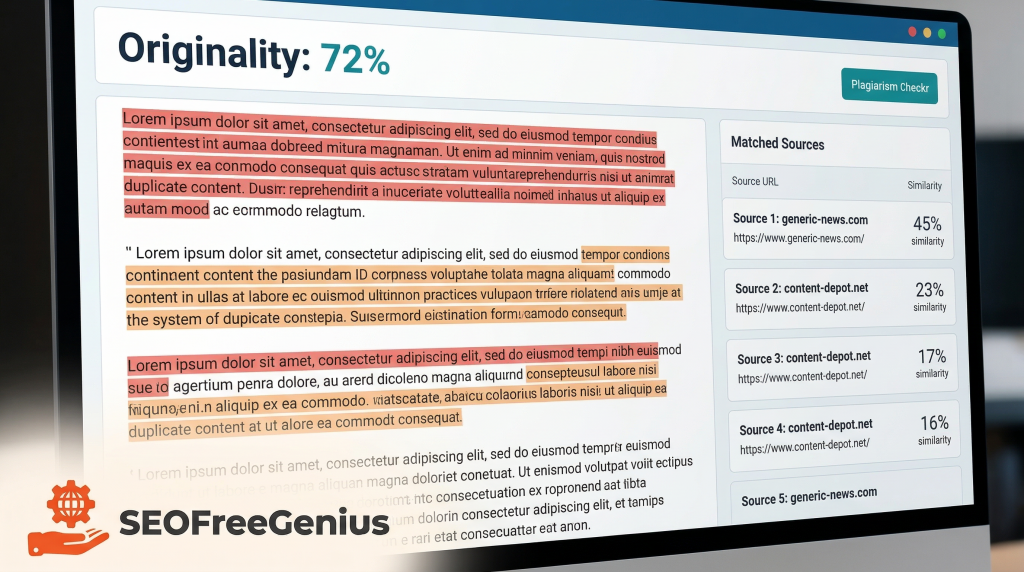
- Paste it into the Plagiarism Checker on SEO Free Genius
- Review the similarity report
The tool scans your text against billions of online sources and highlights matching passages. Pay close attention to two things in the report:
- Similarity percentage (how much of your text matches other sources)
- Highlighted sentences and their sources
If many sentences match external websites, you may have accidentally copied or over‑paraphrased another article—a serious problem for both SEO and AdSense approval. If the matches are between different URLs on your own domain, you’re facing internal duplication: several short posts answering the same question in slightly different words.
Document Your Findings
Add a new column to your spreadsheet labeled “Duplication Status” and annotate each page:
- High external duplication (requires rewrite or removal)
- High internal duplication (candidate for consolidation)
- Mostly original (safe, may just need expansion)
This classification will help you decide in Step 4 which pages deserve a full rewrite, which should be merged together, and which are strong enough to simply expand with more unique content. The SEO Free Genius guide on using plagiarism checkers provides detailed examples of how to interpret similarity scores and what thresholds to watch for.
Step 3: Auditing Meta Data for Quality
Search engines don’t evaluate only the visible text on your pages. Your title tags, meta descriptions, and robots directives also send strong quality signals to both Google’s algorithms and AdSense reviewers.
If many URLs share the same generic title, have missing meta descriptions, or are accidentally blocked from indexing, your site can look low-value or confusing—even if your content is actually decent.
Why Meta Data Matters for AdSense
AdSense reviewers manually check sample pages from your site. When they see:
- Duplicate titles across different URLs
- Titles that don’t accurately describe the content
- Missing or generic descriptions like “Just another WordPress site” or “Home | My Blog”
- Pages with noindex tags that should be indexed
…they conclude that the site owner hasn’t invested effort into quality, which makes approval far less likely.
Auditing Your Meta Tags
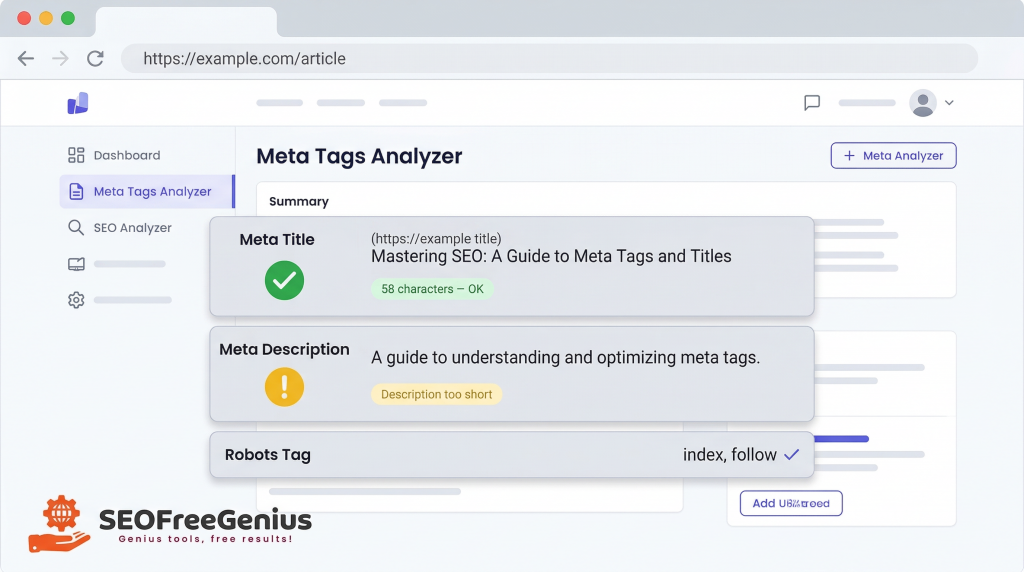
Take 10–20 URLs from your spreadsheet and run each through the Meta Tags Analyzer on SEO Free Genius. For each page, the tool shows you:
- The current meta title and its length (too short or too long?)
- The meta description and whether it’s missing, too short, or exceeds the recommended 160 characters
- Any robots directives (index, noindex, follow, nofollow)
As you review results, flag these common problems:
- Duplicate titles: Multiple URLs with identical or near-identical <title> tags
- Non-descriptive titles: Titles like “Post 1” or “Page 12”
- Missing descriptions: Pages with no meta description at all
- Accidental noindex: Important pages mistakenly set to noindex, preventing them from appearing in search
The complete on-page SEO checklist from SEO Free Genius explains in detail how to write compelling, unique titles and descriptions that both users and search engines love.
Update Your Spreadsheet
Add a “Meta Issues” column to your audit spreadsheet and briefly summarize what needs fixing for each URL. For example:
- “Duplicate title – same as post #47”
- “Missing meta description”
- “Title too long (82 characters)”
This turns your thin‑content cleanup into a comprehensive on‑page quality audit—exactly what AdSense reviewers want to see when they evaluate your site.
Step 4: The Fix – Consolidate, Expand, or Noindex?
By now, you have a prioritized list of URLs with detailed notes on word count, duplication status, traffic, and meta data issues. The final step is to decide what to do with each page.
For almost every thin or duplicate URL, you have three main strategic options:
- Consolidate overlapping posts into one comprehensive guide
- Expand pages with potential by adding unique value
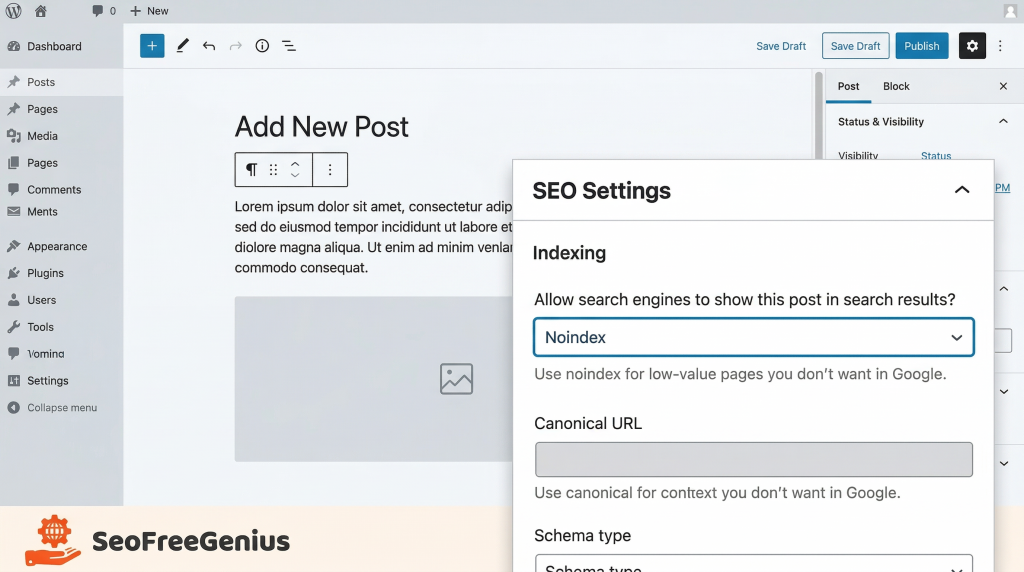
- Noindex low-value structural pages that don’t deserve ranking
Let’s break down when and how to use each approach.
Scenario A: Consolidate Overlapping Posts
When to consolidate:
If you find 2–3 short posts targeting the same keyword or topic (for example, “how to speed up WordPress,” “WordPress performance tips,” and “make WordPress faster”), it rarely makes sense to keep them all as separate pages.
Google sees near‑duplicate content and struggles to pick one canonical page to rank. Users land on one thin post, don’t find complete answers, and leave. AdSense reviewers see many small, similar posts instead of one high‑value resource—a red flag for low editorial quality.
How to consolidate effectively:
Follow this proven workflow:
- Choose the strongest URL as your primary page. Look for:
- The cleanest, most descriptive URL structure
- The page with the most existing backlinks (check in Google Search Console)
- The post with the highest traffic or engagement
- Copy the content from the weaker, overlapping posts into a draft document.
- Use the Plagiarism Checker again to highlight repetitive sections. Paste all the drafts together and run the combined text through the tool to see which sentences and paragraphs are saying the same thing in slightly different words.
- Rewrite and merge the best ideas into a single, comprehensive guide. Remove repetition, fill content gaps, add new sections where needed (such as FAQs, case studies, or tool recommendations), and ensure the final article flows naturally from introduction to conclusion.
- Update the primary URL with this new “ultimate” version of the content.
- Implement 301 redirects from the old overlapping URLs to the primary one. This tells search engines and browsers that the old pages have permanently moved, preserving any existing SEO value and preventing 404 errors. You can easily create these redirects using the Htaccess Redirect Generator on SEO Free Genius if you’re on an Apache server, or use your CMS’s built-in redirect features.
The result: one strong, unique page that is far more likely to rank well, satisfy users, and pass AdSense quality checks. As noted in best practices for 301 redirects and consolidation, consolidating thin content into comprehensive resources is one of the most effective SEO strategies for sites struggling with quality issues.
Scenario B: Expand Pages with Potential
When to expand:
Not every thin page should be deleted or merged. Some URLs target important keywords, products, or topics but were simply published too quickly without sufficient depth. For these pages, your goal is to add unique value, not just pad the word count with fluff.
Expansion checklist:
Use this systematic approach to transform thin pages into valuable resources:
- Clarify search intent: What exact question is the user asking when they land on this page? Search the keyword in Google and study the top 3 results to understand what users expect.
- Add detailed explanations: Break concepts into clear subheadings (H2, H3) and provide step‑by‑step instructions. Don’t just tell readers what to do; explain why it matters and how to do it.
- Include original data: Add screenshots from your own tests, small experiments, or statistics from your own analytics. For example, if you’re writing about site speed, run your own site through speed testing tools and share the before/after results.
- Add visuals: Embed images, diagrams, infographics, or short GIFs that explain complex steps. Visual content dramatically improves engagement and time-on-page metrics.
- Share personal experience: What worked for you? What failed? What specific tools did you use? Personal anecdotes and real-world examples make content more trustworthy and unique.
- Link to helpful tools: For example, when discussing ideal content length, link to the SEO Free Genius Word Counter so readers can check their own pages. When talking about originality, link to the Plagiarism Checker. These contextual tool links add practical value and demonstrate that your site offers solutions, not just information.
Target transformation:
Aim to transform a 300‑word placeholder into a 1,000+‑word guide that genuinely helps the reader accomplish something. But remember: length alone isn’t enough. As explained in the SEO Free Genius article on leveraging Google’s AI trends, Google’s algorithms in 2026 are exceptionally good at detecting “thin” content that’s been artificially inflated with filler. Focus on depth, originality, and problem-solving.
After expansion, recheck the updated copy with the Plagiarism Checker to ensure your new content is original and not overlapping too much with your other articles or external sources.
Scenario C: Noindex Low‑Value or Unavoidable Thin Pages
When to use noindex:
Some URLs are simply not worth keeping in Google’s index, but they’re still useful for site navigation or user experience. Examples include:
- Tag and category archive pages with minimal unique content
- Search result pages on your site
- Very old news or promotional pages that no longer matter
- Auto‑generated filter combinations on eCommerce sites (e.g., “Red shirts size M under $20”)
- Author archive pages with minimal posts
These pages help users navigate your site, but they add little standalone value in search results. For them, the best move is often to keep the page live but add a noindex directive so Google doesn’t count it against your overall site quality.
How to implement noindex:
Technically, you add a noindex meta tag in the <head> section of the page’s HTML:
<meta name=”robots” content=”noindex,follow”>
This tells search engines not to index the page but still to follow its links (preserving internal link equity).
If you use WordPress with SEO plugins like Yoast SEO or Rank Math, you can usually toggle the “noindex” setting for individual pages or entire categories in the plugin’s advanced settings—no code required.
For a deeper technical explanation and more implementation scenarios, see this comprehensive noindex guide from Onely, which covers edge cases, common mistakes, and how to verify that your noindex tags are working correctly.
⚠️ Important warning:
Be very careful not to accidentally noindex important pages like:
- Your homepage
- Main service or product pages
- High-performing blog posts
- Pages you’re actively trying to improve
Use noindex mainly for structural or low-value pages that will never be truly valuable on their own, no matter how much you improve them.
Real-World Workflow: Putting It All Together
Let’s walk through a concrete example to see how this four-step process works in practice.
Scenario:
You run a small digital marketing blog. Your AdSense application was rejected for “insufficient content.” You have 40 published posts, but analytics show that 15 get almost zero traffic.
Step 1 – Audit:
You copy each of those 15 posts into the Word Counter and discover:
- 8 posts are under 400 words
- 5 posts are 400–700 words
- 2 posts are over 1,000 words but have 80%+ bounce rates
Step 2 – Detect duplication:
You run the 8 shortest posts through the Plagiarism Checker and find:
- 3 posts about “email marketing tips” have 60–75% internal overlap with each other
- 2 posts about “Facebook ads” are nearly identical
- 1 post has 40% external duplication (accidentally paraphrased too closely from a competitor)
Step 3 – Meta audit:
Using the Meta Tags Analyzer, you discover:
- 6 posts share the same generic title format: “Marketing Tips | My Blog”
- 10 posts have no meta description at all
- 1 important pillar post is accidentally set to noindex
Step 4 – Fix:
- Consolidate: Merge the 3 “email marketing tips” posts into one 1,500-word ultimate guide. Redirect the old URLs using the Htaccess Redirect Generator.
- Consolidate: Merge the 2 “Facebook ads” posts into one comprehensive tutorial with screenshots and examples.
- Expand: Take the 1 post with external duplication, completely rewrite it with original insights, and expand it to 1,200 words with personal case studies.
- Expand: For the 5 posts that are 400–700 words but have low engagement, add FAQs, tool recommendations (linking to relevant SEO Free Genius tools), and visual content to reach 1,000+ words each.
- Fix meta: Rewrite all titles to be unique and descriptive. Add compelling meta descriptions to every post. Remove the accidental noindex from the pillar post.
Result:
Your site now has 32 posts instead of 40 (8 were consolidated), but each post is:
- Over 800 words with unique value
- Free of significant duplication
- Properly optimized with unique titles and descriptions
- Focused on solving specific user problems
When you reapply for AdSense in 2–3 weeks (after Google re-crawls your updated content), reviewers see a site with substantial, original content—dramatically increasing your approval chances.
Common Mistakes to Avoid
As you work through your cleanup, watch out for these common pitfalls:
1. Deleting pages without redirects
Never just delete thin posts and leave 404 errors. Always set up 301 redirects to guide users and search engines to relevant replacement pages. The SEO Free Genius guide to fixing 404 errors explains why broken links hurt your SEO and how to handle them properly.
2. Adding fluff instead of value
Don’t just pad word counts with unnecessary filler to hit an arbitrary target. Google’s algorithms can detect when content has been artificially inflated without adding real information. Focus on depth and usefulness, not just length.
3. Noindexing important pages
Double-check which pages you’re noindexing. Accidentally hiding your best content from search engines is a devastating mistake that can tank your traffic.
4. Ignoring internal linking
After consolidating or expanding content, update your internal links. If other pages on your site link to the old, now-redirected URLs, update those links to point directly to the new consolidated pages. This improves user experience and helps search engines understand your site structure. The topic clusters guide on SEO Free Genius shows how to build strong internal linking between related content.
5. Rushing the process
Don’t try to fix your entire site in one weekend. Work through your audit systematically, prioritizing the worst offenders first. As you update content, request re-crawling in Google Search Console and give the changes time to be reflected in search results (typically 1–3 weeks).
Measuring Success: What to Track
After implementing your fixes, track these key metrics to confirm improvement:
1. Organic traffic
Monitor Google Analytics or your analytics tool of choice. You should see:
- Traffic increases to your consolidated/expanded pages
- Overall site traffic stabilizing or growing (not dropping due to deleted pages)
2. Engagement metrics
Watch for:
- Decreased bounce rates on improved pages
- Increased average time on page
- More pages per session
3. Google Search Console data
Check:
- Coverage report: Confirm that noindexed pages are properly excluded and important pages are indexed
- Performance report: Monitor clicks and impressions for your improved content
- Manual actions: Ensure you have no manual penalties
4. AdSense reapplication
Wait at least 2–3 weeks after making major content changes before reapplying for AdSense. This gives Google time to re-crawl and re-evaluate your site. When you do reapply, your application will be reviewed with your improved, substantial content—dramatically increasing approval odds.
Conclusion: From Thin Content to AdSense Approval
Thin and duplicate content are two of the biggest reasons small sites get stuck in limbo—no rankings, no traffic, and repeated AdSense rejections. But unlike technical SEO issues that require developer skills, content quality is something you can fix directly with systematic effort and the right tools.
Here’s your complete action plan:
- Audit depth: Use the SEO Free Genius Word Counter to identify short, shallow pages that need attention. Measure every suspicious page objectively.
- Detect duplication: Run your content through the Plagiarism Checker to spot internal and external overlaps before Google or AdSense reviewers do. Document which pages have duplication issues.
- Analyze meta data: Use the Meta Tags Analyzer to clean up duplicate titles, fix missing descriptions, and confirm proper indexation settings.
- Fix strategically: Decide whether to consolidate overlapping posts (using 301 redirects), expand promising but thin pages with unique value, or noindex low-value structural URLs.
Work through this checklist section by section rather than trying to fix everything at once. Focus on your worst 10–15 pages first, then gradually improve the rest.
As you update content, request re-crawling in Google Search Console using the URL Inspection tool, and give Google 1–3 weeks to process the changes. Monitor your Search Console coverage reports to ensure your fixes are working.
Once your site is dominated by substantial, original pages with clean, unique meta data, you’ll be in a much stronger position to reapply for AdSense—and to earn more from every visit that reaches your site.
The path from rejection to approval isn’t mysterious or impossible; it’s a systematic process of identifying weaknesses, eliminating duplication, and adding genuine value. With the free tools at SEO Free Genius and the strategies in this guide, you have everything you need to transform your site’s content quality and finally get that AdSense approval.
Start your cleanup today, and track your progress in a simple spreadsheet. In 30–60 days, you’ll have a fundamentally stronger site that serves users better, ranks higher, and meets Google’s quality standards.
Samir H. M. — SEO Expert
5+ years building SEO tools. SEOFreeGenius creator—50+ sites to #1.
All Articles →
Samir H. M. is the creator of [seofreegenius.com], offering 66+ free SEO tools from Riyadh. He’s hands-on tested and built features like plagiarism checkers and backlink tools, plus 36 guides to help sites rank better. Practical, no-BS advice for real users.