
- Published: March 12, 2026
- Author: SEO Free Genius Team
- Reading time: ~12 minutes
If you prefer your own name or brand persona, you can swap “SEOFreeGenius Editorial Team” for your personal author name.
Introduction
Nothing frustrates users (and search engines) more than clicking a link and landing on a dead‑end 404 page. When that happens, visitors feel stuck, lose trust, and often leave your site entirely—sometimes forever. Search engines also see 404 errors as a sign of poor maintenance and wasted crawl budget, especially when important pages or links are affected. [seofreegenius. Blog]
For many website owners, bloggers, and small businesses, broken links and 404 errors quietly drain traffic and revenue in the background. Users bounce after hitting a broken page, link equity from valuable backlinks is lost, and Google spends time crawling dead URLs instead of the content you actually want to rank.[developers.google. seofreedenus blog]
The good news: you can systematically find, fix, and prevent 404 errors using a simple workflow and a few free tools on seofreegenius.com. In this guide, you’ll learn how to:
- Understand what 404 errors are and how they impact UX and SEO
- Find all broken links and 404s on your site
- Prioritize which errors to fix first
- Build a smart redirect strategy using 301 redirects
- Implement redirects with the Htaccess Redirect Generator
- Verify that your fixes work using the Google Index Checker
- Prevent future 404s with better maintenance and planning
Section 1: Understanding 404 Errors and Their Impact
What Are 404 Errors?
A 404 error is an HTTP status code that means the page requested by the browser does not exist on your server. In simple terms: the URL is valid, but there is no content living at that address.[developers.google]
Common causes include:
- Deleting or renaming a page without adding a redirect
- Changing URL slugs but not updating internal links
- Typo links in navigation, blog posts, or external sites
- Importing or migrating content without preserving old URLs
Google’s own documentation explains that 404s are a normal part of the web, but how you handle them determines whether they hurt your user experience and SEO performance.[developers.google]
How 404 Errors Hurt User Experience
404 errors create friction at key moments in the user journey:
- Visitors click a link expecting a useful page and instead see an error
- Many users don’t try to “fix” the URL—they simply leave the site
- If the error appears on important journeys (e.g., product pages, contact pages), conversions drop sharply
One UX study shared on LinkedIn found that 74% of users leave a website after encountering an error page, which shows how quickly trust and engagement can collapse when navigation breaks.[linkedin]
The UX impact of 404s includes:
- Higher bounce rates
- Lower pages per session
- Reduced time on site
- Fewer leads, sales, or newsletter sign-ups
How 404 Errors Affect SEO
Google has confirmed that 404s by themselves don’t automatically penalize your site, but they can still hurt SEO indirectly if you ignore them. [seofreegenius. developers.google]
Key SEO impacts:
- Lost link equity:
If other sites link to a page that now returns 404, the SEO value of those backlinks is wasted instead of flowing into your site. [sitechecker. seofreegenius] - Wasted crawl budget:
Google allocates a limited amount of crawling to each site. When bots repeatedly crawl missing pages, they waste time that could be spent discovering and indexing important content. [seofreegenius. seofreegenius blog] - Poor site quality signals:
A high number of broken internal links suggests weak maintenance and can contribute to ranking stagnation or decline over time. [seofreegenius. seofreegenius blog]
Internal vs External Broken Links
There are two main types of broken links:
- Internal broken links
Links from one page on your site to another URL on your site that returns 404.- Directly hurt UX on your domain
- Waste internal link equity and confuse crawlers
- External broken links
Links from your site to another website that return 404.- Hurt user experience and trust
- Make your content look outdated
- Do not directly penalize you, but they lower perceived quality
You should aim to fix both types, with a stronger focus on internal broken links and any 404s on URLs that receive backlinks or organic traffic. For Google’s official stance on 404 errors and how they treat them, see Google Search Central’s blog post “Do 404 errors hurt my site?”.[developers.google]
Section 2: How to Find All 404 Errors on Your Site
You can’t fix what you can’t see. The first step is to scan your site for broken links and 404s, then gather those errors into a clean list.
Method 1: Using the Broken Links Finder Tool
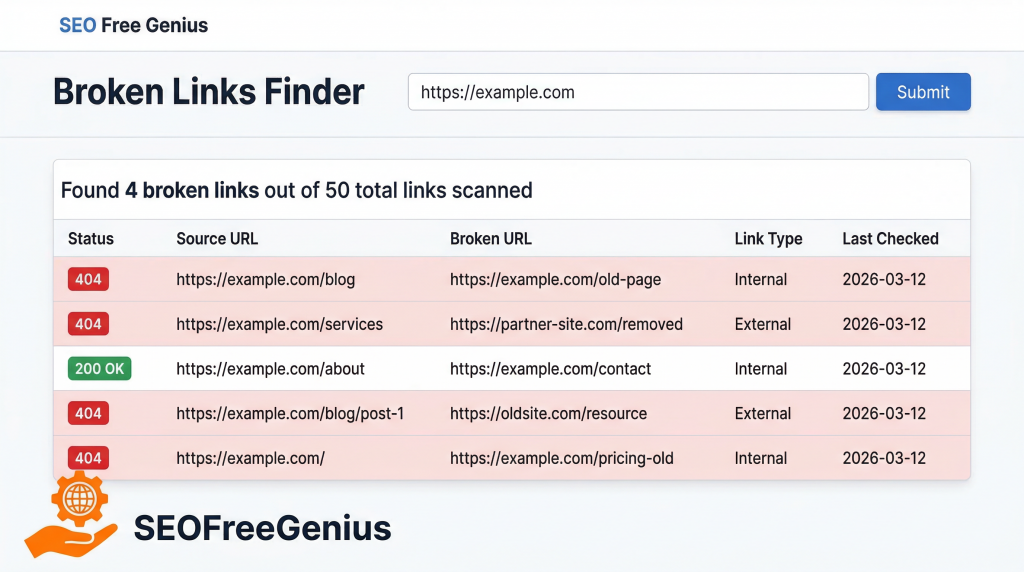
The easiest way to find broken links and 404 errors is with the Broken Links Finder on seofreegenius.
Step-by-step:
- Go to the Broken Links Finder tool (for example: [seofreegenius blog. blog2]
- Enter your homepage URL or a specific section URL you want to audit.
- Click Submit to start crawling your site.
- Wait while the tool checks internal and external links and collects HTTP status codes, including 404s.
When the scan finishes, you’ll see:
- A list of broken internal links (links within your site pointing to 404 pages)
- A list of broken outbound links (links from your site to other domains that return 404 or other error codes)
- The source pages where each broken link appears
You can usually export the results as CSV or copy them into a spreadsheet. Organize them with columns such as:
- Source URL (where the broken link lives)
- Broken URL (the 404 URL)
- Status code (404, 500, etc.)
- Link type (internal/external)
- Priority or notes (you’ll fill this in later)
You should also mention the Broken Links Finder in other contexts across the guide, so readers know they can rely on it for ongoing website maintenance SEO. [seofreegenius blog]
Method 2: Using Google Search Console
Google Search Console (GSC) is another powerful way to find URLs that Google sees as “Not found (404)”.[seotesting. seofreegenius blog]
Steps:
- Log in to Google Search Console and select your property.
- In the left menu, go to Pages (or Coverage in older versions).
- Scroll through the Not indexed / Excluded section and look for “Not found (404)”.synup+2
- Click it to see all URLs that Google tried to crawl but couldn’t find.
- Use the Export button to download the list of 404s for further analysis.
This report is essential because:
- It shows you what Google is trying to index
- It reveals old URLs, mistyped URLs, or outdated sitemaps that still point to non-existent pages. [seofreegenius blog. sitechecker]
For more detail, refer to Google Search Console Help on the Pages/Coverage report and handling 404 errors.seotesting+1
Method 3: Using Crawling Tools (Screaming Frog, etc.)
For larger sites or more advanced audits, you can use desktop crawlers like Screaming Frog SEO Spider:
- Screaming Frog crawls your site like a search engine and reports all URLs returning 404, 500, and 3xx status codes. [screamingfrog.co. searchatlas]
- The free version supports up to 500 URLs, which is enough for many small sites.
Basic workflow:
- Download and install Screaming Frog.
- Enter your site URL and start a crawl.
- Filter by Status Code = 404 to see broken pages.
- Export the list to combine with your Broken Links Finder and GSC exports.
You can use the Broken Links Finder as your online, lightweight option, and Screaming Frog or similar tools when you want a local crawl with deeper insights.
Section 3: Prioritizing Which 404 Errors to Fix First
Once you have your list of 404s, you’ll probably feel overwhelmed. The key is to prioritize, because not all broken pages are equally important.
Why Priority Matters
Fixing every 404 on a medium or large site in one sitting is rarely realistic. A prioritization framework helps you:
- Recover the most SEO value first
- Protect user journeys that directly impact revenue or conversions
- Avoid spending time restoring unimportant, low‑value URLs
A Simple Prioritization Framework
Use this simple priority ranking:
| Priority Level | URL Type / Scenario | Why It Matters |
| High | 404 pages with external backlinks | Losing link equity and authority |
| High | 404 pages with past high organic traffic | Losing proven traffic and rankings |
| High | 404 pages linked from navigation / key funnels | Directly hurting user journeys and conversions |
| Medium | Internal links from important posts to low‑value pages | Hurting UX but limited SEO value |
| Low | Old, no‑traffic pages with no backlinks | Minimal SEO and UX impact |
High-priority examples:
- An old blog post that ranked well and has backlinks, now returning 404
- A discontinued product page linked from tutorials and category pages
- A “services” page linked from your main menu that now errors
How to Check Backlink and Traffic Data
To prioritize high‑value 404 pages:
- Use tools like Ahrefs, Moz, or Semrush to check whether a 404 URL has external backlinks pointing to it. [sitechecker. seofreegenius blog]
- Use Google Analytics or similar analytics tools to see whether the page previously received significant organic traffic.[seofreegenius blog]
Any 404 page with strong backlinks or a proven traffic history should be treated as urgent.
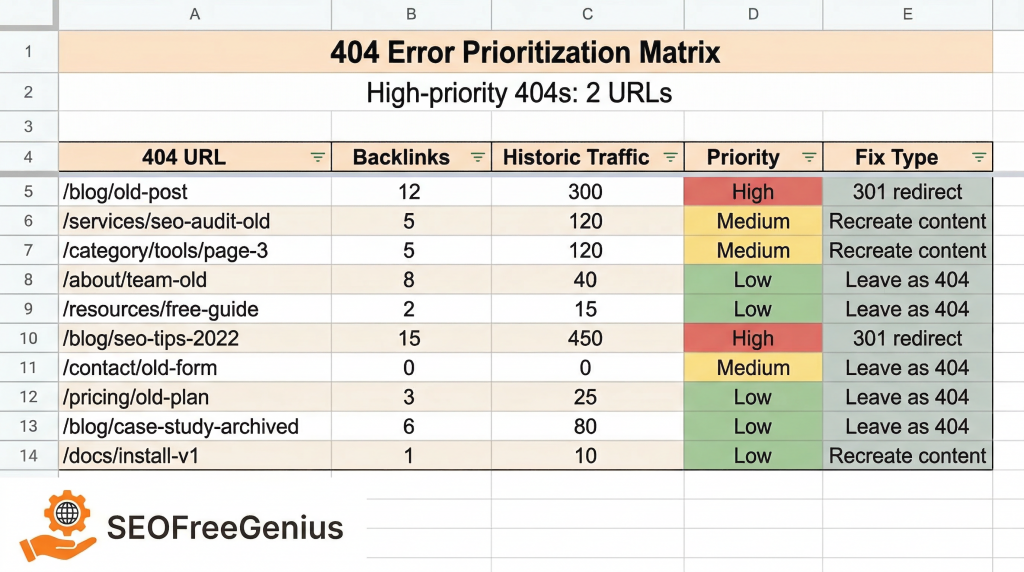
Create a Tracking Spreadsheet
Create a sheet with columns like:
- 404 URL
- Source pages (where it’s linked)
- Has backlinks? (Yes/No + tool used)
- Historic traffic? (High/Medium/Low)
- Priority (High/Medium/Low)
- Fix type (301 redirect / recreate page / leave as 404)
- Status (To do / In progress / Done)
Section 4: Creating a Redirect Strategy That Works
Now that your priorities are clear, it’s time to plan how you’ll fix each broken URL.
The Golden Rule of Redirects
Always redirect to the most relevant, closely related page—not just the homepage.
Redirecting every 404 to your homepage creates a poor user experience and can even be treated by Google as a soft 404, where the page looks like a “fake” replacement rather than a genuine match. [seofreegenius blog. developers.google]
Examples of good redirect targets:
- Old blog post about “On-page SEO checklist 2022” → New, updated “On-page SEO checklist guide”
- Discontinued product A → Newer version of product A, or the product category page
- Old “Services” page URL → New “Services” page with similar content
301 vs 302 Redirects (and Others)
According to Moz’s redirect guide, the main redirect types are:[moz]
- 301 – Moved Permanently
- Best for SEO when a URL or page has moved permanently
- Passes most or all link equity to the new URL
- Should be your default choice for fixing 404 errors and restructuring URLs
- 302 – Found (Temporary)
- Use when the change is temporary (e.g., maintenance, tests)
- Does not always pass full link equity
- Not ideal for long‑term URL changes
- 307 and meta refresh
- Specialist or outdated approaches
- Generally not recommended for typical SEO use cases
For most website owners, bloggers, and small businesses looking to fix 404 errors, 301 redirects are the safest and most effective choice.
Common Redirect Mistakes to Avoid
- Redirect chains
When URL A → B → C → D before reaching the final page.- Slows down load times
- Wastes crawl budget
- Dilutes link equitymoz+1
- Redirect loops
When URL A redirects to B and B redirects back to A (or a closed loop of URLs).- Causes browser errors and frustrates users
- Blocks crawlers from reaching content
- Redirecting to irrelevant pages
Sending every 404 to your homepage or a random category is confusing.- Can be treated like a soft 404 by Google
- Fails to meet user intent
Consolidation Strategy (When to Merge Pages)
Sometimes the best fix is to consolidate multiple old URLs into one stronger, updated page:
- You have 3 thin blog posts about similar topics that are now outdated
- You create a new, comprehensive guide that replaces them
- You set up 301 redirects from all three old URLs → the new guide
This consolidation:
- Preserves link equity from all old URLs
- Gives users a better, more complete resource
- Simplifies your site structure over time
You can find more best practices and examples in resources like Moz’s redirects guide and Google’s guidance on handling moved or removed content.[moz. developers.google]
Section 5: How to Create 301 Redirects Using the Htaccess Redirect Generator
Once your strategy is clear, you need a safe and simple way to implement 301 redirects.
What Is .htaccess and When Is It Used?
If your site runs on an Apache web server (including most shared hosting and many WordPress setups), redirects are often managed through a configuration file called .htaccess.[moz]
- It lives in the root directory of your site (e.g., /public_html/.htaccess).
- It controls rules for redirects, rewrites, and other server behavior.
- A single typo can break your site, so always backup first.
If you’re on seofreegenius.com regularly, you’ve likely seen other Apache‑related guides and tools, which makes the Htaccess Redirect Generator a natural fit for safe redirect creation.
Introducing the Htaccess Redirect Generator
The Htaccess Redirect Generator on seofreegenius. (for example: https://seofreegenius.com/htaccess-redirect-generator) lets you:
- Generate single 301 redirects quickly without remembering syntax
- Create bulk redirect rules from your 404 list
- Copy clean, ready‑to‑paste code into your .htaccess file
This is ideal for website owners and bloggers on budget hosting who want to fix broken links without hiring a developer.
Step‑by‑Step: Creating a WWW / non‑WWW Redirect
- Open the Htaccess Redirect Generator: https://seofreegenius.com/htaccess-redirect-generator/.
- Under “Select redirect type”, choose one option:
- “Redirect from www to non‑www”, or
- “Redirect from non‑www to www”.
- In “Enter your domain name”, type your domain only (for example: seofreegenius.com), without http://, https://, or www.
- Click the “Get .htaccess Code” button.
- Copy all of the generated code from the box in step 4.
- Open your .htaccess file via FTP or your hosting file manager.
- Paste the generated code near the top of the file, below any existing RewriteEngine On line if there is one.
- Save the file, then test both versions of your domain in the browser (with and without www) to confirm that they correctly redirect to the preferred version.
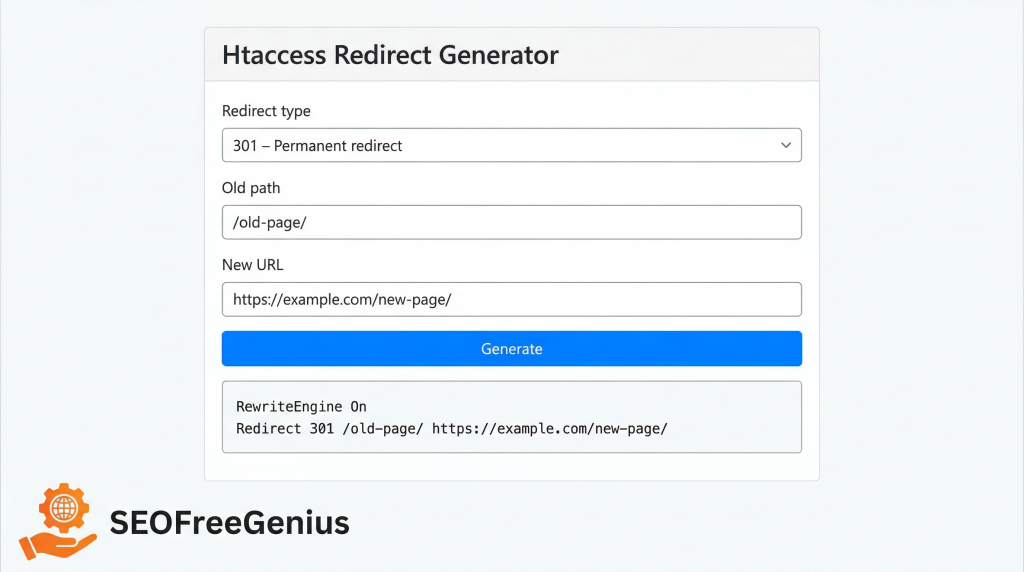
Bulk Redirects from Your 404 List
If you’ve exported dozens of 404 URLs from the Broken Links Finder and GSC, you can:
- Map old URLs → new URLs in a spreadsheet.
- Paste them into the bulk section of the Htaccess Redirect Generator (if available) or generate them one by one.
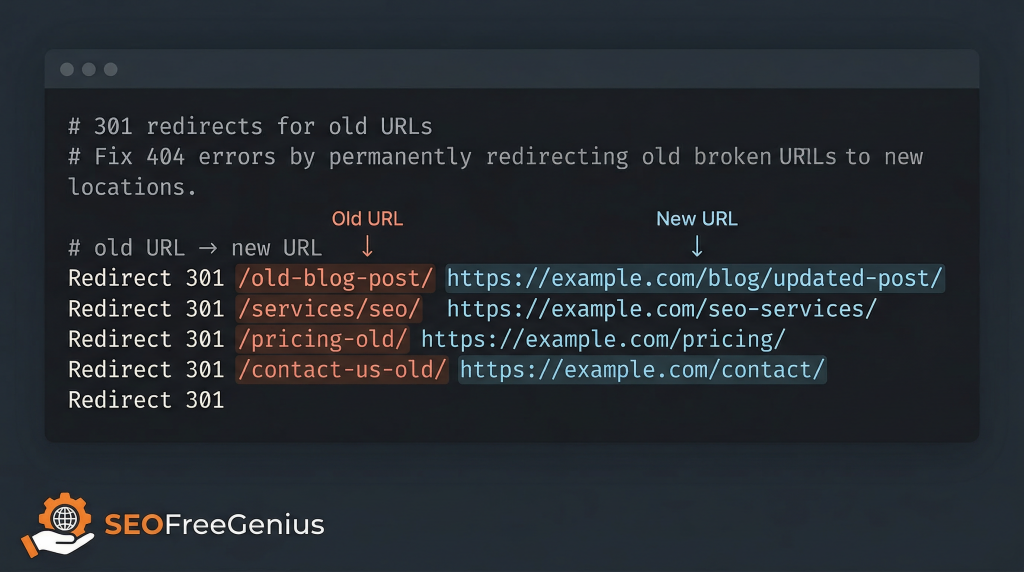
- Combine all the generated rules:
Redirect 301 /old-page-1/ https://seofreegenius.com/blog/new-guide/
Redirect 301 /seo-checklist-2022/ https://seofreegenius.com/blog/seo-checklist/
Redirect 301 /services/ https://seofreegenius.com/seo-services/
- Backup your .htaccess file, then paste all rules.
- Save and test multiple URLs.
WordPress-Specific Redirect Options
If you’re using WordPress and prefer not to edit .htaccess directly:
- Install a plugin like Redirection, Yoast SEO Premium, or Rank Math.[moz]
- Use the plugin interface to map old URLs to new URLs as 301 redirects.
- Check that you’re not creating duplicate rules (e.g., both plugin and .htaccess rules for the same URL).
Other Platforms (Shopify, Wix, Squarespace)
If your site runs on a hosted platform:
- Shopify – Use the URL Redirects section in Shopify admin to add 301 redirects.
- Wix – Use Wix’s redirect manager under SEO settings to map old URLs to new ones.
- Squarespace – Use URL Mappings under Advanced settings to set up 301 redirects.
You can still use the Htaccess Redirect Generator as a learning tool to understand correct mapping, even if the final implementation uses a graphical interface.
Important Tool Disclaimer
Before editing .htaccess or adding redirects:
- Always back up your site and configuration files.
- If possible, test new rules on a staging site first.
- A single typo in .htaccess can cause your site to return errors.
Tools like the Htaccess Redirect Generator and Broken Links Finder help you identify and generate fixes, but you remain responsible for changes on your hosting environment.
Section 6: Verifying Your Redirects Work and Pages Get Indexed
Fixing 404s is only half the story. You also need to verify that:
- Your redirects are working correctly.
- Google recognizes the new URLs and is indexing them.
Step 1: Test Redirects
Use one or more of these methods:
- Type old URLs in your browser and ensure they land on the correct new page.
- Use an online redirect checker to verify the status code (should be 301) and the final destination.
- Run a small crawl with Screaming Frog or similar tools to see if any 3xx chains or loops still exist. [screamingfrog.co. moz]
Step 2: Use the Google Index Checker
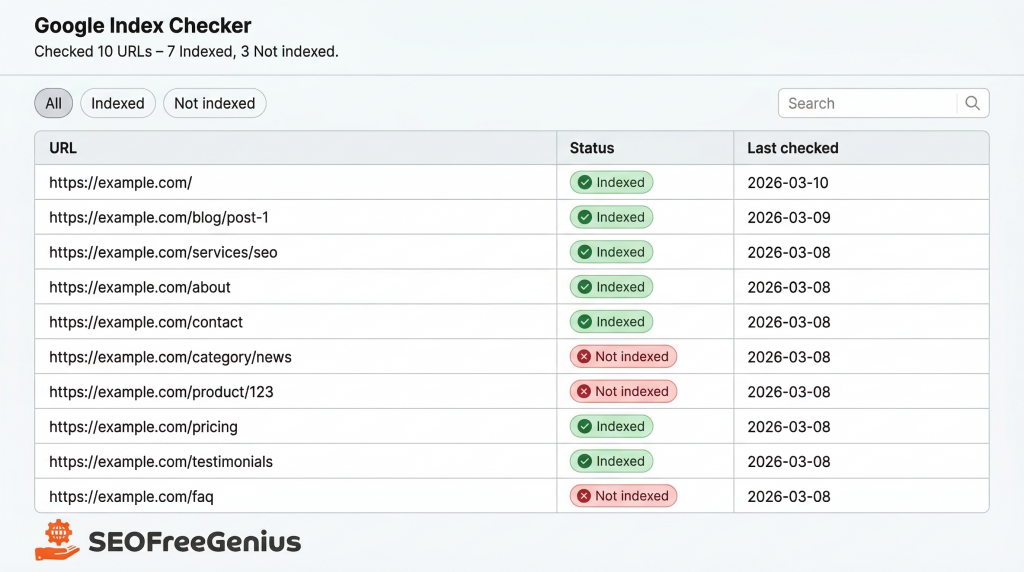
To confirm that your new destination URLs are actually indexed by Google, use the Google Index Checker tool on seofreegenius (for example: https://seofreegenius.com/google-index-checker). [seofreegenius blog. Blog2]
How to use it:
- Open the Google Index Checker.
- In the “Enter a URL” field, paste one of your destination URLs (the URL you redirected to).
- Click the “Submit” button and wait for the tool to check Google.
- Review the result to see whether that URL is indexed or not.
If a key page is not indexed, use the result as a quick warning so you can:
- Inspect the URL in Google Search Console.
- Use “Request indexing” for important URLs.
- Double‑check that the URL returns 200 OK and isn’t blocked by robots.txt or a noindex tag. [seofreegenius blog1. Blog2]
Step 3: Monitor for New 404s Over Time
Fixing 404s is not a one‑time project. As you publish new content, update URLs, and remove old pages, new errors can appear.
Set up a basic maintenance schedule:
- Run the Broken Links Finder monthly to catch new broken links early. [seofreegenius blog1. Blog2]
- Check Google Search Console > Pages/Coverage monthly for “Not found (404)” entries. [consumableai. seofreegenius blog]
Re‑run a small crawl with Screaming Frog or similar tooling when you do major site changes.
Section 7: Preventing Future 404 Errors
Prevention is easier (and cheaper) than constant cleanup. A few habits can dramatically reduce the number of new 404s your site generates.
Best Practices for URL Structure
- Use clean, descriptive URLs that don’t rely on dates or fragile structures.
- Avoid changing URLs just for cosmetic reasons.
- When you must change a URL, plan the 301 redirect before publishing the change.
Plan Redirects Before Major Changes
Before:
- Redesigns
- Domain changes
- Large content audits or pruning
Always:
- Export a list of existing URLs.
- Decide which URLs will be deleted, merged, or moved.
- Prepare a mapping file (old → new).
- Implement redirects with the Htaccess Redirect Generator or platform tools.
Regular Site Maintenance SEO
Build website maintenance SEO into your monthly or quarterly routine:
- Run Broken Links Finder to scan for broken links frequently.[seofreegenius blog]
- Use the Google Index Checker to confirm that key new pages are indexed.
- Monitor Search Console for new 404 or soft 404 issues.
Use Helpful Custom 404 Pages
You will never reach zero 404s, and that’s okay. When 404s do happen, a helpful custom 404 page can turn a dead‑end into a useful experience. [developers.google. seofreegenius blog]
A good custom 404 page should:
- Explain clearly that the page can’t be found
- Offer a search box
- Include links to key sections (home, blog, products, contact)
- Suggest popular articles or categories
- Match your site’s branding so users feel they’re still “inside” your experience
Remember: the server should still return a true 404 status code for missing pages, even if the 404 page looks visually like part of your site.[developers.google]
Conclusion
Fixing 404 errors and implementing redirects correctly is one of the highest‑impact technical SEO tasks you can tackle—especially if your site has been around for a while.
The complete workflow looks like this:
- Find broken links and 404 URLs using the Broken Links Finder, Google Search Console, and crawling tools.
- Prioritize high‑impact URLs (backlinks, historic traffic, key funnels) using a simple matrix.
- Redirect important 404s with a smart 301 redirect strategy, using the Htaccess Redirect Generator or platform tools.
- Verify your redirects and indexing with testing tools and the Google Index Checker.
- Monitor and prevent future 404s through better URL planning and regular maintenance.
Fixing 404s isn’t a one‑time task—it’s ongoing website maintenance that protects your UX, preserves hard‑earned link equity, and makes it easier for Google to trust and rank your content.seofreegenius+2
If you’re not sure where to start, begin with a full scan using the Broken Links Finder on seofreegenius, then work down your highest‑priority 404s this week.
By treating SEO Free Genius as your all‑in‑one toolbox for backlink checks, broken links, redirects, and indexing diagnostics, you can run a complete backlink health check whenever you need it—without paid software.[seofreegenius blog. seofreegenius]
FIX 404 ERRORS & REDIRECTS CHECKLIST
(Website Maintenance SEO)
If you’d like a simple, step‑by‑step way to apply everything in this guide, use this printable checklist as your roadmap. It walks you through the exact process to find, prioritize, fix, and monitor 404 errors and redirects, so you can protect your traffic and SEO without missing any critical steps.
- PREP AND BACKUPS
□ Backup your entire website (files and database).
□ Backup your .htaccess file (if you use Apache).
□ Backup any redirect/plugin configuration files.
□ If possible, create or use a staging site to test changes first.
- FIND ALL 404 ERRORS
TOOLS: Broken Links Finder, Google Search Console, crawler (e.g., Screaming Frog)
□ Run Broken Links Finder on your site to detect:
□ Broken internal links (links to your own site that return 404).
□ Broken external links (links to other sites that return 404).
□ Export the Broken Links Finder scan results.
□ Copy or import the results into a spreadsheet.
□ In Google Search Console:
□ Open the Pages / Coverage report.
□ Filter for “Not found (404)” URLs.
□ Export the list of 404 URLs. □ (Optional) Crawl the site with a desktop crawler such as Screaming Frog.
□ Consolidate all exported lists into one master 404 list in your spreadsheet.
- PRIORITIZE WHAT TO FIX FIRST
In your spreadsheet, add columns for: Backlinks, Historic Traffic, Priority, and Fix Type.
□ Mark as HIGH PRIORITY:
□ 404 URLs that have external backlinks.
□ 404 URLs that previously received significant organic traffic.
□ 404 URLs linked from navigation menus or key conversion funnels.
□ Mark as MEDIUM PRIORITY:
□ 404 URLs coming from internal links on important content pages.
□ Mark as LOW PRIORITY:
□ Old URLs with no backlinks and no meaningful traffic.
□ Decide the appropriate fix type for each 404 URL:
□ 301 redirect to a relevant live page.
□ Recreate or restore the missing content.
□ Leave as a genuine 404 if the page is obsolete and has no value.
- PLAN REDIRECT TARGETS
For every HIGH or MEDIUM priority 404 URL:
□ Choose the most relevant replacement page on your site.
□ Avoid redirecting everything to the homepage.
□ For multiple similar old pages, plan to consolidate them into one updated page.
□ Record the final target URL for each 404 URL in your spreadsheet (old URL → new URL).
- CREATE 301 REDIRECTS
TOOLS: Htaccess Redirect Generator, platform redirect tools, WordPress plugins
IF YOU USE APACHE / .HTACCESS:
□ Open Htaccess Redirect Generator.
□ For each old URL and new URL pair:
□ Select 301 redirect type.
□ Generate the redirect rule.
□ Copy all generated rules into a text file for review.
□ Connect to your server (FTP or file manager).
□ Open the .htaccess file in the site’s root directory.
□ Paste the new 301 redirect rules in the appropriate place.
□ Save the file.
IF YOU USE WORDPRESS REDIRECT PLUGINS:
□ Install or confirm a redirect plugin (e.g., Redirection, Yoast, Rank Math).
□ Add 301 redirects for each old → new URL mapping using the plugin interface.
□ Check for and remove any duplicate or conflicting redirect rules.
IF YOU USE SHOPIFY, WIX, SQUARESPACE OR SIMILAR:
□ Open your platform’s URL redirect settings.
□ Create 301 redirects for each old URL pointing to the chosen new URL.
- TEST YOUR REDIRECTS
□ Manually type a sample of old URLs into your browser.
□ Confirm they land on the correct relevant page.
□ Use a redirect checker tool to verify:
□ The redirect status code is 301 (Moved Permanently).
□ There are no redirect loops (URL A → URL B → URL A).
□ There are no long redirect chains (URL A → B → C → D).
- VERIFY INDEXING OF DESTINATION PAGES
TOOLS: Google Index Checker, Google Search Console
□ Open Google Index Checker.
□ Enter the main destination (new) URLs that you redirected to.
□ Check which URLs are currently indexed by Google.
FOR IMPORTANT PAGES THAT ARE NOT INDEXED:
□ Inspect the URL in Google Search Console.
□ Confirm the URL:
□ Returns a 200 OK status.
□ Is not blocked by robots.txt.
□ Does not have a noindex tag.
□ Is included in your XML sitemap (if appropriate).
□ Use “Request indexing” in Google Search Console for high‑value URLs.
- CLEAN UP BROKEN EXTERNAL LINKS
From your Broken Links Finder report:
□ Filter to show only broken external links.
For each broken external link:
□ Try to find a new, valid URL from the same site (updated article or resource).
□ If a good replacement exists, update the link to the new URL.
□ If not, remove the broken link or replace it with a different high‑quality source.
- IMPROVE YOUR 404 PAGE
□ Ensure missing pages return a real 404 HTTP status code (not 200).
Your custom 404 page should:
□ Clearly explain that the page cannot be found.
□ Provide a search box to help users find what they need.
□ Include links to key sections (Home, Blog, Services, Contact).
□ Highlight a few popular or recommended articles/pages.
□ Match your site’s design so users know they’re still on your website.
- SET UP ONGOING MAINTENANCE
MONTHLY TASKS:
□ Run Broken Links Finder to detect new broken links.
□ Check Google Search Console Pages / Coverage report for new “Not found (404)” URLs.
WHENEVER YOU PLAN MAJOR CHANGES (REDESIGN, MIGRATION, PRUNING):
□ Export a list of current URLs.
□ Decide which URLs will be deleted, merged, or moved.
□ Prepare an old URL → new URL mapping file in advance.
□ Implement 301 redirects before or at launch.
□ Test redirects and key user journeys after the changes go live.
NOTES AND REMINDERS
□ Always back up your site and configuration files before editing .htaccess or redirects.
□ Where possible, test new redirects on a staging or development site first.
□ Fixing 404 errors and maintaining redirects is an ongoing process, not a one‑time task.
Download the printable 404 & Redirect Checklist (PDF).
FAQ: 404 Errors, Redirects, and SEO
1. How long do 301 redirects last?
A 301 redirect is intended to be permanent, and best practice is to keep it in place indefinitely. Removing a 301 too soon can confuse users and search engines and risk losing the link equity that has already been transferred.[moz]
2. Will I lose PageRank or SEO value with redirects?
A properly implemented 301 redirect passes most or all link equity from the old URL to the new one. Some temporary fluctuation can occur while search engines process the change, but 301s are still the safest way to preserve value when URLs change.[moz]
3. Should I redirect or recreate deleted pages?
It depends:
- If the deleted page had valuable backlinks or consistent traffic, consider recreating it or redirecting it to a highly relevant alternative page.
- If the content is obsolete and has no SEO value, it’s fine to return a 404 or 410 as Google recommends. [seofreegenius blog. developers.google]
4. How many redirects are too many?
There’s no fixed number, but you should:
- Avoid long redirect chains (A → B → C → D). Always redirect original URLs directly to the final destination.
- Avoid having multiple redirects on every important user journey, as they can slow down performance and complicate crawling. [seofreegenius blog. Moz]
5. Do 404 errors still hurt my SEO if I have a custom 404 page?
A friendly custom 404 page greatly improves UX, but it doesn’t prevent the indirect SEO issues if many important URLs are missing—such as lost link equity and wasted crawl budget. You should still fix high‑impact 404s with redirects or recreated content. [developers.google. seofreegenius blog]
6. Can I redirect to other domains?
Yes, you can redirect from one domain to another (e.g., oldbrand.com → newbrand.com) using 301 redirects. Search engines do accept cross‑domain redirects, but they may scrutinize them more closely, so make sure:[moz]
- The content is genuinely equivalent or strongly related.
- The redirect is permanent and not part of a spammy scheme.
7. How often should I check for 404 errors?
For most small and medium sites, checking monthly is ideal:
- Run Broken Links Finder monthly.
- Review Google Search Console > Pages/Coverage monthly.
- Do a deeper crawl after major site changes.
High‑change or large sites may need weekly checks.
8. What’s the difference between a soft 404 and a hard 404?
- A hard 404 returns an actual 404 HTTP status code, clearly telling search engines that the page doesn’t exist. [seofreegenius blog. developers.google]
- A soft 404 returns 200 OK or redirects to an irrelevant page (e.g., homepage) but looks empty or error‑like to Google.
Soft 404s confuse crawlers and are considered a quality issue. Always ensure your missing pages return a true 404, and your redirects point to relevant content. [seofreegenius blog. developers.google]
Samir H. M. — SEO Expert
5+ years building SEO tools. SEOFreeGenius creator—50+ sites to #1.
All Articles →
Samir H. M. is the creator of [seofreegenius.com], offering 66+ free SEO tools from Riyadh. He’s hands-on tested and built features like plagiarism checkers and backlink tools, plus 36 guides to help sites rank better. Practical, no-BS advice for real users.