
Introduction
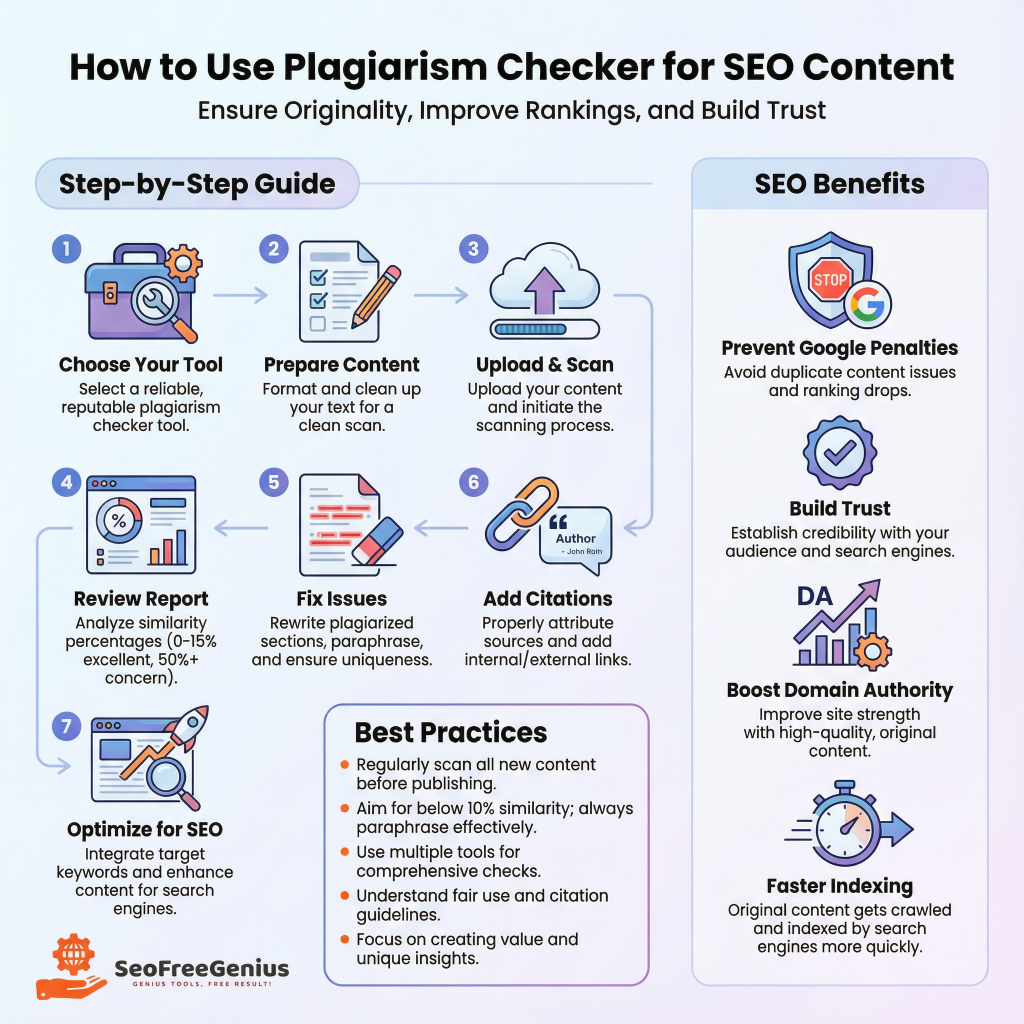
In 2024, creating original, high-quality content has become essential for both user engagement and search engine rankings. Google’s algorithms increasingly prioritize authentic, plagiarism-free content, making plagiarism detection tools a critical part of any content creator’s workflow. Whether you’re running a blog, managing a website, or creating marketing materials, understanding how to effectively use a plagiarism checker ensures your content remains original while boosting your SEO performance. The challenge for modern content creators is not just writing good content—it’s ensuring that content is completely original and optimized for search engines. Plagiarism checkers serve as your first line of defense against accidental content duplication, which can severely damage your search rankings and website authority. In this guide, we’ll walk you through everything you need to know about using plagiarism checkers to maintain content originality while maximizing your SEO potential.
What Is a Plagiarism Checker and Why Does It Matter for SEO?
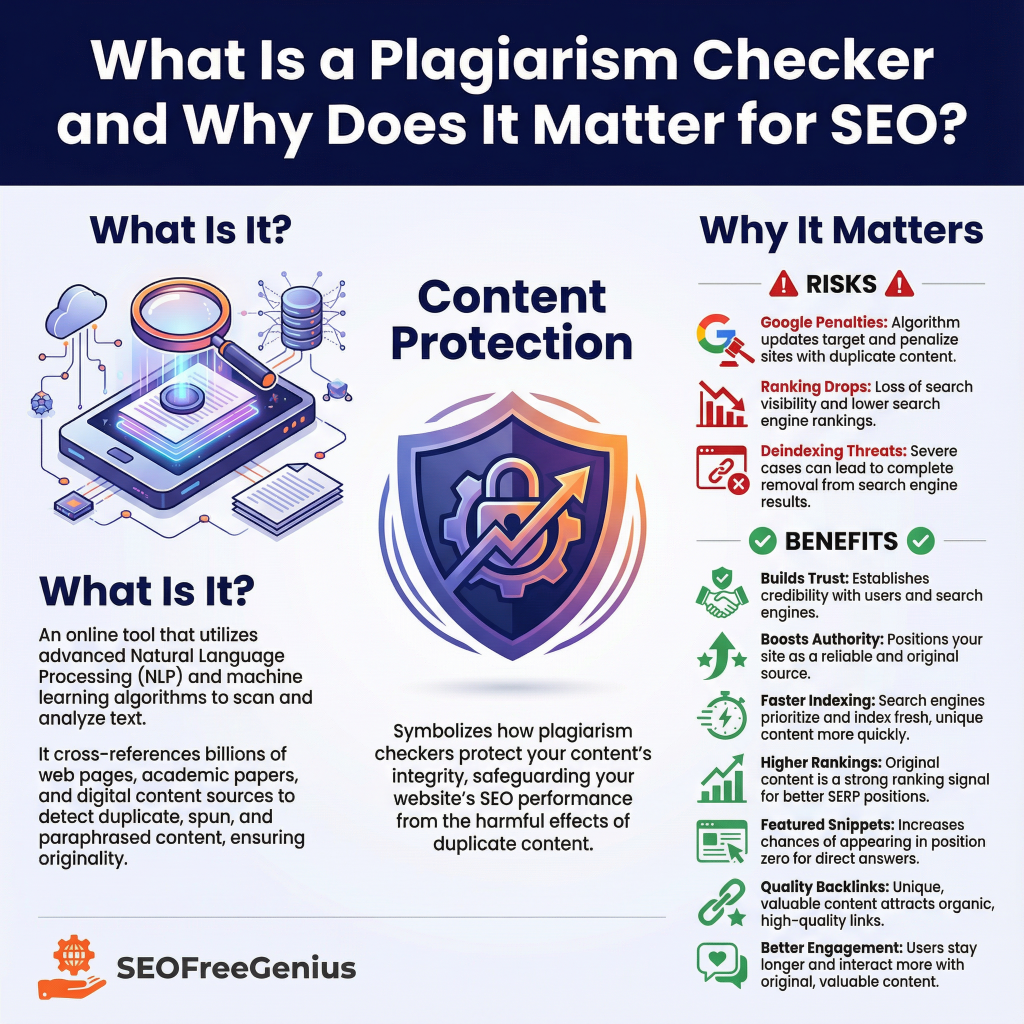
A plagiarism checker is an online tool that scans your content against billions of web pages and academic databases to detect duplicate or highly similar text. These tools use advanced algorithms, including natural language processing and machine learning, to identify matching phrases, paraphrased content, and potential plagiarism issues.
For SEO professionals and content creators, plagiarism checkers matter for several critical reasons:
- Google Penalties: Duplicate or plagiarized content can result in severe Google algorithm penalties, causing your rankings to plummet and your website visibility to disappear entirely.
- User Trust: Original content builds credibility and trust with your audience, which translates into higher engagement rates and better conversion metrics.
- Domain Authority: Search engines favor websites that consistently publish unique, authoritative content. Plagiarism-free material helps establish your domain authority over time.
- Faster Indexing: Original content is indexed by Google more quickly and reliably than content with plagiarism concerns.
Step-by-Step Guide: How to Use a Plagiarism Checker for Your SEO Content
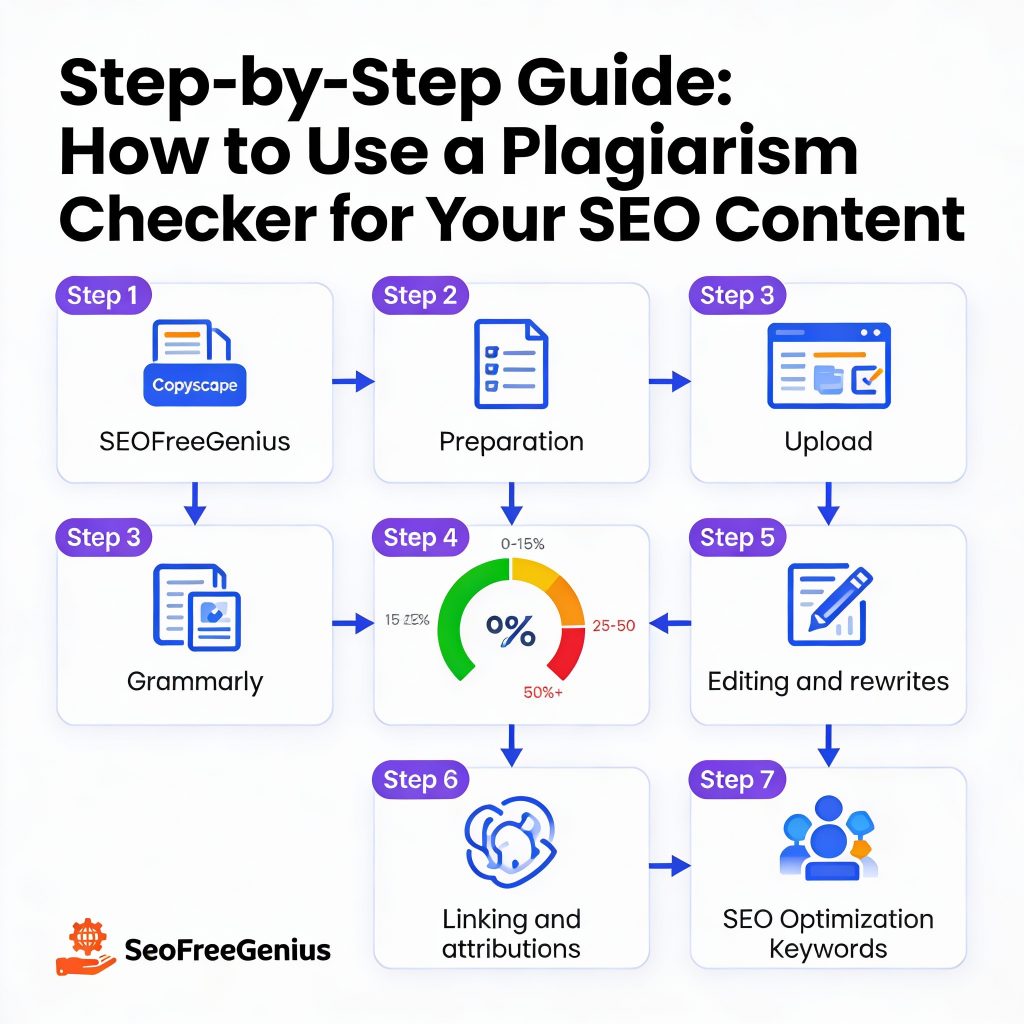
Step 1: Choose the Right Plagiarism Checker Tool
Not all plagiarism checkers are created equal. Different tools offer varying levels of accuracy, database size, and features. When selecting a plagiarism checker for SEO content, consider these top options:
Free and Effective Options:
- SEOFreeGenius Plagiarism Checker (https://seofreegenius.com/plagiarism-checker/): A robust free tool that scans your content against online sources and highlights matching passages. It supports up to 1,000 words per search and provides instant similarity percentages—perfect for quick content checks before publishing.
- Copyscape (https://www.copyscape.com): One of the most trusted plagiarism detection tools, Copyscape uses Google as its search provider and delivers highly accurate results by post-processing search findings.
- Grammarly Plagiarism Checker (https://www.grammarly.com/plagiarism-checker): This AI-powered tool cross-references your text against over 16 billion web pages and academic papers, making it ideal for comprehensive content verification.
- Quetext (https://www.quetext.com): Features DeepSearch™ technology that searches billions of sources and includes AI detection capabilities to identify AI-generated content alongside plagiarism.
Before running your content through a plagiarism checker, ensure it’s ready for scanning:
- Finalize Your Draft: Complete your article or web copy and review it for obvious errors before checking.
- Section-by-Section Scanning: For longer articles (over 1,000 words), split your content into sections to maximize accuracy and stay within tool limits. Make sure you are within the limit. Check your exact word count with our [Word Counter] before pasting.
- Copy-Paste Format: Most plagiarism checkers accept text pasted directly. Simply copy your finalized content and prepare it for upload.
- Document Upload: If your tool supports it (like Copyscape and others), you can upload .DOC, .DOCX, .PDF, or .TXT files directly.
Step 3: Upload or Paste Your Content
Now that your plagiarism checker is selected, upload your content:
- Access the Tool: Open your chosen plagiarism checker (for example, https://seofreegenius.com/plagiarism-checker/)
- Paste Your Text: Copy and paste your article content into the provided text box, or use the file upload feature if available
- Submit for Scanning: Click the “Check for Plagiarism” or equivalent button
- Wait for Results: The tool will scan your content against its database, typically completing the check within seconds to a few minutes
Step 4: Review the Similarity Report
Once the scan is complete, your plagiarism checker will provide a detailed report showing:
Key Metrics to Review:
- Similarity Percentage: The overall percentage of your content that matches existing sources. Aim for 80-90% originality minimum. Some overlap is normal, especially for common industry terms.
- Highlighted Matching Passages: The tool will highlight or list specific sentences that match existing content, allowing you to pinpoint exact problem areas.
- Source Attribution: The tool identifies which websites or documents your content matched against, helping you understand where duplicates came from.
- Match Context: Review whether matches are direct copies, minor paraphrasing, or just similar phrasing of common concepts.
Interpreting Your Results:
- 0-15% Similarity: Excellent—your content is highly original
- 15-25% Similarity: Good—minor overlaps are acceptable for common phrases
- 25-50% Similarity: Requires review—identify and rewrite matching sections
- 50%+ Similarity: High concern—substantial rewriting or content reconstruction needed
Step 5: Identify and Fix Plagiarism Issues
When your plagiarism report reveals matches, take these corrective steps:
For Minor Matches (Under 20% Similarity):
- Review the highlighted passages and determine if they’re common industry terminology
- If acceptable, proceed with publication; Google understands that certain phrases are industry-standard
- Add proper citations if you’ve intentionally quoted sources
For Significant Matches (20-50% Similarity):
- Manually rewrite matching sections in your own words
- Change sentence structure, use synonyms, and reorganize ideas
- Ensure your rewritten content maintains the original meaning while being completely different in phrasing
- Run the revised sections through the plagiarism checker again to confirm changes
For Major Plagiarism Concerns (Over 50% Similarity):
- Consider whether you’ve accidentally duplicated substantial portions from source material
- Rewrite entire sections from scratch
- Use the plagiarism report to identify source pages and create original content based on that research
- Always recheck after major revisions
💡 Quick Fix: Found too many matches? Don’t rewrite manually. Use our [Article Rewriter] to instantly paraphrase your text into unique content.
After rewriting, ensure you didn’t lose your SEO focus. Run a final check with our [Keyword Density Checker].
Step 6: Integrate Proper Citations and Attribution
Even if your content is original, citing sources strengthens your SEO authority and demonstrates research quality. For plagiarism checkers that detect highlighted source matching, add proper citations:
- Link to Sources: When discussing other websites or tools, embed natural links within your content. For example, mention “SEOFreeGenius offers a comprehensive suite of SEO tools” and link naturally to https://seofreegenius.com/
- Quote Attribution: When quoting directly, keep quotes brief (under 20 words) and attribute them clearly with author and source information embedded in the text
- Avoid Block Quotes: Instead of block quotes, paraphrase information and link to the original source, which is better for SEO
- Benchmark Content: If you’re citing statistics or findings, link to the original research organization or website
Step 7: Optimize for SEO While Ensuring Originality
Creating original content that also ranks well requires balancing plagiarism concerns with SEO best practices:
Keyword Optimization:
- Include your target keyword naturally in headings and body text
- Avoid keyword stuffing, which can trigger plagiarism flags by making content sound unnatural
- Research keyword variations that appear in your target search results, then write original content incorporating those terms contextually
Internal Linking:
- Link to your own pillar content and tool pages, such as your word counter, meta tags analyzer, or SEO tools homepage (https://seofreegenius.com/)
- Internal links improve SEO while making it clear you’re creating original content clusters around specific topics
External Linking Best Practices:
- Link to authoritative sources like industry leaders, research institutions, and established publications
- Place external links naturally within content where they provide genuine value to readers
- Avoid over-linking; typically 3-5 external links per 1,000 words is optimal
Content Depth and Uniqueness:
- Expand on topics with original research, case studies, or unique perspectives
- Include original examples, screenshots, or data visualizations
- Answer reader questions comprehensively to create content more valuable than competitors
Best Practices for Maintaining Content Originality
Use a Pre-Publication Plagiarism Checking Process
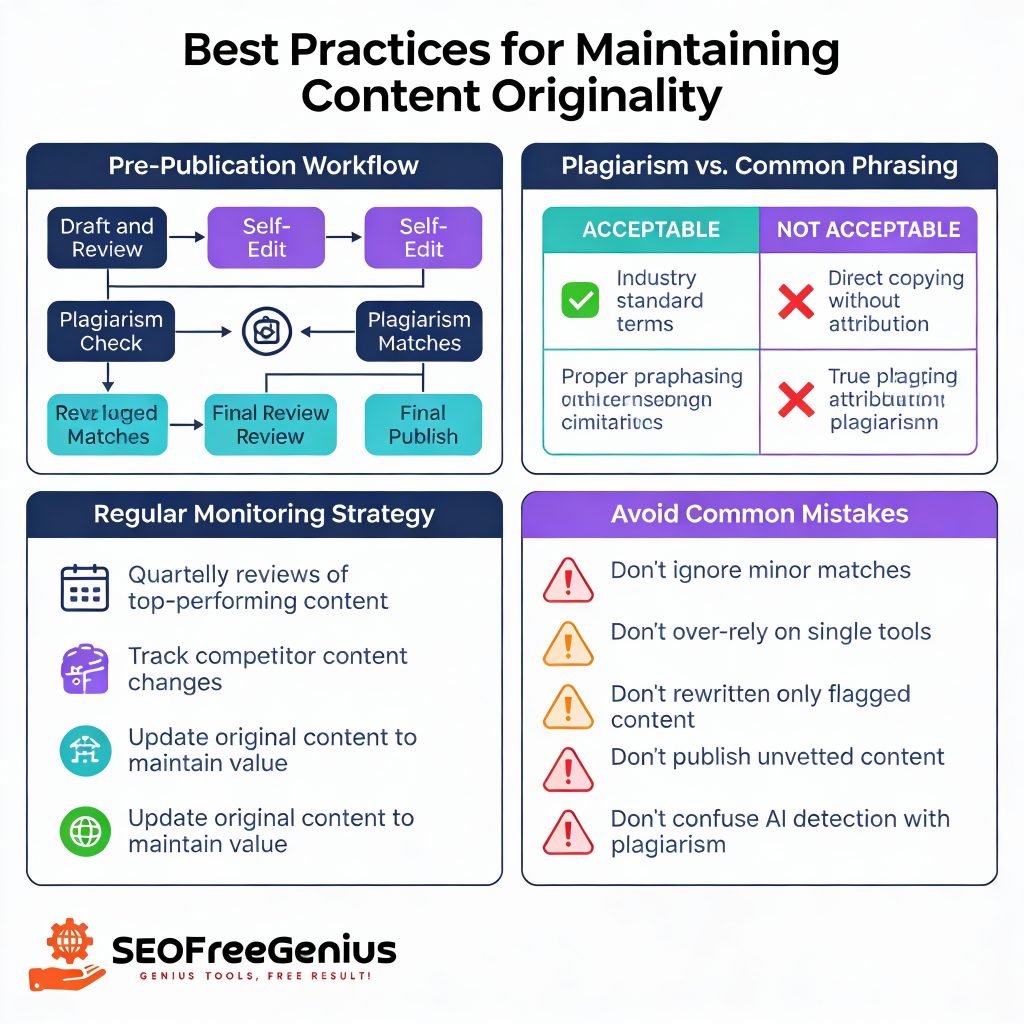
Establish a content workflow that includes plagiarism checking before every publication:
- Draft and Review: Complete your article with proper citations marked
- Self-Edit: Review for clarity, readability, and flow
- Plagiarism Check: Run through your selected tool
- Revise if Needed: Address any flagged matches
- Final Review: Confirm all revisions are correct
- Publish: Deploy your verified original content
Understand What Constitutes Plagiarism vs. Common Phrasing
Not every content match is plagiarism. Understand the difference:
- Acceptable Similarity: Common industry terms (like “SEO optimization,” “content marketing,” “plagiarism checker”) will naturally appear across websites
- Proper Paraphrasing: Rewording ideas while maintaining meaning is acceptable if properly cited
- Accidental Similarity: Sometimes independent writers will phrase ideas similarly without intentional copying
- True Plagiarism: Copying sentences or paragraphs directly without attribution or permission
Google’s algorithms account for these differences and focus on overall content uniqueness rather than penalizing normal phrase overlap.
Monitor Existing Content Regularly
Content originality isn’t a one-time check. Continue monitoring:
- Quarterly Reviews: Recheck your top-performing content periodically to ensure no plagiarism issues have developed
- Competitor Content Changes: If competitors republish similar content, your older article might develop higher similarity scores
- Update Original Content: Refresh and expand your best content to maintain its originality value and SEO authority
- Track Variations: Keep tabs on whether any of your content has been republished without permission across the web
Best Acceptable Similarity Rates for SEO Content
According to SEO best practices and Google guidelines:
- Blog Posts: 85-100% original content is acceptable; minor common phrases don’t trigger penalties
- Product Descriptions: Aim for 90%+ originality; industry terminology may account for the 10% similarity
- News Articles: 80%+ original with proper citations to news sources
- Educational Content: 85-100% original; citations of research are expected and encouraged
Common Plagiarism Checking Mistakes to Avoid
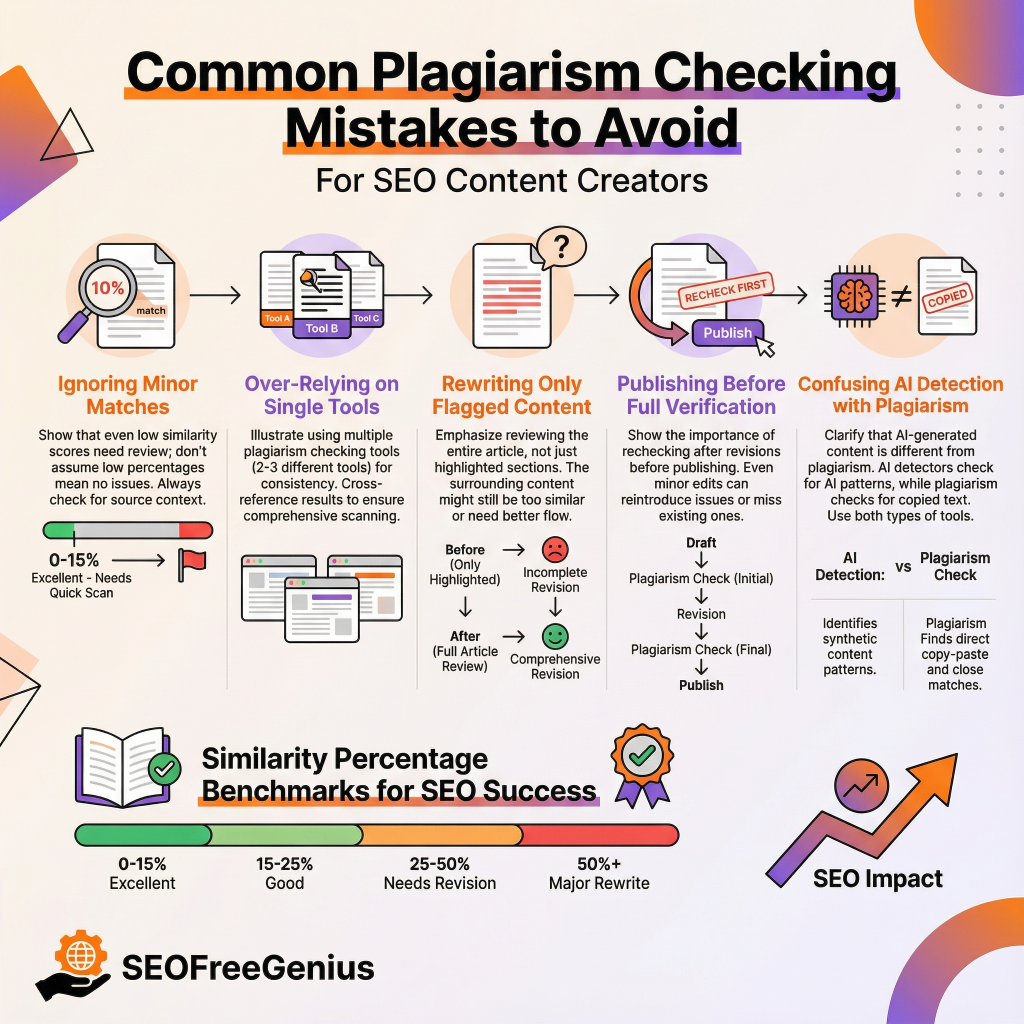
Mistake 1: Ignoring Minor Matches
Many content creators see a low plagiarism percentage and assume their content is fine without reviewing the highlighted matches. Always investigate what’s matching, even if your similarity score is acceptable.
Mistake 2: Over-Relying on Single Tools
Different plagiarism checkers have different databases and algorithms. For critical content:
- Run checks through 2-3 different tools
- Compare results to ensure consistency
- Use free tools like SEOFreeGenius Plagiarism Checker for quick checks and paid tools like Copyscape for comprehensive verification
Mistake 3: Rewriting Only Flagged Content
If your plagiarism checker highlights 20% of your content, don’t just rewrite those sections. Review the entire article to ensure the remaining 80% is also original and doesn’t contain subtle duplication that the tool might have missed.
Mistake 4: Publishing Before Full Verification
Never publish content immediately after a plagiarism check, especially if matches are detected. Always:
- Allow time to review and rewrite
- Run a second check after revisions
- Verify the final version meets your originality standards
Mistake 5: Confusing AI Detection with Plagiarism
Some modern tools detect AI-generated content separately from plagiarism. Remember:
- AI-generated content is different from plagiarized content
- Google may penalize AI-generated content that isn’t disclosed
- Use AI writing tools as drafting aids, then rewrite for originality and human review
SEO Impact: How Plagiarism Affects Your Rankings
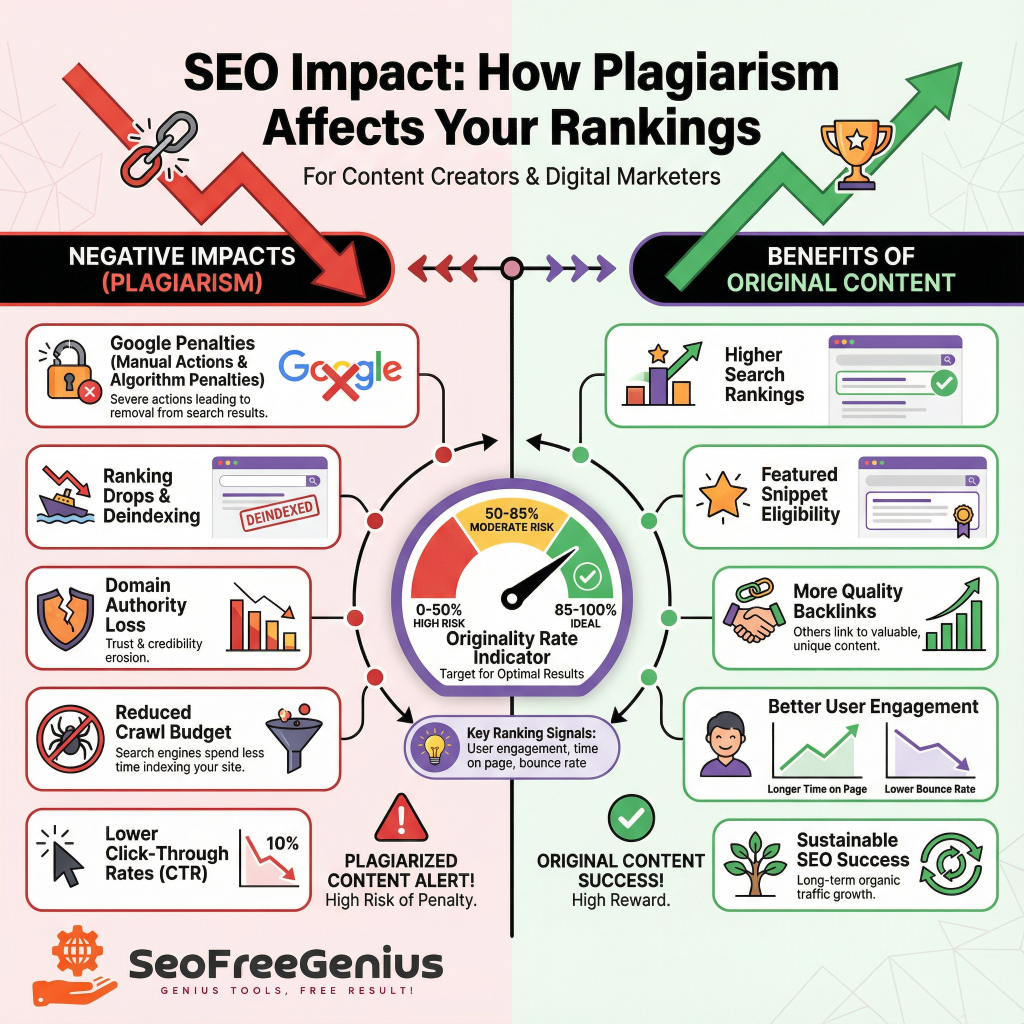
Understanding the SEO consequences of plagiarism helps motivate strict adherence to originality standards:
Google explicitly penalizes duplicate content:
- Manual Action Penalties: Google’s Search Quality team may manually review suspicious content and apply penalties
- Algorithm Penalties: Google’s core algorithms automatically down rank content with high plagiarism indicators
- De-indexing: In severe cases, Google may remove plagiarized pages entirely from its index
Beyond direct penalties:
- Domain Authority Loss: Repeated plagiarism issues damage your entire domain’s trustworthiness
- Click-Through Rate Drop: Even if your page appears in search results, users may click competitors’ original content instead
- Reduced Crawl Budget: Google allocates crawl budget (the number of pages it crawls daily) based on site quality; plagiarism reduces your allocation
Positive SEO Benefits of Original Content
Conversely, plagiarism-free original content delivers SEO advantages:
- Higher Rankings: Original, unique perspectives rank better than similar content
- Featured Snippets: Google often selects original, well-researched content for featured snippets
- Backlinks: Other websites are more likely to link to original content than duplicated material
- User Engagement: Original content typically achieves better engagement metrics (time on page, lower bounce rate), which Google uses as ranking signals
Integration with Your Content Marketing Workflow

Before you even write:
- Research competitors’ existing content on your target topic
- Identify gaps and angles they haven’t covered
- Plan original research, data, or perspectives you can contribute
- This upstream planning reduces plagiarism risk and improves content quality
As you write:
- Use plagiarism checking as you develop content, not just after completion
- Use citation as you research—mark sources to add links later
- Ensure your voice and perspective remain distinct from sources you’re researching
Before launching:
- Conduct your full plagiarism check (as detailed above in Steps 1-7)
- Have a second team member review the content independently
- Verify all internal and external links are functional and contextually placed
- Confirm metadata (title tags, meta descriptions) are original
After publishing:
- Monitor Google Search Console for any manual actions or penalties
- Track content performance to ensure it’s gaining organic traffic
- Update content every 3-6 months to maintain originality and freshness
- Recheck content with plagiarism tools if making substantial updates
Plagiarism Checkers and Your Website’s Tools
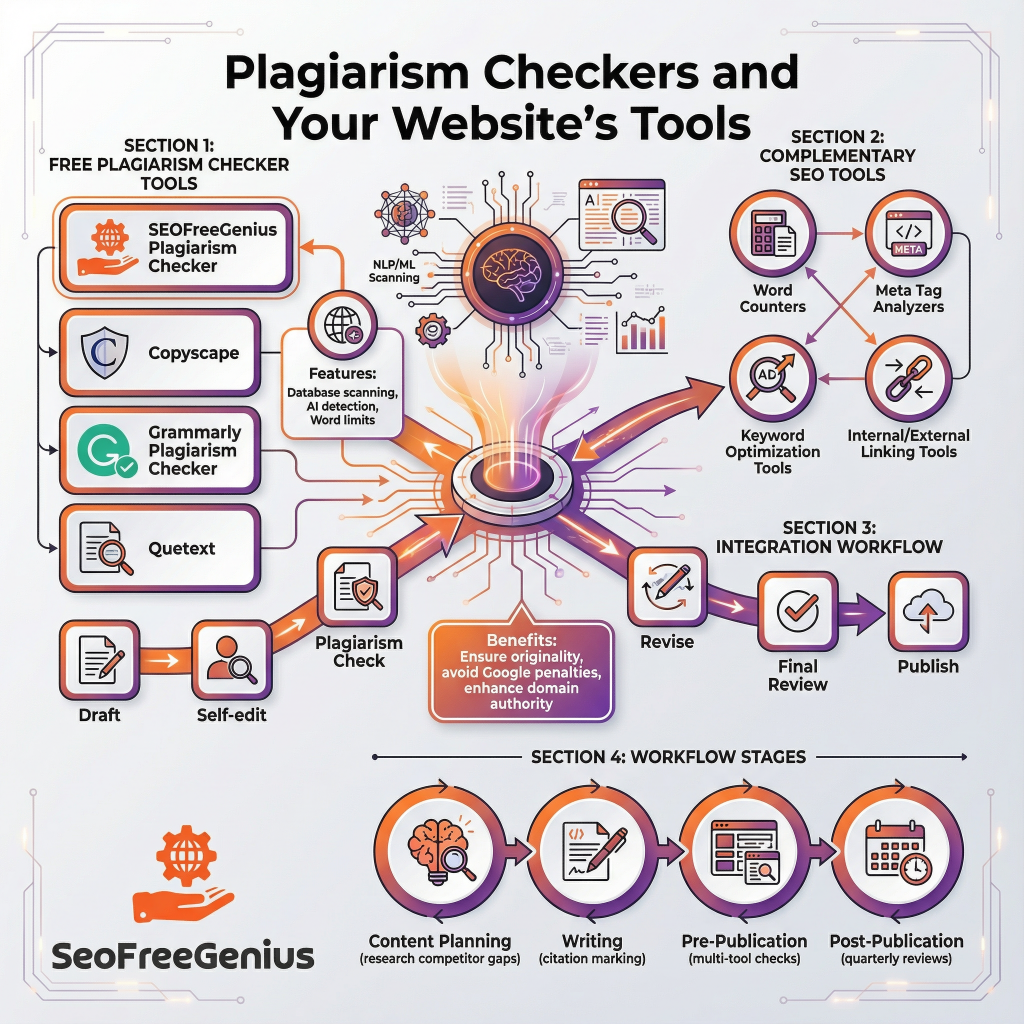
If you operate a website with SEO tools (like a comprehensive SEO tools platform similar to https://seofreegenius.com/), a plagiarism checker is essential infrastructure:
- User Value: Visitors to your site want to check their own content, so offering a plagiarism checker increases your site’s value proposition
- Tool Ecosystem: Plagiarism checkers pair naturally with word counters (https://seofreegenius.com/word-counter/), meta tag analyzers (https://seofreegenius.com/meta-tags-analyzer/), and other content tools
- Cross-Tool Workflows: Users naturally flow from plagiarism checking to meta tag optimization to final publication, creating a complete content workflow
- SEO Authority: Operating original, trustworthy tools builds your own website authority and sets the example for content quality standards
Conclusion
Using a plagiarism checker effectively is no longer optional for serious content creators and SEO professionals—it’s essential. By following this step-by-step guide, you ensure your content remains original while maximizing its SEO potential. Remember:
- Select the Right Tool: Choose a plagiarism checker that fits your needs, whether it’s the quick checks offered by free tools like SEOFreeGenius (https://seofreegenius.com/plagiarism-checker/) or the comprehensive verification of premium options
- Check Before Publishing: Make plagiarism checking a non-negotiable part of your content workflow
- Understand the Results: Review similarity scores in context, not as absolute judgments
- Rewrite with Purpose: When plagiarism is detected, rewrite with intention to improve your original content
- Link Strategically: Use internal links to your site’s resources and external links to authoritative sources to enhance both originality and SEO value
- Monitor Continuously: Don’t treat plagiarism checking as a one-time task; monitor your content regularly
Original, well-researched content isn’t just ethically correct—it’s also the most reliable path to sustainable SEO success. By combining effective plagiarism detection with thoughtful content creation, you’ll build a website that ranks well, engages readers, and establishes lasting authority in your niche. Begin your plagiarism-free content strategy today, and watch as your SEO performance, user engagement, and domain authority grow together.