
Published: March 6, 2026
Author: SEO Free Genius Team
Reading time: 9 minutes
Introduction
If you’ve ever opened a blank document and thought, “What keywords should I even target?”, you’re not alone. Many bloggers and small business owners know they need keyword research, but feel overwhelmed by paid tools and complex data.[seranking]
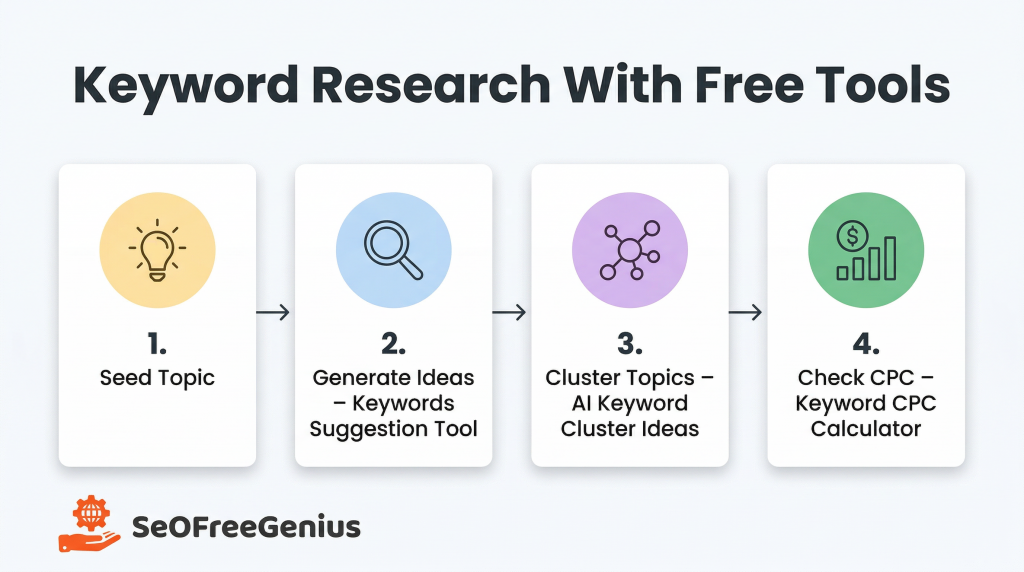
The good news: you can build a solid keyword strategy using only free tools. In this guide, you’ll learn a simple, repeatable workflow using the Keywords Suggestion Tool, AI Keyword Cluster Ideas, and Keyword CPC Calculator—plus a couple of free external resources for additional ideas.seofreegenius. keywordtool. wordstream
By the end, you’ll know how to start from one seed topic, generate hundreds of related keywords, group them into pillar and supporting posts, judge which terms show stronger commercial intent, and map everything into a clear blog structure and internal linking plan
Step 1: Start With a Clear Seed Topic
Before touching any tool, you need a seed topic—a simple phrase that describes what your site or post is about.developers. google. orbitmedia
Examples of seed topics:
- “beginner yoga at home”
- “wordpress speed optimization”
- “saudi arabia travel tips”
Pick a seed that:
- Matches your real products, services, or expertise.
- Is specific enough to indicate intent (e.g., “wordpress speed optimization” instead of just “wordpress”).
We’ll use “wordpress speed optimization” as an example throughout this guide.
Step 2: Generate Hundreds of Ideas With Keywords Suggestion Tool
The first tool in the workflow is Keywords Suggestion Tool from SEOFreeGenius. It expands your seed into dozens or hundreds of related keyword ideas by pulling suggestions from search engines and related queries. wordstream. seofreegenius
How to use Keywords Suggestion Tool
- Go to seofreegenius.com/keywords-suggestion-tool.
- Enter your seed phrase, e.g., wordpress speed optimization.
- Click Submit / Suggest Keywords.
You’ll get a list of keyword variations such as:
- wordpress speed optimization plugins
- how to speed up wordpress site without plugins
- wordpress speed test tools
- reduce wordpress loading time
Export or copy this list into a spreadsheet (Google Sheets or Excel) so you can clean and organize it.[seranking]
Add a few external sources (optional)
If you want even more ideas, you can quickly cross‑check with free external tools like WordStream Free Keyword Tool or Keyword Tool and paste any good extra keywords into the same sheet. keywordtool. wordstream
At this stage, don’t worry about search volume or competition. The goal is breadth—collect as many relevant phrases as possible.
Step 3: Clean Your List So Only Good Ideas Remain
A raw keyword list always includes noise. Before clustering or planning content, quickly clean it. Industry checklists from tools like Semrush and Surfer recommend removing irrelevant queries early to keep your strategy focused. semrush. surferseo
In your spreadsheet, remove keywords that:
- Clearly don’t match your topic or audience (e.g., “wordpress speed game” if you’re not building games).
- Are purely navigational (brand names you don’t plan to cover).
- Duplicate the same intent with obvious misspellings.
You can also add simple labels:
- Column A: keyword
- Column B: Search Intent (informational, commercial, transactional, navigational). orbitmedia. backlinko
- Column C: Notes (e.g., “good for tutorial”, “product comparison”).
We’ll refine these columns in the next steps.
Step 4: Turn Chaos Into Clusters With AI Keyword Cluster Ideas
Now you have a cleaned list of dozens or hundreds of keywords—but they’re still just a flat list. The next step is to group them into clusters with AI Keyword Cluster Ideas. seofreegenius. juma.
Keyword clustering means grouping different phrases that share the same search intent and can be answered in one article or a small content hub. This aligns with how modern search engines rank entire topics rather than single pages in isolation. seofreegenius. blog.
How to use AI Keyword Cluster Ideas
- Go to seofreegenius.com/ai-keyword-cluster-ideas.
- Paste 20–200 related keywords from your sheet into the input box.
- Choose the Tone.
- Click Generate Clusters.
The tool will return groups, each with a main “cluster topic” and the related supporting keywords.
A simplified example output:
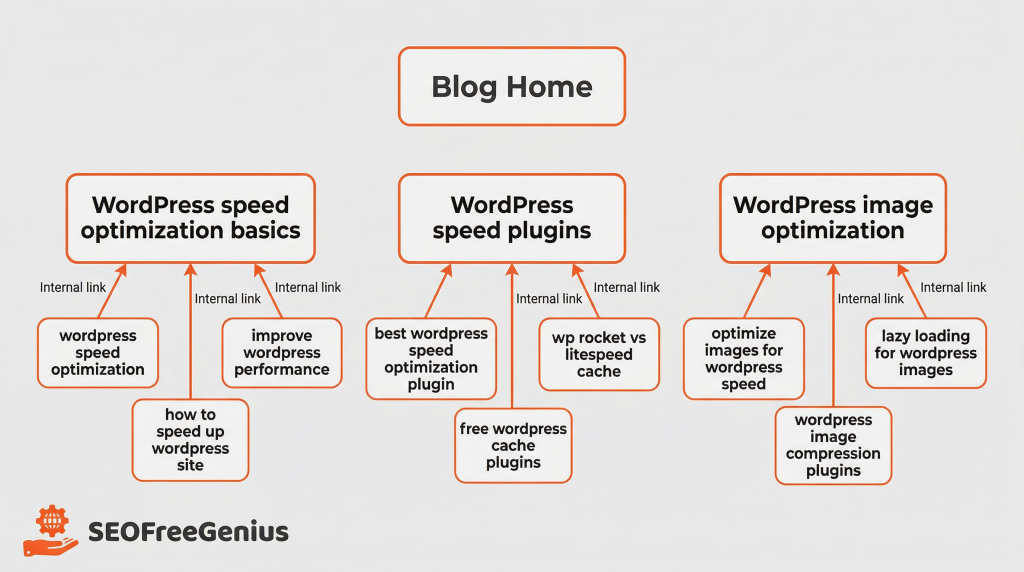
- Cluster 1 – wordpress speed optimization basics
- wordpress speed optimization
- how to speed up wordpress site
- improve wordpress performance
- Cluster 2 – wordpress speed plugins
- best wordpress speed optimization plugin
- wp rocket vs litespeed cache
- free wordpress cache plugins
- Cluster 3 – wordpress image optimization
- optimize images for wordpress speed
- wordpress image compression plugins
Decide pillar vs supporting pages
For each cluster:
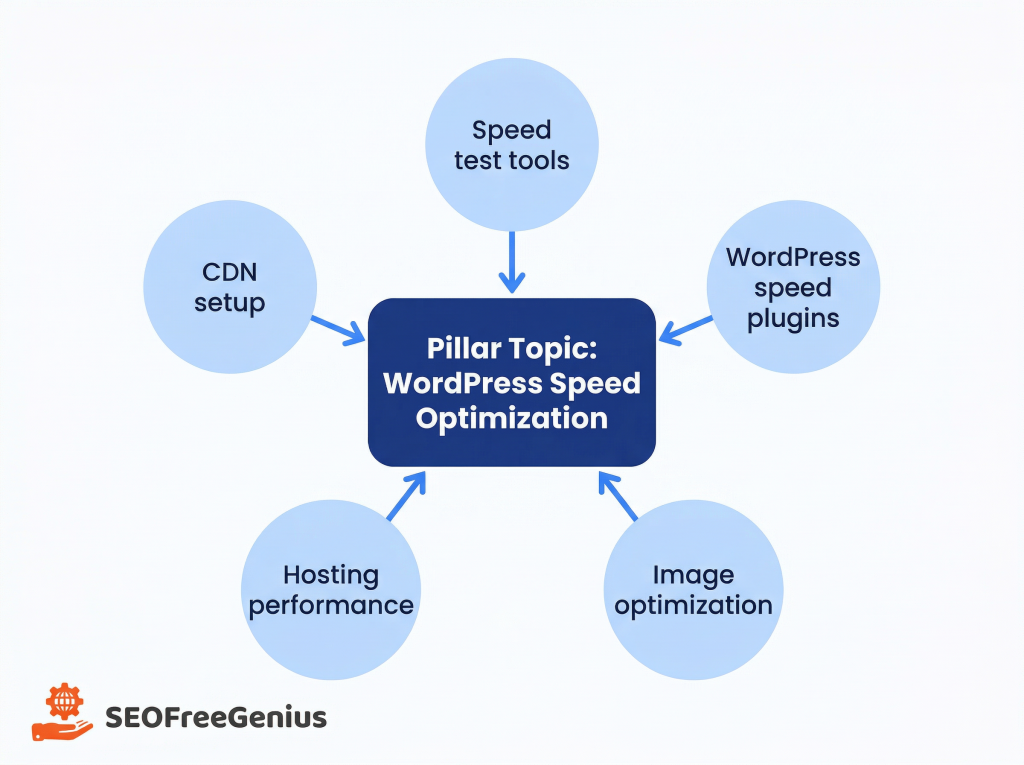
- The main cluster topic becomes your pillar page idea (a comprehensive guide).
- The related keywords become supporting pages or sections that link back to the pillar.
Using our example:
- Pillar: “WordPress Speed Optimization: Complete Beginner’s Guide”
- Supporting posts:
- “Best Free WordPress Speed Plugins Compared”
- “How to Optimize Images to Speed Up WordPress”
This matches modern advice on topic clusters from SEO guides by Backlinko and other authorities. backlinko. orbitmedia.
Step 5: Use Keyword CPC Calculator to Gauge Commercial Intent
Search volume and competition are helpful, but they’re often locked behind paid tools. One free proxy for “how valuable a keyword might be” is cost per click (CPC) from ads. coolseotools. smartseotools.
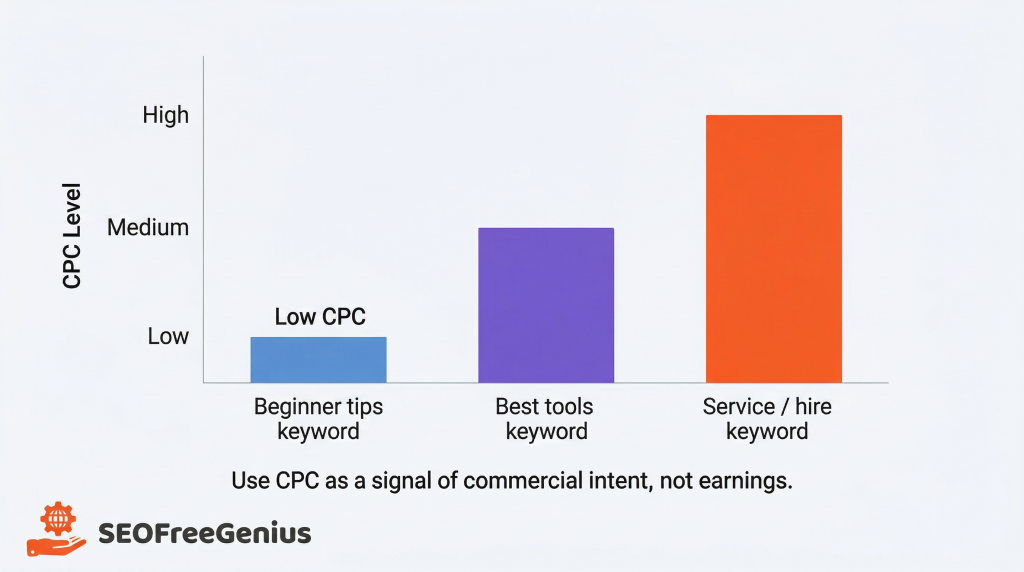
The Keyword CPC Calculator lets you estimate how much advertisers typically pay per click for a given term. Higher CPC usually means the keyword attracts visitors who are closer to buying something or signing up for a service. seofreegenius. coolseotools.
Important: Use CPC as a signal of commercial intent, not a promise of earnings. Just because advertisers bid more doesn’t mean you personally will earn that amount.
How to use Keyword CPC Calculator
- Visit seofreegenius.com/keyword-cpc-calculator.
- Enter one of your cluster’s main keywords, e.g., best wordpress speed optimization plugin.
- Click Submit.
Record the estimated CPC in your spreadsheet. Repeat for your top 10–20 most promising keywords across clusters.
How to use CPC data in practice
You can now:
- Prioritize clusters with higher‑CPC main keywords for monetized content (affiliate posts, service pages, email list building). smartseotools. coolseotools.
- Use lower‑CPC / purely informational keywords for top‑of‑funnel educational posts that build trust and internal links.
A simple prioritization table might look like:
| Keyword | Cluster / Topic | Search Intent | Est. CPC (USD) | Priority | Pillar / Supporting |
| wordpress speed optimization | WordPress speed basics | Informational | 0.80 | High | Pillar |
| how to speed up wordpress site | WordPress speed basics | Informational | 0.70 | High | Supporting |
| best wordpress speed optimization plugin | Speed plugins | Commercial | 1.90 | Very High | Pillar |
| free wordpress cache plugin | Speed plugins | Commercial | 1.20 | High | Supporting |
| wp rocket vs litespeed cache | Speed plugins | Commercial | 2.10 | Very High | Supporting |
| optimize images for wordpress speed | Image optimization | Informational | 0.90 | High | Pillar |
| wordpress image compression plugin | Image optimization | Commercial | 1.40 | High | Supporting |
| wordpress speed test tools | Speed testing | Informational | 0.60 | Medium | Supporting |
| reduce wordpress loading time | WordPress speed basics | Informational | 0.75 | Medium | Supporting |
| fastest wordpress hosting for speed | Hosting & infrastructure | Commercial | 2.30 | Very High | Pillar |
Step 6: Map Clusters to Your Blog Structure
Now you know:
- Which keyword clusters exist.
- Which ones carry stronger commercial intent.
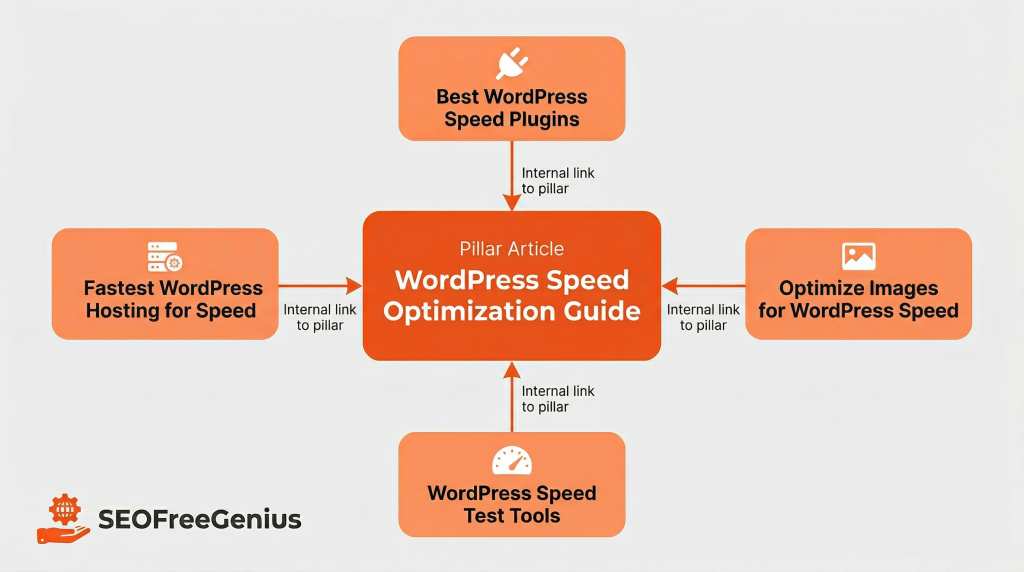
Next, you need to map clusters into a logical blog structure that both users and search engines understand. Google’s own SEO Starter Guide and other on‑page checklists emphasize clear site structure and internal linking as foundational ranking factors. backlinko. seo. developers.google. orbitmedia
Build a simple silo or hub structure
For each major cluster:
- Create one pillar article that broadly covers the topic (2,000+ words for competitive themes is common). wincher. backlinko
- Create several supporting articles, each focusing on one angle or question from the cluster.
- Link from every supporting article to the pillar using descriptive anchor text.
- Add links between closely related supporting articles when it helps readers.
Example structure for our WordPress speed cluster:
- /wordpress-speed-optimization-guide/ (pillar)
- Links out to:
- /best-wordpress-speed-plugins/
- /optimize-images-for-wordpress-speed/
- /wordpress-speed-test-tools/
- Links out to:
- Each supporting post links back to the pillar with anchors like “WordPress speed optimization guide” or “complete WordPress performance tutorial.”
Use categories and menus to reinforce the structure
- Assign all related posts to the same blog category (e.g., “WordPress Performance”).
- Consider adding the pillar page to your main navigation or a “Start here” section.
- Use breadcrumbs so users and search engines can see where each post fits. wellows. orbitmedia.
Step 7: Optimize Each Post Around Its Primary Keyword
Once your structure is planned, you still need to optimize individual pages. On‑page SEO guides consistently recommend focusing each page on one main keyword plus a few closely related phrases. seofreegenius. blog. orbitmedia. semrush.
For each pillar or supporting article:
- Use the main keyword in:
- Title tag and H1 heading.
- First 100–150 words of the introduction.
- One or two H2/H3 subheadings.
- Image alt text where it makes sense. hobo-web.co. seofreegenius.
- Keep content natural; modern studies show that rigid “keyword density” targets are less important than topical relevance and clarity. rankability. stanventures. 2pointagency.
You can use free tools like:
- Meta Tags Analyzer to check your titles and descriptions.
- Keyword Density Checker to ensure you’re not stuffing the keyword unnaturally. seofreegenius. Keyword Density Checker.
Step 8: Track What’s Working and Refine
Keyword research is not a one‑time project. As you publish content and gain traffic, you should refine your clusters based on real performance. seo. wincher.
Use:
- Keyword Position Checker to see where your posts rank over time for their main keywords.[seofreegenius]
- Google Search Console to spot new queries you’re getting impressions for, and add promising ones to existing articles or new supporting posts.[developers.google]
Every few months:
- Export your ranking data.
- Note which clusters perform best.
- Strengthen winners with more supporting posts and internal links.
- Prune or merge weak articles that never gain traction, as many SEO experts recommend to keep site quality high. seofreegenius blog. orbitmedia. blog.
A Simple Beginner Workflow You Can Reuse
To recap, here’s a repeatable keyword research plan you can follow for any niche:
- Choose a seed topic that reflects your business or interests.
- Generate ideas with Keywords Suggestion Tool and optional external tools like WordStream or Keyword Tool. seofreegenius. keywordtool. wordstream.
- Clean the list by removing irrelevant or duplicate queries.
- Cluster keywords with AI Keyword Cluster Ideas to identify pillar and supporting topics.[seofreegenius]
- Estimate commercial intent using Keyword CPC Calculator—prioritize higher‑CPC clusters when you have monetization in mind. seofreegenius. coolseotools.
- Map clusters to your blog structure, with strong internal links from supporting pages to pillar content. orbitmedia. wellows.
- Optimize each article around one main keyword and publish consistently.
- Monitor rankings and refine your clusters over time.
You don’t need expensive software to find great keywords or build a smart content plan. With a few free tools and a simple process, you can move from “I have no idea what to target” to a clear roadmap of topics, posts, and internal links that grow your organic traffic month after month.
Samir H. M. — SEO Expert
5+ years building SEO tools. SEOFreeGenius creator—50+ sites to #1.
All Articles →
Samir H. M. is the creator of [seofreegenius.com], offering 66+ free SEO tools from Riyadh. He’s hands-on tested and built features like plagiarism checkers and backlink tools, plus 36 guides to help sites rank better. Practical, no-BS advice for real users.